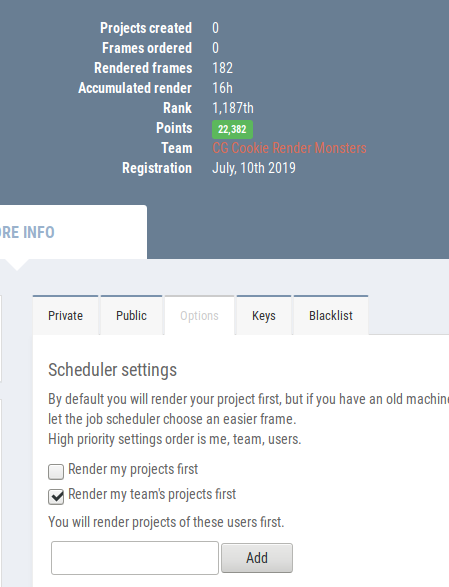
Update 7/29/2019: Omar's new scene is ready to render and already underway on SheepIt. If you're part of the CG Cookie Render Monsters team, we'd appreciate you launching the SheepIt app on your computer to contribute. NOTE: Make sure on your SheepIt account "Options" you enable Render my team's projects first. Thanks!
Update 7/18/2019: Omar is polishing new scenes.
Update 7/3/2019: Omar has 2 new files ready for rendering. Let's do dis.
Update 7/1/2019: We have finished rendering two of Omar's reel projects. Way to go community. Omar still has several to prep for rendering. I'm going to unpin this thread and re-pin once it's ready to render again.
Update 6/17/2019: Omar has updated his shared project folder with new scenes to render. It was accidentally uploaded as a new folder so if you've already synced the previous folder, you can delete that one (if it's still there) and you'll have to sync this new one. From now on we know how to avoid this so no more re-syncing.
The time to render is now!
Update 6/16/2019: We've finished Omar's first 2 scenes! Way to go People 👏👏 Thanks to everyone for contributing. Now we're waiting for Omar to setup and upload his next scene.
@theluthier Kent after comparing the original Cycles renders and Element 3D real time ones, I think you are right, rendering it out of Cycles is totally worth going the extra mile for. Although you and Lampel said it was great, that it's 95% there, for a second I saw a twinkle in your eyes saying "C'mon dude, you know it, I know it... there is no spoon." And then the twinkle continued "No one eats an Oreo and doesn't go all the way to the stuffing in the middle, the cookie part is just enough". I see what you mean twinkle.
I didn't want to bother people though, but I guess if I'm going to try this there's no way around that. I don't know how to use Drop Box, I've never used it before. Should I get an account? I hope it's enough space. I remember you kinda set things up in a similar way in the Rendering & Finishing A Blender Animation course. I should re-watch that. I have never done things through the internet so this should be a learning experience.
I, Kent Trammell, am commandeering Omar's original post! [evil laugh] I'm the one that encouraged Omar to reach out to the community for helping him render his demo reel. My computer just sits collecting dust most nights and I'm happy to lend some rendering power to this project while I'm asleep. I suspect that there are a number of CGC community members willing to do the same 🙏
If you want to help out, please follow the instructions below!
The status of the project will be stated and updated at the end of the thread title in brackets. When it says "READY TO RENDER" that means a project has been submitted to SheepIt for rendering. If it says anything else, the project isn't ready for rendering yet.
The status of the project will be stated and updated at the end of the thread title in brackets. When it says "READY TO RENDER" that means it's ready to sync the project folder and start rendering. If it says anything else, the project isn't ready for rendering yet.
STEP 1 -- Sync Omar's project folder to your Google Drive.
If you have a gmail account, you have 15 GB of free Google Drive space. Just click the link and when you're redirected to the Google Drive website, right click on the "Demo Reel Files" folder and choose Add to My Drive.
If you're on Mac or Windows, use the official Google Drive app (personal version) to sync your Google Drive to your computer's file system.
Render_Scenes_1_Packed.blend
If you're on Linux like me, there is no official app. I've had some success with Open Drive but it seems to have stopped syncing on my system. I'm currently using Insync and it's working beautifully. It's $30 after the 15 day trial period, which I will likely pay.
STEP 2 -- Open one of the render-ready .blends with Blender 2.8
After the project folder has finished syncing *entirely* to your computer, launch Blender 2.8 and open Demo Reel Files > Blend Packed Files > Render_2.8-Scene_1_Packed.blend. Then follow Omar's instructions in the file for CPU or GPU rendering, whichever your machine is best equipped.
Enable viewport rendering to double check the scenes look fine (no pink from missing textures). I've tested these files myself and they should be ready to render without problems.
STEP 3 -- Render the Animation
The files should all be setup properly so anyone that opens them doesn't have to do anything but click the Render button.
That should be all you need to do to contribute rendering to Omar's project! Note that these scenes are heavy and can take an hour or more per frame, even on a high end machine, which is why Omar needs our help.
When the rendering is all done (or you need to stop and regain your own GoogleDrive space), simply navigate to the Google Drive website, right click on the folder and choose "Remove".
 phoenix4690 Cool Phil, come and join the list. Linux Luke is unstoppable though, there's no way we're getting Kent out of that first place.


Can I say I'm not happy with that space scene
@dostovel Well there's no need to rush it. One thing I just realized when test-rendering your updated version is that there's a sun object coming over the horizon and a spec highlight on the ocean that doesn't match; it suggests two sun objects. I think some adjustments to the lighting + lens flare + would take this scene from "not happy with it" to "wow!". Like this artwork for example:

Notice how the glare + flare + shadow can hide (or at least draw attention aware from the earth.
I'd prefer you be happy with this shot. You're really close to that "wow!" factor after all :)
@theluthier Alright. Thanks for the encouragement. I have been trying to rush it afraid that the momentum of rendering would go away. But it is better to invest the time to try and take renders to a level one is happy with.
Two things, the sun is not orange nor yellow, it is actually white. The colors are an illusion of our atmosphere. And since the sun is the only light available, objects have a really hash shadow. You can see it on videos of Elon's Musk Spaceman car in orbit. But if you stick to physically accurate, the render is not going to look appealing, so I guess it is better to take creative licences.
And lastly, I need to learn how to use Render Layers in 2.8. to achieve the lens flares and bloom needed. I have no idea how the system works now with the Collections. Lets hope YouTube has an answer for now.
I really want to see how viable SheepIt can be for rendering our projects, like we've been doing with Omar's reel. So if you're willing, go sign up for a SheepIt account (free), grab the applet from the "Get Started" page, then ask to join the CG Cookie Render Monsters team and I will add you.
Once we have a handful of people on the team, I will submit (or ask dostovel to submit) a scene file for rendering. If you go to your SheepIt profile page under Options, you can enable "Render my team's projects first" to prioritize them. Then all you have to do is launch the applet on your computer, sign in with your credentials, choose your preferred settings, and SheepIt will do the rest.
I didn't have any problem finding answers to my questions from the site's FAQ page, but don't hesitate to ask me questions here!

williamatics Tis but the color of your dreams, William. Some colors exist in dreams that are not present in the waking spectrum. So does follow the heart.
@theluthier Kent, perhaps we should replace the old instructions in the top text of the thread with this one now? No need to have so much clutter up there? or is it too soon to replace Google Drive with Sheepit?
I was looking at the FAQs of Sheepit, they say they don't support Open EXR. How does the rendering work then? I thought that it was like Google Drive that the rendered files just landed on a folder on your computer, no matter the type of file.
I was looking for an explanation for this

What does it really mean? is it a priority for me for what? or a priority that people set? That slider isn't clear to me.
they say they don't support Open EXR
Wait...what? I saw someone say they didn't support 32 bit EXRs but I didn't realize no EXRs at all. That could be a big deal.
Personally I only do EXR's for maybe 25% of my animation rendering. Most of the time I'm able to include my compositing tricks at render time and output PNGs.
dostovel Can your compositing be applied to your earth scene at render time for outputting PNGs? You can still do some compositing with PNGs after the fact like color corrections, adding vignette, and/or adding lens flares. But vector-pass motion blur and fake DoF can't be composited with PNGs, though it looks like you're doing those 2 things true with Cycles anyway.
The priority slider isn't clear to me either. I just leave it at the normal 0 value. Though I just realized one of my machines was set all the way to low. Maybe that explains why that machine is making notably few points despite being active much longer...
@theluthier It's a bummer they don't support EXR. I always think compositing doesn't get the love it deserves. One never notices it, but I think renders really come out of the oven very crude, you only get a glimpse of it once you've put salsa on them and look back at it, you know some dressing and spices, a little oregano here and there.
There's this thing you can do with High Dynamic Ranges that tends to really make them pop I think, the only problem is I don't know how to do that in Blender's compositor. But yeah, I think I can set up the compositing nodes so that Sheepit spits out composited ready images. I'll dig around and see what I can do.
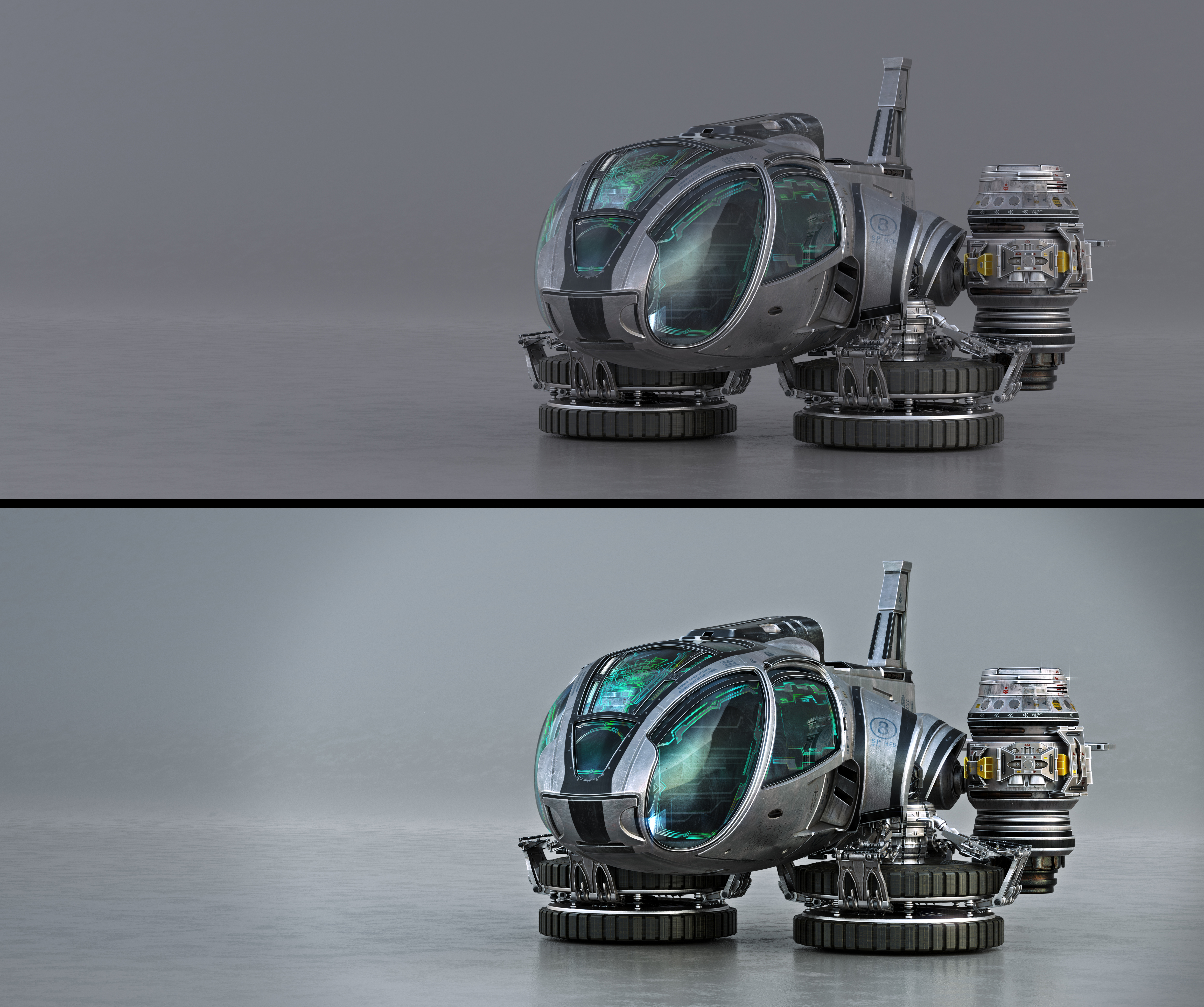
Some comparison of before and after. Raw render straight out of blender and then after some cooking.
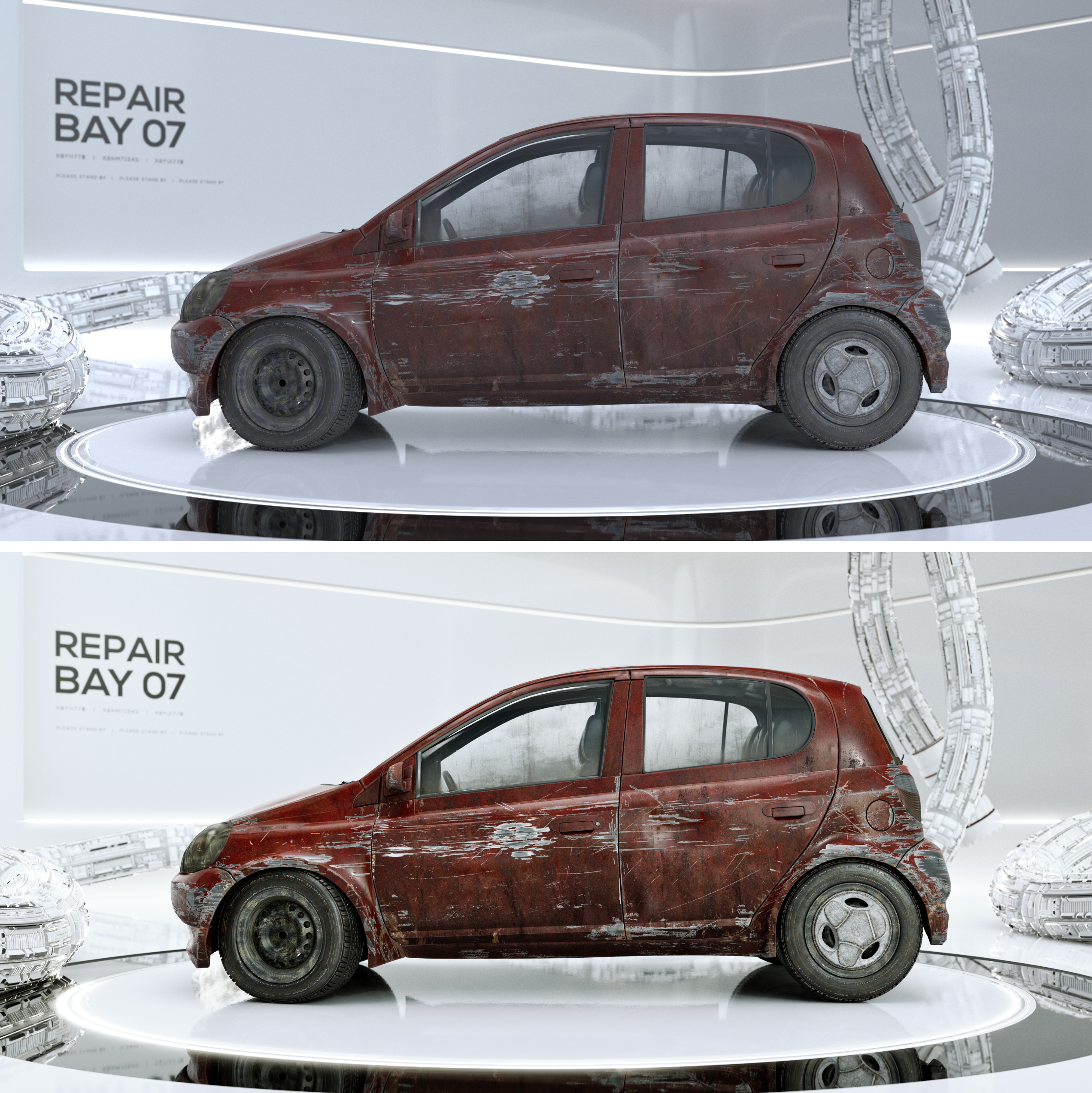
dostovel A few days ago, the cardioid in the title of this thread was green. Now it's yellow.
williamatics I just wanted a way to quickly color-code the status of this render thread. Red being CANCELLED, Yellow being PENDING, and green being READY TO RENDER. Btw thanks to you I learned what a "cardioid" is.
dostovel Oh yeah, the ability to fine tune renders with the compositor is crucial to my workflow. Your comps are looking great! Really pushes it that extra little bit.
One note: I can see the vignette very distinctly in the last image (heli). I'd blur that more if it were me.
Update on our SheepIt Team: We currently have 7 members closing in on a combined total of 200K points. That was fast! Thanks to those of you who joined. I'm thinking I will post a separate thread inviting the broader community to join, when I find the time..
@theluthier Yikes yes, that vignette really needs to be less noticeable.
Dudes, Phil and Jack Bauer really have powerful machines, they ranked up really quick.
Also noticed CG Cookie Render Monsters jumped Rank from 133rd to 95th, right on, only 94th's to go.
dostovel hey omar i would like to help but i have some problems with the steps .is there like a place where its shown with pictures of small clip how it work? dont want to do it wrong :p
not sure i did good but i saved it onto my computer and put in the settings you suggested then hit render animation.
how i know when things are working ? he went back to render 0% after he reached 100% is that normal?
yyukinoh1989 Hi Yukino.
Thanks helping out. For now the old method of Google Drive is on hold, so we're not currently using it. In other words, do not follow the instructions above.
Kent tried another method, that of a collective render farm called Sheep It and for now it seems to be going good.
I'll copy paste what Kent wrote as to the new Sheep It method. It can be a thing as to the whole CG Cookie Community, not only for rendering my demo reel. I think Kent will try to make a separate bigger post about it. Several of us are already part of the group and are rendering projects.
-----------------------------------------------------------------------------------------------------
I really want to see how viable SheepIt can be for rendering our projects, like we've been doing with Omar's reel. So if you're willing, go sign up for a SheepIt account (free), grab the applet from the "Get Started" page, then ask to join the CG Cookie Render Monsters team and I will add you.
Once we have a handful of people on the team, I will submit (or ask to submit) a scene file for rendering. If you go to your SheepIt profile page under Options, you can enable "Render my team's projects first" to prioritize them. Then all you have to do is launch the applet on your computer, sign in with your credentials, choose your preferred settings, and SheepIt will do the rest.
I didn't have any problem finding answers to my questions from the site's FAQ page, but don't hesitate to ask me questions here!

I definitely see the benefit of the SheepIt rendering farm. I can envision building up points now and cashing in the accumulated good will of points in the future when I could use some extra rendering power. But, SheepIt is not without privacy and security concerns.
I’d recommend anyone considering using SheepIt review their brief “Terms of Use” and “Privacy Policy” (https://www.sheepit-renderfarm.com/legal.php#terms). SheepIt does collect information on your computer’s configuration. The rendering client uses this information to optimize rendering assignments based upon your RAM, CPU and GPU.
If you are having your project rendered, be aware that your Blend file is downloaded to each computer that is rendering it. They are in temporary folders called farm_*. For Windows, these folders can typically be found in C:\Users\YOURNAME\AppData\Local\Temp. For Unix-likes, they are stored in /tmp or /var/tmp. If you are working on a commercial or confidential project, you may want to reconsider getting it rendered under SheepIt.
While these issues may not be a deal breaker for some, anyone signing up to SheepIt should at least be aware of the possible privacy and security risks.
I look forward to contributing to help render Omar’s demo reel!
splat21 Well thanks Splat. I think you summarized it all nicely; since it' just a demo reel or some other personal thing people render, it is not that big of a deal but if it's a project that requires security concerns then Sheep It might not be the way to go. In my case I don't mind that much, everyone had access to the files on Google Drive anyway. It was even worst since any person that stumbled upon the link could go into the folder and copy everything.

@theluthier One thing that might be worth mentioning: even on a slow machine, you can gather points easily, because they give thousands of extra points (Rewards) for total rendered time and time rendered continuously, which are machine strength independent.
I am already at 22K after about ten hours of rendering on my old Desktop. (Although they didn't show yet on the team's page??? Maybe it doesn't update immediately?)
spikeyxxx I think you have to enable "Render my Team Project first" in the options. Although maybe what you mean is that points seem to be independent when it comes to your team and your personal points. I don't really get how that goes, if I spend points to render something, will they be slashed off my own or the team? If I win points how do they get distributed between my personal points and my team?