Update 7/29/2019: Omar's new scene is ready to render and already underway on SheepIt. If you're part of the CG Cookie Render Monsters team, we'd appreciate you launching the SheepIt app on your computer to contribute. NOTE: Make sure on your SheepIt account "Options" you enable Render my team's projects first. Thanks!
Update 7/18/2019: Omar is polishing new scenes.
Update 7/3/2019: Omar has 2 new files ready for rendering. Let's do dis.
Update 7/1/2019: We have finished rendering two of Omar's reel projects. Way to go community. Omar still has several to prep for rendering. I'm going to unpin this thread and re-pin once it's ready to render again.
Update 6/17/2019: Omar has updated his shared project folder with new scenes to render. It was accidentally uploaded as a new folder so if you've already synced the previous folder, you can delete that one (if it's still there) and you'll have to sync this new one. From now on we know how to avoid this so no more re-syncing.
The time to render is now!
Update 6/16/2019: We've finished Omar's first 2 scenes! Way to go People 👏👏 Thanks to everyone for contributing. Now we're waiting for Omar to setup and upload his next scene.
@theluthier Kent after comparing the original Cycles renders and Element 3D real time ones, I think you are right, rendering it out of Cycles is totally worth going the extra mile for. Although you and Lampel said it was great, that it's 95% there, for a second I saw a twinkle in your eyes saying "C'mon dude, you know it, I know it... there is no spoon." And then the twinkle continued "No one eats an Oreo and doesn't go all the way to the stuffing in the middle, the cookie part is just enough". I see what you mean twinkle.
I didn't want to bother people though, but I guess if I'm going to try this there's no way around that. I don't know how to use Drop Box, I've never used it before. Should I get an account? I hope it's enough space. I remember you kinda set things up in a similar way in the Rendering & Finishing A Blender Animation course. I should re-watch that. I have never done things through the internet so this should be a learning experience.
I, Kent Trammell, am commandeering Omar's original post! [evil laugh] I'm the one that encouraged Omar to reach out to the community for helping him render his demo reel. My computer just sits collecting dust most nights and I'm happy to lend some rendering power to this project while I'm asleep. I suspect that there are a number of CGC community members willing to do the same 🙏
If you want to help out, please follow the instructions below!
The status of the project will be stated and updated at the end of the thread title in brackets. When it says "READY TO RENDER" that means a project has been submitted to SheepIt for rendering. If it says anything else, the project isn't ready for rendering yet.
The status of the project will be stated and updated at the end of the thread title in brackets. When it says "READY TO RENDER" that means it's ready to sync the project folder and start rendering. If it says anything else, the project isn't ready for rendering yet.
STEP 1 -- Sync Omar's project folder to your Google Drive.
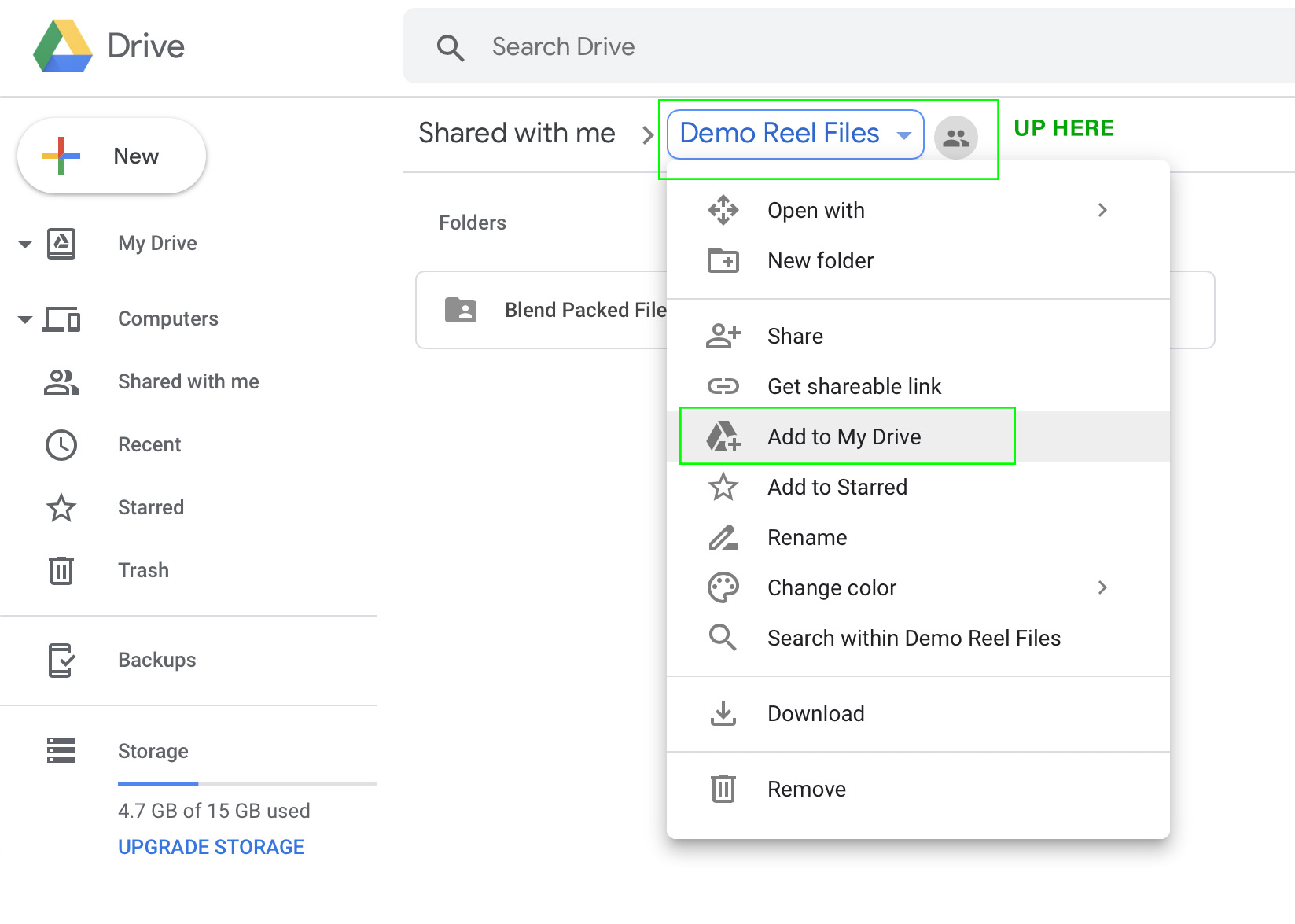
If you have a gmail account, you have 15 GB of free Google Drive space. Just click the link and when you're redirected to the Google Drive website, right click on the "Demo Reel Files" folder and choose Add to My Drive.
If you're on Mac or Windows, use the official Google Drive app (personal version) to sync your Google Drive to your computer's file system.
Render_Scenes_1_Packed.blend
If you're on Linux like me, there is no official app. I've had some success with Open Drive but it seems to have stopped syncing on my system. I'm currently using Insync and it's working beautifully. It's $30 after the 15 day trial period, which I will likely pay.
STEP 2 -- Open one of the render-ready .blends with Blender 2.8
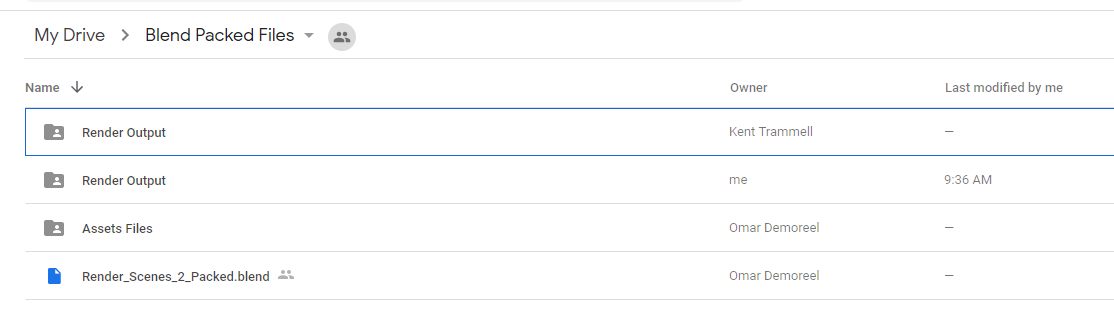
After the project folder has finished syncing *entirely* to your computer, launch Blender 2.8 and open Demo Reel Files > Blend Packed Files > Render_2.8-Scene_1_Packed.blend. Then follow Omar's instructions in the file for CPU or GPU rendering, whichever your machine is best equipped.
Enable viewport rendering to double check the scenes look fine (no pink from missing textures). I've tested these files myself and they should be ready to render without problems.
STEP 3 -- Render the Animation
The files should all be setup properly so anyone that opens them doesn't have to do anything but click the Render button.
That should be all you need to do to contribute rendering to Omar's project! Note that these scenes are heavy and can take an hour or more per frame, even on a high end machine, which is why Omar needs our help.
When the rendering is all done (or you need to stop and regain your own GoogleDrive space), simply navigate to the Google Drive website, right click on the folder and choose "Remove".
@theluthier No, I didn't get the chance to copy 1-38 EXR files :(
What in the world? Drive does keep a long log in the Activity tab, but what seems to have happened is that the whole folder got deleted and then added back again, that's why the history resets at 1:04 AM. If you're feeling kinda bummed out by the Activity Log pinning your user in the ordeal, don't think about it, who knows what crazy thing went wrong. It could've easily been my user or anyone else there. Plus, I'm glad it was this and not than it was deleted because there was a mistake, like I first thought it had been.
 phoenix4690 Phil, I thought you could copy paste the file in, because the one I have here on my home laptop isn't the latest one with the mistake of the vanishing piece corrected. But now I see the folder of the Assets Files is also gone, which has the car and environments models linked in. So that's a no go. I'll just make the corrections here and upload them.
@theluthier You're right, now that I read it correctly, I thought it said those folders were created again, but no, it says An Item. This is getting weirder and weirder. I say it's Google Drive being all glitchy and buggy.
@theluthier Well good news I think, the files that are still being rendered are ok, I loaded the EXR's and the PNG sequence seems to be working. I thought they were going to be black or pink frames or something.
I think now I really get it when I see Blender loading everything into RAM, it copies all and holds it and they still exist in there until it has to be unloaded, it's like a memory, something that it isn't there anymore but still exists on a recollection.... Random Access Memory, genius.
EDIT: The short video is in the Results folder.


dostovel The motion-blurred shots turned out great! I was a little concerned seeing one frame at a time. Can't believe I've never rendered with true Cycles motion bur 😅
RAM is pretty amazing! Easy to take for granted but it came through big in this situation.
silentheart00 Maybe your powers are growing.
@theluthier I wanted to have scenes ready as the rendering was still active, you know to keep the momentum alive. But I'm afraid rendering was quicker than I could finish scenes up, even with the small inconveniences that have happened. I'm afraid I only have one more ready, the default Heli one, I still have to prepare the other Heli scenes I had in mind.

annoying, I rendered a few files and then I saw one of them was deleted. Someone else had rendered the same file and my double was removed. I thought the files we were busy with were locked?
sheila5 They are supposed to be locked, in a manner of speaking, the placeholder file is supposed to prevent us from rendering the same file, in other words prevent it from being duplicated. But Google Drive is kinda wonky and doesn't synchronize well so Blender isn't seeing the file as being there therefore it goes ahead and renders it anyways. That plus other little glitches here and there makes Drive a little annoying, but it's ok, it is getting the job done fairly well.
dostovel These are turning out so good! Its a bit of a bummer on the glitchy nature of Google Drive.
@theluthier In the future if one was to do this using Drop Box. Would everyone need to purchase the same amount of space or would just one person buy the render folder and can share it to those who want to participate?
phoenix4690 I still have almost 2 gb space left in my dropbox. if you want we could try if the sharing feature works

Oh wow just checked the Results so far folder, it looks so cool!
Another glitch when duplicated data occur is when it happens to the folder, I got a (1) in the name, and then Blender can get confused and star from frame 1. Just double check and update the output folder (without saving the blender file!) so it exports it correctly.
And double check on the browser version of drive that you're saving what it should where it should.
dostovel Ghaa Omar! I was wondering why my renders were much faster than the others, the car is missing !
How come ? All my files are up to date with Drive though, I don't get where the issue comes from 🤔
tbrbn Yeah there was some crazy event that happened where all the files got deleted from Drive, so now you have to un-sync the folder and then re-sync so it resets. In other words, Remove then Add to my Drive again.

dostovel Dang , should have read the whole thread more thoroughly sorry :( Welp I'll do that, thanks for the quick answer!
tbrbn No worries.
We are on frame 272 of 288, it is almost over so it's going to take forever for you to sync 272 EXR that are in the folder. It is best that you set the time line to whatever frames you want to render and then manually introduce them to the Drive folder, that way to wont wait forever for all the files to sync.
dostovel Makes sense. There's other scene to render otherwise right ? I can wait for the next one
tbrbn Yes, there are a couple more scenes of other renders, I'd say we're at 35%, so there's a lot left. 😓
Bad thing is I still have to prepare the other ones, I thought rendering was going to take a lot longer to the point were I would be able to work on the scenes on par with the rendering, but nop, I'm not done preparing the other ones so there will be periods of inactivity until it's time to render again.
Thanks for staying interested Thibaut.