Update 7/29/2019: Omar's new scene is ready to render and already underway on SheepIt. If you're part of the CG Cookie Render Monsters team, we'd appreciate you launching the SheepIt app on your computer to contribute. NOTE: Make sure on your SheepIt account "Options" you enable Render my team's projects first. Thanks!
Update 7/18/2019: Omar is polishing new scenes.
Update 7/3/2019: Omar has 2 new files ready for rendering. Let's do dis.
Update 7/1/2019: We have finished rendering two of Omar's reel projects. Way to go community. Omar still has several to prep for rendering. I'm going to unpin this thread and re-pin once it's ready to render again.
Update 6/17/2019: Omar has updated his shared project folder with new scenes to render. It was accidentally uploaded as a new folder so if you've already synced the previous folder, you can delete that one (if it's still there) and you'll have to sync this new one. From now on we know how to avoid this so no more re-syncing.
The time to render is now!
Update 6/16/2019: We've finished Omar's first 2 scenes! Way to go People 👏👏 Thanks to everyone for contributing. Now we're waiting for Omar to setup and upload his next scene.
@theluthier Kent after comparing the original Cycles renders and Element 3D real time ones, I think you are right, rendering it out of Cycles is totally worth going the extra mile for. Although you and Lampel said it was great, that it's 95% there, for a second I saw a twinkle in your eyes saying "C'mon dude, you know it, I know it... there is no spoon." And then the twinkle continued "No one eats an Oreo and doesn't go all the way to the stuffing in the middle, the cookie part is just enough". I see what you mean twinkle.
I didn't want to bother people though, but I guess if I'm going to try this there's no way around that. I don't know how to use Drop Box, I've never used it before. Should I get an account? I hope it's enough space. I remember you kinda set things up in a similar way in the Rendering & Finishing A Blender Animation course. I should re-watch that. I have never done things through the internet so this should be a learning experience.
I, Kent Trammell, am commandeering Omar's original post! [evil laugh] I'm the one that encouraged Omar to reach out to the community for helping him render his demo reel. My computer just sits collecting dust most nights and I'm happy to lend some rendering power to this project while I'm asleep. I suspect that there are a number of CGC community members willing to do the same 🙏
If you want to help out, please follow the instructions below!
The status of the project will be stated and updated at the end of the thread title in brackets. When it says "READY TO RENDER" that means a project has been submitted to SheepIt for rendering. If it says anything else, the project isn't ready for rendering yet.
The status of the project will be stated and updated at the end of the thread title in brackets. When it says "READY TO RENDER" that means it's ready to sync the project folder and start rendering. If it says anything else, the project isn't ready for rendering yet.
STEP 1 -- Sync Omar's project folder to your Google Drive.
If you have a gmail account, you have 15 GB of free Google Drive space. Just click the link and when you're redirected to the Google Drive website, right click on the "Demo Reel Files" folder and choose Add to My Drive.
If you're on Mac or Windows, use the official Google Drive app (personal version) to sync your Google Drive to your computer's file system.
Render_Scenes_1_Packed.blend
If you're on Linux like me, there is no official app. I've had some success with Open Drive but it seems to have stopped syncing on my system. I'm currently using Insync and it's working beautifully. It's $30 after the 15 day trial period, which I will likely pay.
STEP 2 -- Open one of the render-ready .blends with Blender 2.8
After the project folder has finished syncing *entirely* to your computer, launch Blender 2.8 and open Demo Reel Files > Blend Packed Files > Render_2.8-Scene_1_Packed.blend. Then follow Omar's instructions in the file for CPU or GPU rendering, whichever your machine is best equipped.
Enable viewport rendering to double check the scenes look fine (no pink from missing textures). I've tested these files myself and they should be ready to render without problems.
STEP 3 -- Render the Animation
The files should all be setup properly so anyone that opens them doesn't have to do anything but click the Render button.
That should be all you need to do to contribute rendering to Omar's project! Note that these scenes are heavy and can take an hour or more per frame, even on a high end machine, which is why Omar needs our help.
When the rendering is all done (or you need to stop and regain your own GoogleDrive space), simply navigate to the Google Drive website, right click on the folder and choose "Remove".

@theluthier I'll be ready to help as soon as I get home from work.

I didn't think the iMac's from work would render the scene because in the .blend it is set to GPU and these iMac's only have CPU, but it seems Sheepit is smart enough to change it in Blender somehow. They are rendering away, that is cool.

dostovel Darnit, Omar! I'm not able to help as I'm away from my workstation. Next time.
silentheart00 You mean you get time away from your workstation... [starts rethinking his life]
@theluthier ok this is weird. I had sheep-it on and it said there were not projects available while on the website several projects are waiting. So I guess my limited pc isn't picked for rendering. Perhaps after the new video card is available
sheila5 I had a similar experience, my laptop at my house isn't picking up Kent's project, even though I have render my team first enable and my laptop has a GTX 1070 video card in it. Come on Sheepit, what is going on.
Computers at work are not rendering the project either, yet yesterday they were. The only common denominator I see is that when the computer were rendering the project, Kent was online. Maybe the person who posted the project has to be online for the "render my team first" thing can take effect? That would not be cool if that is the case Sheepit.

dostovel sometimes frames need to long to render. If sheepIt notize that tha project will be frozen till you render 1 frame by your self. I have never troubles by rendering with sheep it. If you have trouble you can go on https://discordapp.com/channels/253355867938750485/301912419368697856 . The admin answers very fast and can take a look whats going wrong on your render.
cruento It might not be a bad idea to talk with the admins, though my tech jargon talk is quite bad. I'm not very tech savvy.
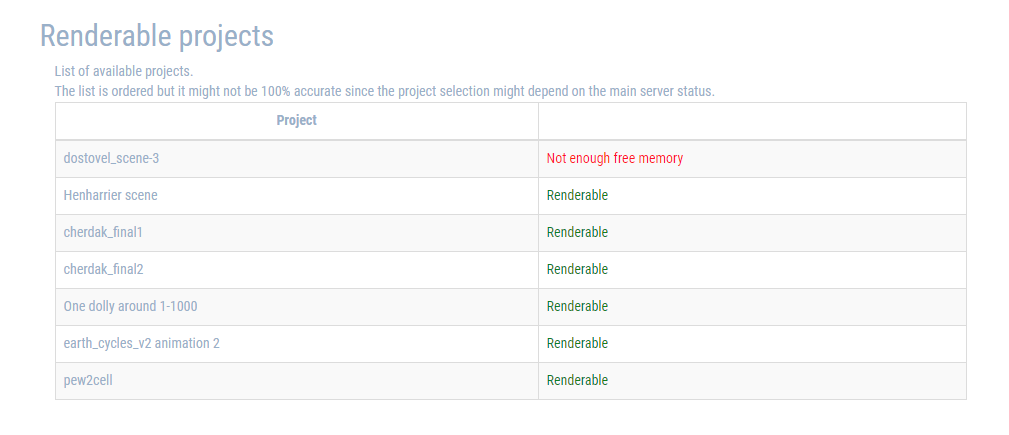
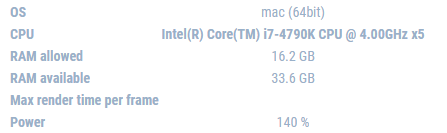
I was poking around in Sheepit and I saw it has a list of things waiting to render. For the scene it says "Not enough free memory" So that is why it is not rendering the scene, but why does it say that? the iMacs clearly have enough RAM to render the scene out since rendering the scene is 4.9GB of Ram and the iMac's have 16GB Ram allowed to use. I do not understand the inner workings of Sheepit very well.
dostovel you are right, there are so many possibilities, yesterday I can't render it, but today it works fine.
I do think Kent has to be online for the project to be available for rendering. But yesterday he was online and it still didn't come first
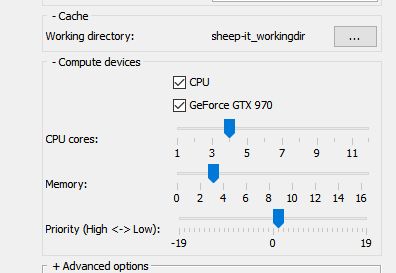
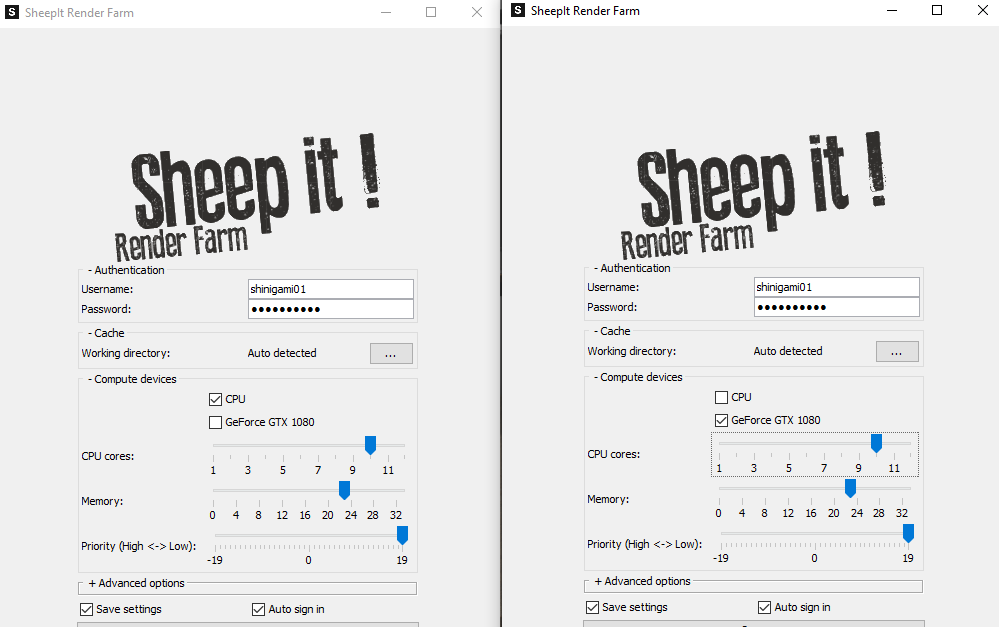
sheila5 if you use GPU for rendering it always lags, because GPU always render with 100% and her are no resources left for the display. You also can open 2 instances of sheep it to render with CPU and GPU at the same time. In this case you need to reduce the CPU cores at least at 2 because the CPU have to put the data to the GPU. So you can pause the instance from GPU sheepit if you want to work and have more control.
sheila5 hm....ok I render with these settings since half year and never have troubles. Do you render with laptop?

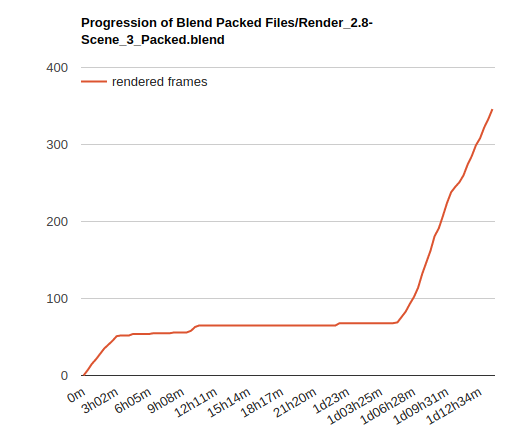
Ok, finally back to this thread. I agree that this project was a weird one. It started off quick with 4 random people rendering (as in not part of our team) but promptly dropped to just me rendering for the first few hours. Then mostly plateaued for a day before bolting to the finish line. The progression graph from SheepIt presents it well:
Very odd that sheila5 and others weren't able to contribute despite enabling "Render my team's projects first". It made me wonder if the scene was too heavy for most computers, especially non-GPU-capable ones. I did a test with the current settings (1000 samples + denoising + 256 px tiles) and simply switched to CPU. My computer slowed way down after 15-20 minutes of rendering at which point I killed the render because I had to do other stuff. I just did another test dropping the settings (250 samples + denoising + 32px tiles) and it rendered in 9m 26s.
My theory is that the scene I uploaded took too long and too many resources to render on most people's computers, thus SheepIt kept it waiting till more powerful machines were available. More and more I think 1000 samples is [always] too high but also the 256 px tiles is a potential problem. Even though it's optimal for GPU, it's less so for CPU. My test results:
So I'm thinking 64 tiles is the optimal middle ground for GPU and CPU renderers. Also I'm going to try setting to CPU in the .blend file and see if that's better than GPU. I feel like currently these scenes are GPU by default with CPU being optional. Maybe if we switch that around sheepit won't keep it waiting (?)
dostovel I just saved a new version of Scene 3 (and zipped it with "optimized-1" suffix) with CPU as the device, 256 samples, and 64px tiles. Can you submit that as a project to Sheepit? Note that sheepit will detect both .blend files in the .zip and you only need to submit the render-ready one.