

Update 7/29/2019: Omar's new scene is ready to render and already underway on SheepIt. If you're part of the CG Cookie Render Monsters team, we'd appreciate you launching the SheepIt app on your computer to contribute. NOTE: Make sure on your SheepIt account "Options" you enable Render my team's projects first. Thanks!
Update 7/18/2019: Omar is polishing new scenes.
Update 7/3/2019: Omar has 2 new files ready for rendering. Let's do dis.
Update 7/1/2019: We have finished rendering two of Omar's reel projects. Way to go community. Omar still has several to prep for rendering. I'm going to unpin this thread and re-pin once it's ready to render again.
Update 6/17/2019: Omar has updated his shared project folder with new scenes to render. It was accidentally uploaded as a new folder so if you've already synced the previous folder, you can delete that one (if it's still there) and you'll have to sync this new one. From now on we know how to avoid this so no more re-syncing.
The time to render is now!
Update 6/16/2019: We've finished Omar's first 2 scenes! Way to go People 👏👏 Thanks to everyone for contributing. Now we're waiting for Omar to setup and upload his next scene.
@theluthier Kent after comparing the original Cycles renders and Element 3D real time ones, I think you are right, rendering it out of Cycles is totally worth going the extra mile for. Although you and Lampel said it was great, that it's 95% there, for a second I saw a twinkle in your eyes saying "C'mon dude, you know it, I know it... there is no spoon." And then the twinkle continued "No one eats an Oreo and doesn't go all the way to the stuffing in the middle, the cookie part is just enough". I see what you mean twinkle.
I didn't want to bother people though, but I guess if I'm going to try this there's no way around that. I don't know how to use Drop Box, I've never used it before. Should I get an account? I hope it's enough space. I remember you kinda set things up in a similar way in the Rendering & Finishing A Blender Animation course. I should re-watch that. I have never done things through the internet so this should be a learning experience.
I, Kent Trammell, am commandeering Omar's original post! [evil laugh] I'm the one that encouraged Omar to reach out to the community for helping him render his demo reel. My computer just sits collecting dust most nights and I'm happy to lend some rendering power to this project while I'm asleep. I suspect that there are a number of CGC community members willing to do the same 🙏
If you want to help out, please follow the instructions below!
The status of the project will be stated and updated at the end of the thread title in brackets. When it says "READY TO RENDER" that means a project has been submitted to SheepIt for rendering. If it says anything else, the project isn't ready for rendering yet.
The status of the project will be stated and updated at the end of the thread title in brackets. When it says "READY TO RENDER" that means it's ready to sync the project folder and start rendering. If it says anything else, the project isn't ready for rendering yet.
STEP 1 -- Sync Omar's project folder to your Google Drive.
If you have a gmail account, you have 15 GB of free Google Drive space. Just click the link and when you're redirected to the Google Drive website, right click on the "Demo Reel Files" folder and choose Add to My Drive.
If you're on Mac or Windows, use the official Google Drive app (personal version) to sync your Google Drive to your computer's file system.
Render_Scenes_1_Packed.blend
If you're on Linux like me, there is no official app. I've had some success with Open Drive but it seems to have stopped syncing on my system. I'm currently using Insync and it's working beautifully. It's $30 after the 15 day trial period, which I will likely pay.
STEP 2 -- Open one of the render-ready .blends with Blender 2.8
After the project folder has finished syncing *entirely* to your computer, launch Blender 2.8 and open Demo Reel Files > Blend Packed Files > Render_2.8-Scene_1_Packed.blend. Then follow Omar's instructions in the file for CPU or GPU rendering, whichever your machine is best equipped.
Enable viewport rendering to double check the scenes look fine (no pink from missing textures). I've tested these files myself and they should be ready to render without problems.
STEP 3 -- Render the Animation
The files should all be setup properly so anyone that opens them doesn't have to do anything but click the Render button.
That should be all you need to do to contribute rendering to Omar's project! Note that these scenes are heavy and can take an hour or more per frame, even on a high end machine, which is why Omar needs our help.
When the rendering is all done (or you need to stop and regain your own GoogleDrive space), simply navigate to the Google Drive website, right click on the folder and choose "Remove".

I found it easier to send the .blend file. So I don't need to care about correct /path of all my files.
Important is to pack all images at the .blend file!
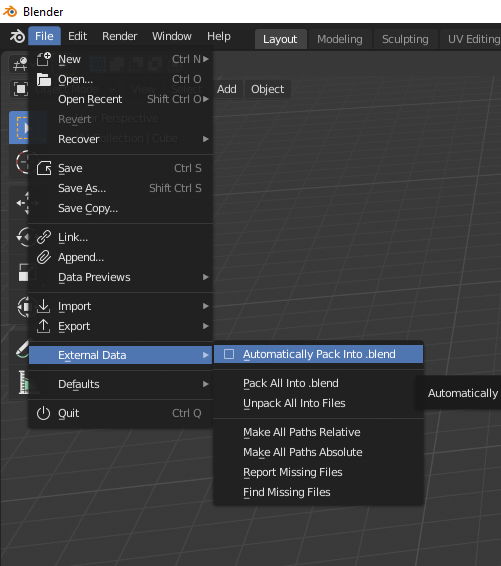
The maximum upload is limited to 500mb.
@theluthier Yeah I learned the lesson and started at 256 samples as we have been doing, but renders were coming out very very muddy and noisy, so I bumped it to 1,000 samples and it was kinda ok... but now that I think about it, that was when it had clouds with volume scatter shader, when I changed to the asteroid I didn't change the sample numbers.
But man that volume scatter thing is very noise heavy. I had to abandon the clouds since Blender was acting out very weird, crashing and killing the render all the time.
Are the renders coming out ok at 256 samples with the asteroid? I didn't test that.
Yes, I will submit the zip with the optimized sufix. I don't understand what this means though...
"Note that sheepit will detect both .blend files in the .zip and you only need to submit the render-ready one."
I'm guessing I'll understand that better once I see how submitting to Sheepit works. I think what you mean is that Sheepit will enter the Zip and in there there are two .blends, one is the Heli model and the other is the scene ready with the linked models .blend and that is the one to submit? Lets see.
@theluthier OK yeah I see what you mean, there were two "Add This Blend" for each .blend. I only added the first one.
And I unchecked NVidia so it only searches for CPU's. All the other setting I left as is.
Where are the rendered files dropping at? Do they stay at Sheepit until the whole thing is done?
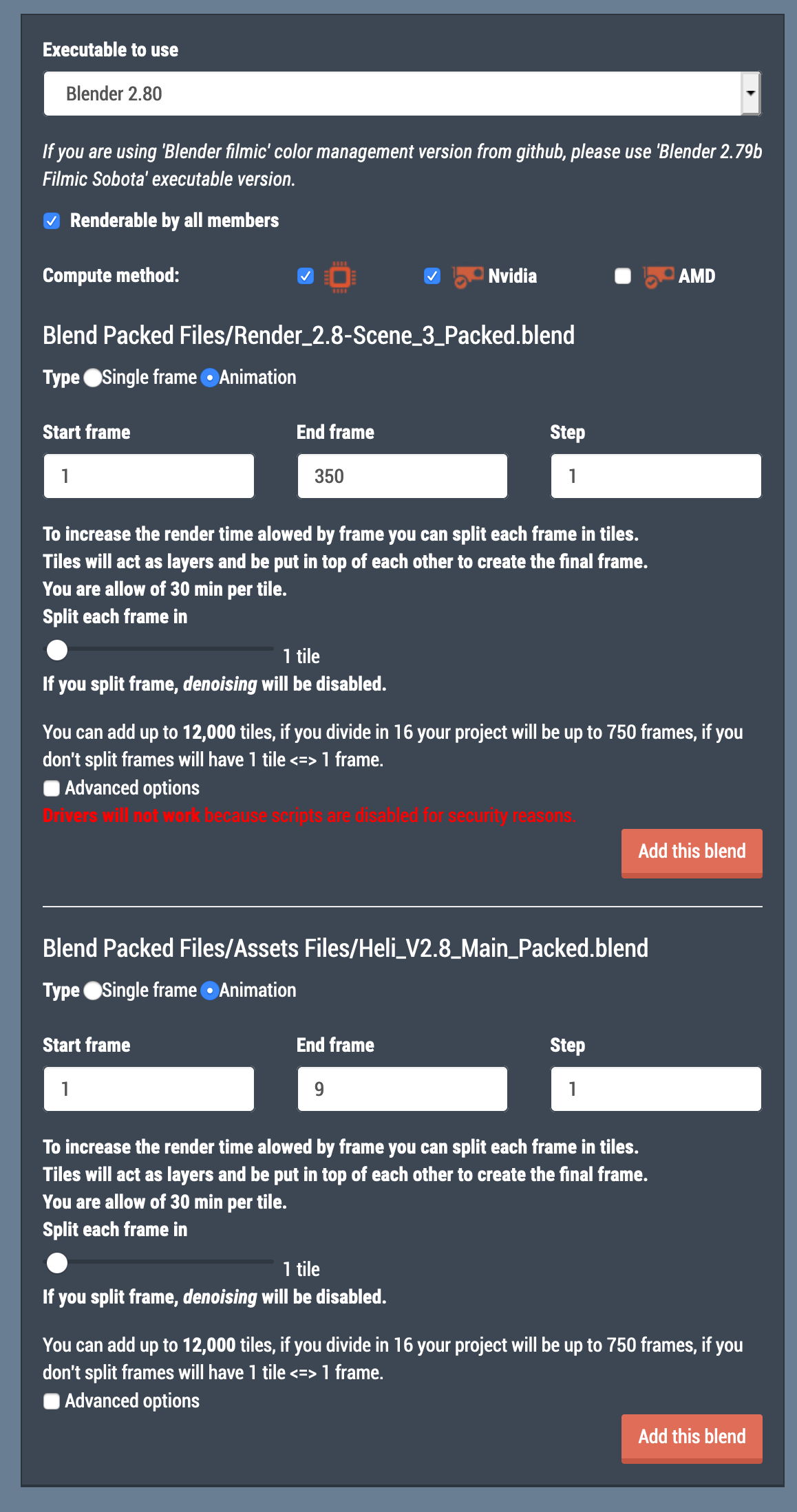

dostovel Asteroid renders came out fine at 256 samples for me. Volumetrics makes sense to render at 1000 samples. Confession: I've never rendered Cycles volumetrics 😬 I've always assume I wouldn't have the patience for it lol.
That screenshot is exactly what I was talking: Giving you the option to add both blends, but you only need to add the render-ready one.
And I unchecked NVidia so it only searches for CPU's.
I don't think you need to uncheck NVidia. I would leave it checked as an option but the .blend file being set to CPU by default should 'favor' that in a way (that's my theory at least).
Yes, I will submit the zip with the optimized sufix. I don't understand what this means though...
Optimized just means "more efficient".
Where are the rendered files dropping at? Do they stay at Sheepit until the whole thing is done?
Yes, SheepIt stores all the finished frames and allows you to download them after the render finishes. In fact I'm not sure how important the output directory is in the .blend file...all I know is setting one within the project directory seems to work fine."
That reminds me - I will download the previous rendered frames to Google Drive.
@theluthier it is now doing the file of Kraska, I haven't been able to contribute anything to the team yet :(
Tonight is again raid night so I'll try for just a little bit longer
@theluthier Jesus christ it is almost done. This is incredible!
So the problem was that not everyone has a video card powerful enough to render the scene? mine could barely handle it.
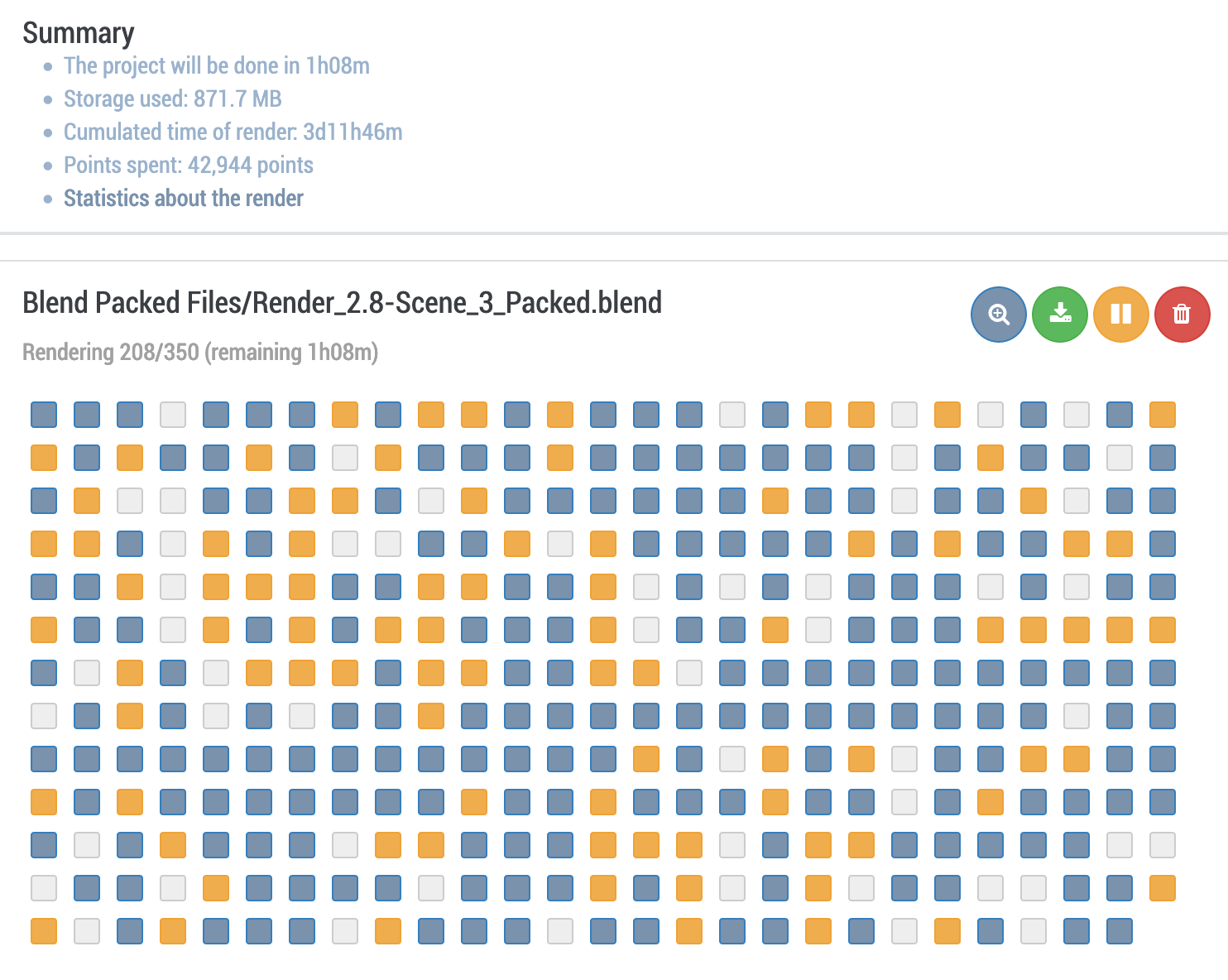
Lots of questions remain but the main one is, what are the collective points of the whole team for? I don't know how many points I had before I submitted the scene, I should've checked because I don't know if it used my points or the team's. I imagine it used mine but then what are the Team points for?
Your points are used. The Team points are for the ranking and boost your own ranking what I know. You have 300k points, so you on place 100 for rendering your project because people with more points render before you. The Team points put you on place 50. Only an example. If you not have enough points we can render your project 4 free if you gave me a public key. This key is only used for render, and we can not login your account. This is a nice option, but if you use it you have to do the same 4 the people :)
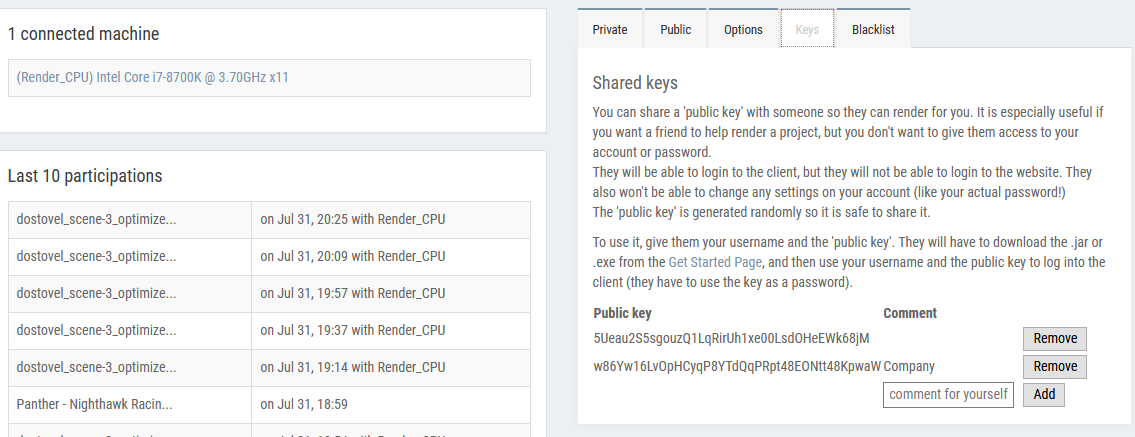
It finished. When I get home I'll download the frames and see if it's all ok. if Sheepit continues to be this great, might as well start donating whatever possible amount.

Here's the short render of the space scene. Lets see how it all fits later with the whole reel. And no EXR from Sheepit surely is a challenge for compositing, but at least it forces you to get creative that's for sure.
cruento Thanks Philipp. I feel it can be improved in so many ways, I may come back to it in the future. 😅
@theluthier Kent help me out a bit here, I'd like to know your thoughts, I'm torn in half. I want to participate in the course even though it is a beginners class, but if I do that then it means taking a month off the demo reel work. Yet if I do the course a render could come out of it to put on the reel. Should I invest the time into finishing the reel or should I focus on the course?
dostovel what did you have in mind to make? ‘cause that will influence the decision making a lot
Btw your portfolio work is solid! imo you can apply for jobs even without the demo reel, at least that my opinion.
dostovel oh, did you know it’s a 3 week class this time? Since homework for week 1 is due this Sunday already, that leaves a little more than 2 weeks for the class. So a lot less than a month. Just thought you should know
ssmurfmier1985 Well I was thinking on doing the barrel, model it simple but put all the energy into texturing, lighting and composition on trying to make it the most realistic as I can. But since I only have Saturday's and Sunday's to work in Blender I would feel bad not participating in the class as a whole, meaning seeing everyone else's work, commenting, helping where I can, posting my progress, sharing workflow advice, etc. Kent every class really makes an emphasis on not flexing and I wouldn't want to seem a flexionist.
dostovel You are the most modest person I know Omar, I never see you flexing! Personally I find your work super inspiring, it motivates me to try harder.
