if that's not enough info or your not understanding ill try my best to explain

Hi Mr. Thicc bbattlehorn5283battle ,
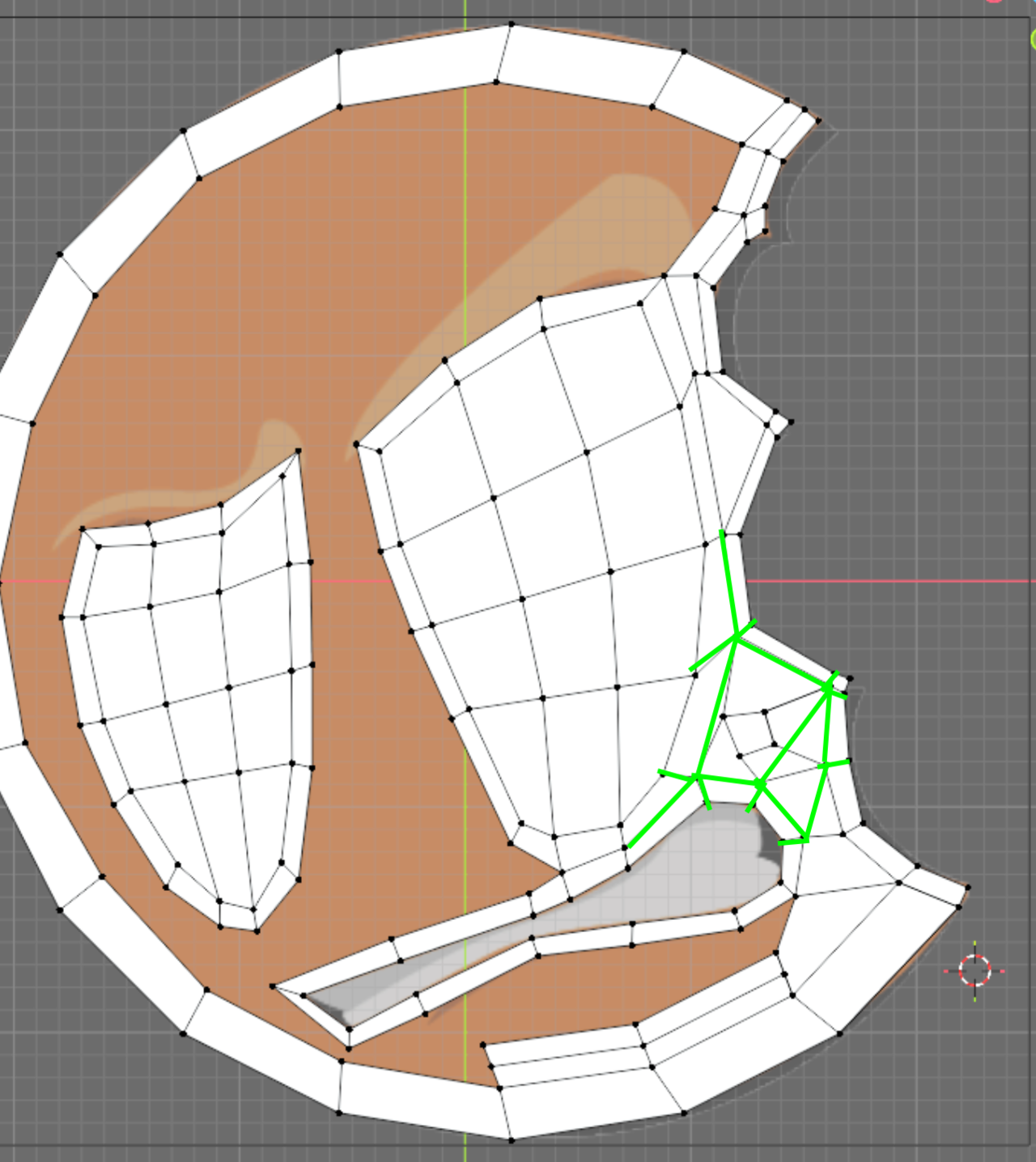
You have too many Vertices in the 'bitemarks': Like here:
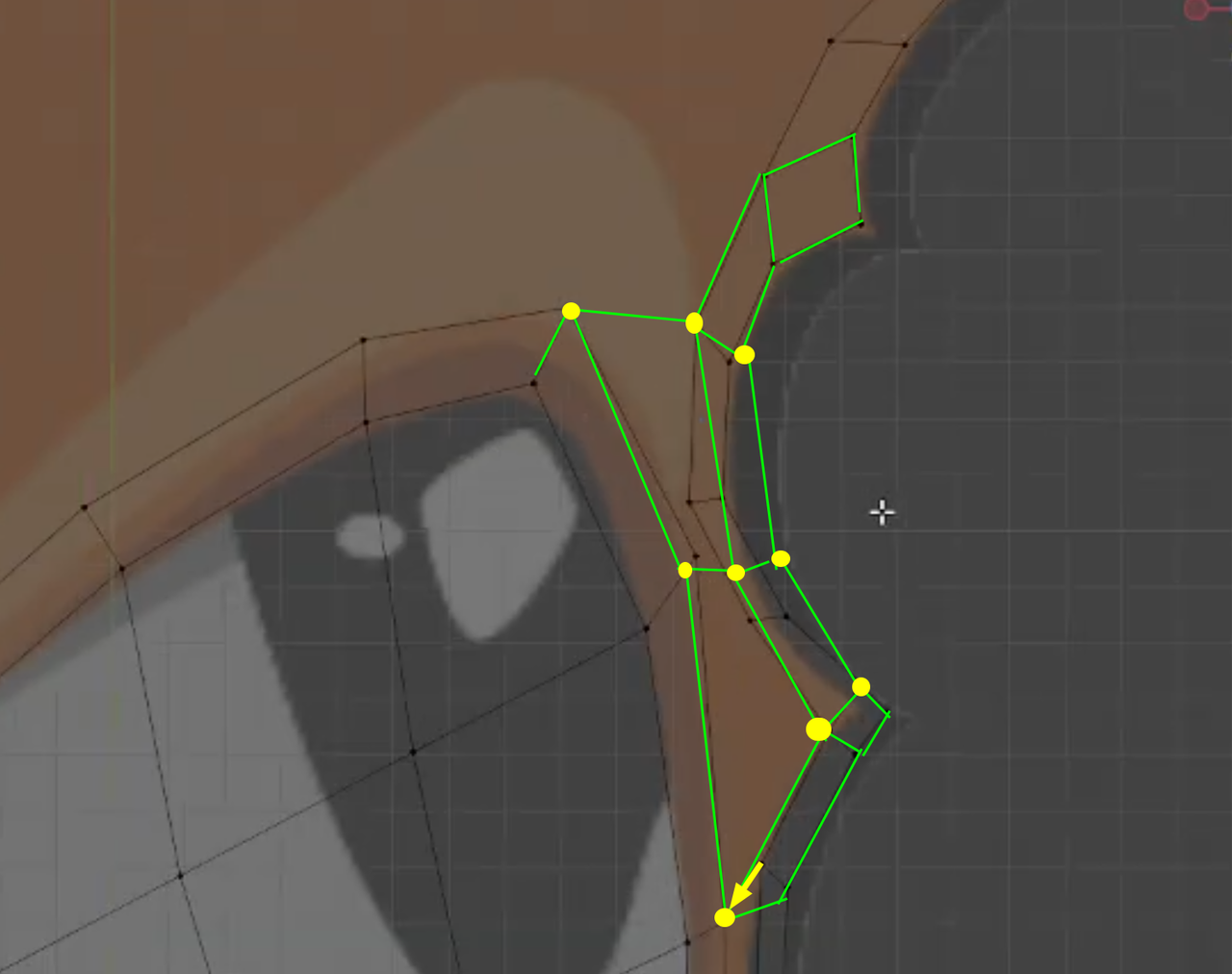
Of course you still need to shift Vertices around a bit to make things prettier, but this is basically it.
It is actually a good idea to start over from scratch, as unintuitive as that sounds. Watch the 3 videos for the Face Modeling irst and then again in bite sized pieces, following along.

It's the classic dilemma - 7 green edges need to join to 3 red edges. You either reduce Green edges as Martin suggests or you add to red as below shown in yellow. Note. I've over simplified here to show 7 edges to 7 edges but they don't have to actually match... you see in Martins example he's resolved 2 edges to 1 edge. Being able to reduce or increase the edges across your model is the key skill which takes a lot of time and patience to develop

The rule of thumb is the minimum number of verts to get the shape you want. So Martins approach is more optimal / best practice as with sub d you only need a few verts to get smooth curves. You have so many you could probably leave this low poly (no sub-d) and it'd still look pretty smooth once zoomed out to show the whole logo.
I'm not sure if i should create a new post or not but its mostly related. I got the vertex count to be the same but i cant figure out what i did wrong/ different for the spot above they mouth and under the eye to be like his I been trying to not ask but its been a few days and I'm not able to pin point what i need to change

Why don't you go back and start over? We all get a bit lost following a course, and when things begin to not go as planned, it's when we always throw out what we have done up to that point and just go back and start from scratch. You you watch a lesson again, you'll see much more clearly where you went astray and things will start to click. You can follow along exactly with the instructor at first, follow step by step. Like training wheels on a bike. At first is hard, but your brain starts to get it.
Yeah, Omar is right. Starting over is a great advice, unintuively as it may sound.
You probably think something along the lines of: "Do I have to do all that work again?", but actually, the second (third...) time, it'll go so much faster and the result will also be better.
Whenever I feel like I'm 'losing control' of the model, I just start over. I still do this, even after 14 years of using Blender daily.
I do that as well. Kent does it, JL does it, everyone does it. It's standard procedure. Teachers call it their "exploration phase". Where you start to see what the best approach to something is and it's full of false starts. You realize the way you started is not working and you go back from scratch a couple of times until you feel it click and you're like aha! this is the way.
I'm not sure you need to start over here but the advice is solid. Keep the blend file as a v1 and start a new v2. In time you'll realise that the time you spend trying to correct the mistakes you made early on will take longer and produce a less satisfying result than just starting again and getting the key foundational pieces in place from the outset