
I need some CGCookie knowledge. I want to recreate this katana handle. How do I get the rope to fit around the handle in exactly this pattern?
I watched the technique on YouTube; it is twisted twice and then wrapped around the handle (to put it simply).
The question now is how to achieve this realistically. The easiest way would certainly be to create the pattern with planes and then apply a texture over it somehow.
I would just like it to be very precise. I have already tried something with curves or with planes that I tried to twist, but the middle point where it constricts always remains the same width (see image).
I think i could achieve something like this with cloth simulation; That you can simulate something like wringing out a towel but i have no idea.


Well I'd totally sculpt that and then retopo it. You'll have that free flowing grace to build up the shape. Also maybe a Lattice? So you can massage the shape into being with the curvy curve. In the end what I'm trying to say is that I would hack it, it doesn't have to be straight up poly modeling.

Hi Leo,
Yes, that's indeed quite challenging.
Years ago, I wanted to do something 'similar' and tried all sorts of techniques. At the end I used not 1 piece of 'cloth', but small patches, and 'stitched them toghether where needed. This was based on the fact, that there is quite a bvit of 'cloth', that is not visible, where it goes under itself. So, I mean something like this:
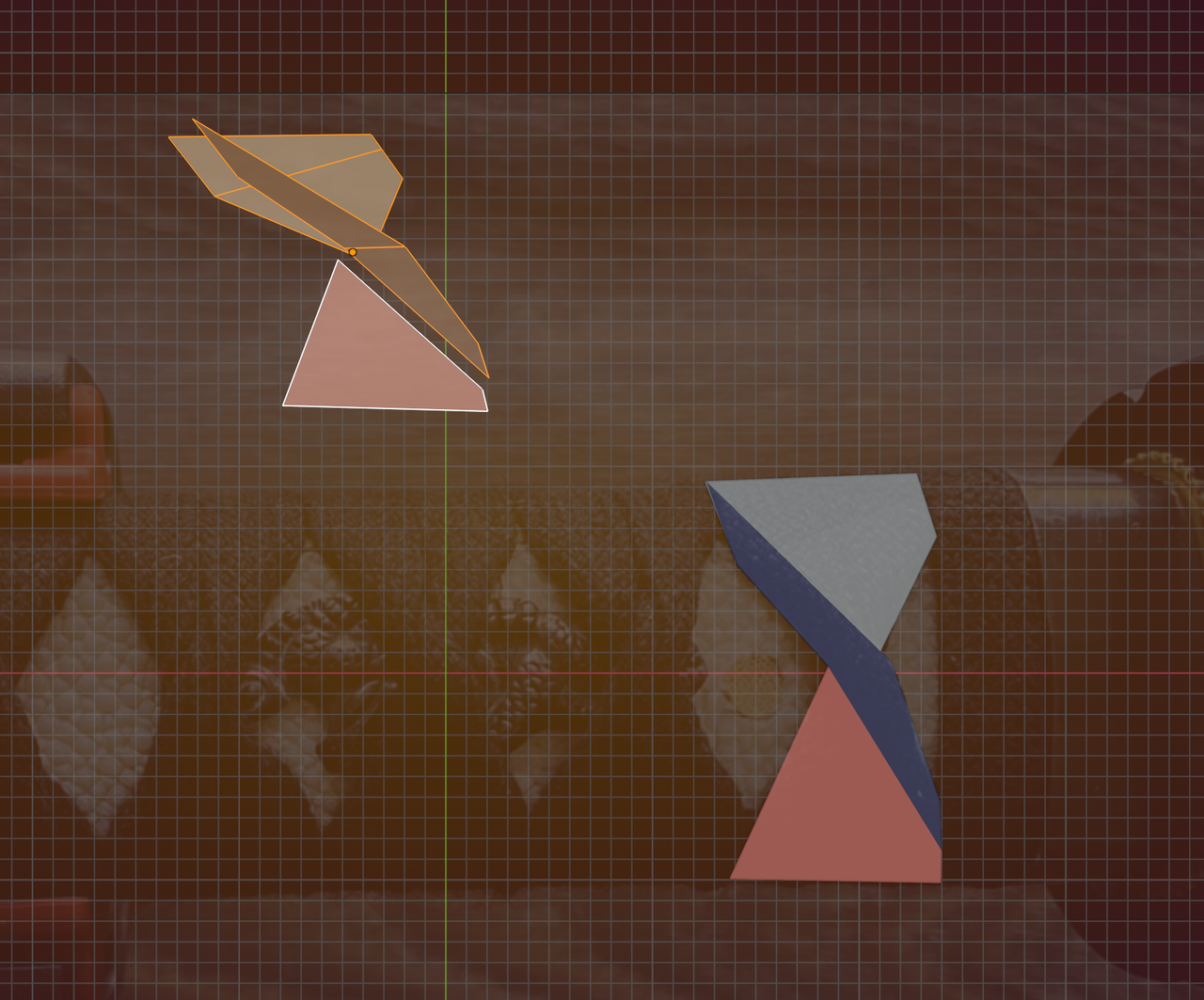
Theoretically, it should be possible with a Cloth Sim, but that's gonna be a lot harder to get right (believe me, I tried😉)

I'm with Omar. Sculpt it as each one is uniquely 'precise'. That said doing the texturing from the sculpt is another challenge entirely and way beyond my level of knowledge/skill. So i understand why you'd want to wrap a piece of textured cloth. I guess it depends on how close you see if in the render as to which is most practical.


Im not really good at sculpting, but doing this via a mesh then you could try to simply have two crossing bridges for the simplest effect?
Not exactly the same, but also I made that in a minute, with a bit more work you can get it a lot closer.
Then use a curve modifier to wrap it around the handle, maybe mirror it to save some time unless that breaks pattern.

Heres a short video of how I made the mesh: https://imgur.com/a/SnawTot
Now that I think about it, it kind of looks like t he 'cool S' that people used to draw on their highschool desks or grafiti on walls lmao.