
Awesome tutorial! Just have an update here.
Using version 5 I could not find the "object data properties --> Normals --> Auto Smooth" option. Instead, I have added the modifier "Smooth by Angle" as also described in the following stack exchange:
https://blender.stackexchange.com/questions/318674/where-is-the-auto-smooth-option-in-blender-4-1
However, I still cannot figure out how to edit some angles to then be sharp? Additionally, this tool only works when i check off the box "Ignore Sharpness"?

Hi Philip CCookieGoatieBoy ,
Don't forget to set the Object to Shade Smooth. Just adding the Smooth by Angle Modifier by itself does nothing if the Object is set to Shade Flat.
The easiest is, to not add the Modifier yourself, but go to Object > Shade Auto Smooth. (Then Blender sets the Object to Shade Smooth and adds the Smooth by Angle Modifier for you.)
Also make sure the Angle is high enough:
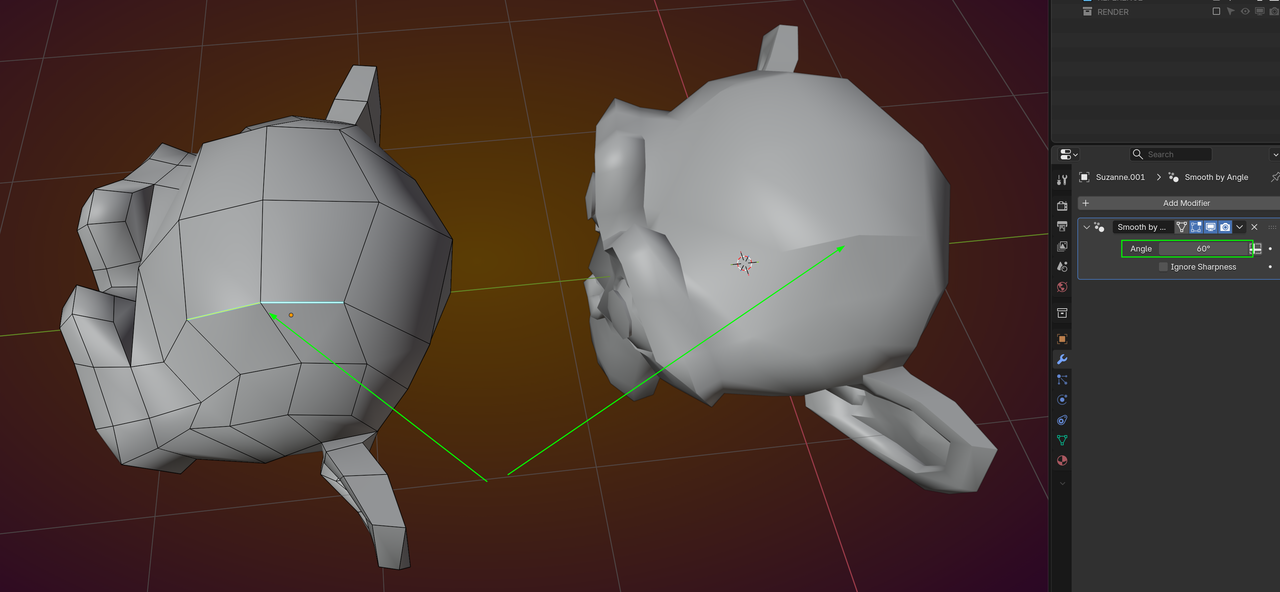
In Edit Mode, Edge Select, CTRL+E > Mark Sharp.

Is this what you're looking for? Unfurl the modifier and you can set the angle it smooths at
This applies globally but if there are edges you want to be sharp then you can select these Edges and Edge > Mark Sharp (or Ctl + E)


