
When I apply the bevel modifier on the entire crate at the end of the process, many edges arent impacted by the modifier. Does anybody know why? Is there a quick fix or do I need to start over?

Hi Matthieu,
Most likely the Bevel is being Clamped by some Close-together Edges. Disable the Clamp Overlap:
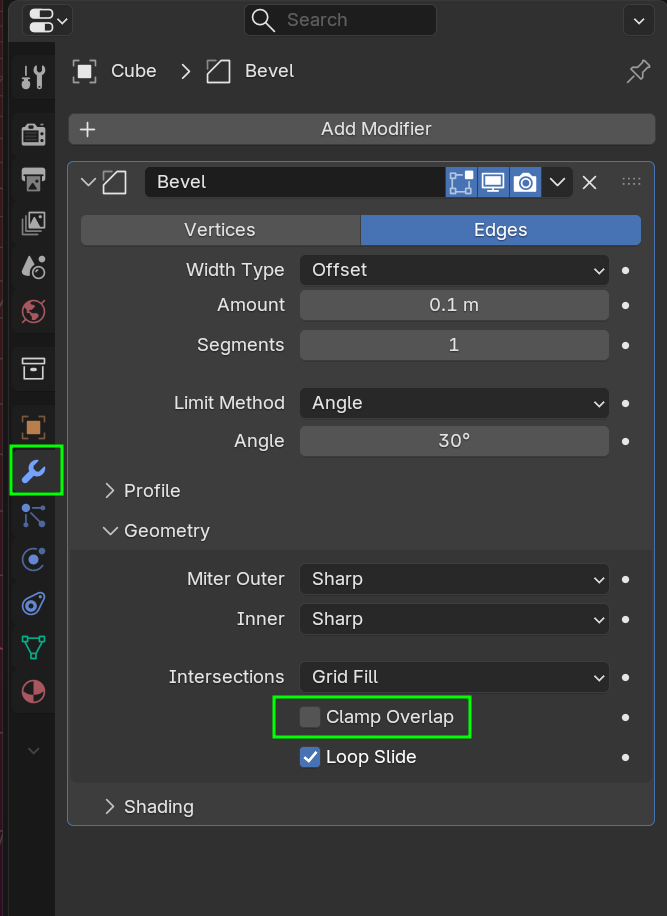
You might need to decrease the Bevel Amount when you do that.
You can also, in Edit Mode, Select all (with A) and then: M > Merge > By Distance.
And make sure your Scale is Applied. In Object Mode, CTRL+A > Apply > Scale.
If that all doesn't help, ask again and add some screenshots (whole UI).

You have to keep in mind the relation of the sizes. For example if your crate is 5 meters and your bevel amount is 0.01, that is a super tiny amount compared to the size of the box so it'll seem like nothing happened. And if your box is small, like 0.5 meters and your bevel amount is 0.1, then that is a huge bevel and your box will almost turn into a circle. It all gets worst if you haven't applied the scale of your model and Blender is confused about the size of things.