
Hello Again,
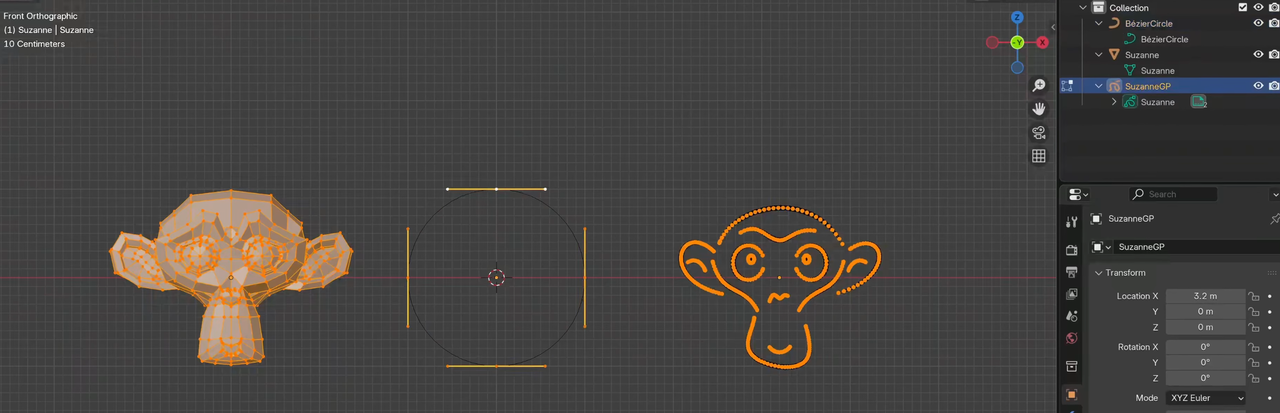
I hope someone can help. I'm currently working on the Course Material for Blender Basics: An Intro. to Blender 3D 4.5 LTS/ Section 2: Editing Objects/ Lesson 7: Object Data & Duplicating. The Instructor gave an example in Lesson 7, where he edited the components of three different objects at once from the Add Menu (Shift A), [the Mesh Monkey, Curve Circle, and Grease Pencil Monkey], by toggling between Object and Edit Mode. Example of his Edit Mode results below:

Unfortunately, when I attempted to repeat the example, I got less than desirable results. Shown here--

Somehow, when I switched from Object to Edit Mode, only one of the three objects’ vertices were visible-- The other two, the Mesh and Grease Pencil Monkeys, vertices were missing. I thought it might be my method of selection, but no matter the order, or the number of items I selected in Object Mode, the result was the same-- Two of the three objects' vertices (in this case, the monkey's) were not accessible in Edit Mode.
I'll give another example-- Here was a switch from Object to Edit Mode without any items being selected--

Again, notice no vertices. And, yet there was more:

This time I selected all three objects, left to right (although, right to left gave similar result) in Object Mode. When I toggled to Edit Mode this is what happened-- Only the Mesh Monkey vertices were visible, but not selected (highlighted), and the other two objects were selected, but had no vertices. Also, I could not deselect the Curve Circle, nor the Grease Pencil Monkey in Edit Mode. Strangely, when I returned to object mode, all of the objects were selected, and could be deselected in any order, or group. Shown below—

Of coarse, I could get the vertices for the Mesh Monkey and the Curve Circle individually in Edit Mode, but not in a group. Also, the Grease Pencil Monkey highlights but does not seem to have vertices, no matter what the Mode, or approach.
Another issue I had was with toggling, itself. Sometimes, the Tab Key would not work.
I thought it might be my computer, but it seems to be virus free, and up-to-date. Then, I thought it was my Blender 4.5, so I uninstalled and reinstalled the program. I'm really at a loss! Heck, my Grease Pencil Monkey looked nothing like what the instructor used in his example-- Mine was yellow!
Am I doing something wrong, or did I miss something? Do I have an older program? Is there a newer, better, bug free version of 4.5 that I am not aware of? Are the settings on my Blender and/ or computer wrong? I would be truly grateful for any advice you could give me. Thank you.

Hi Andy AAeJax,
You cannot Edit different types of Objects (like Meshes, Curves, Grease Pencils Objects) at the same time.
Why could Paul do that then, you ask... Fair question. Paul can't do that either, but he has 'doctored' (Photoshopped?) the footage; it's fake:
In the Outliner, you can see that only the Grease Pencil Monkey is Selected and in Edit Mode.

I think Martin described it well... I even double checked it. When going to object mode with multiple objects, with curves and meshes (at least) when you go into edit mode, you can see all that you have of the same type as the active object that is selected. So if a mesh object is the active object selected, all selected mesh objects will have their verts visible, and with a curve object actively selected, all curve points from the curve objects will be visible... but only the one you have actively selected. So if you have both types in your selection and your active object is a mesh, you'll only see verts of the mesh objects, but not of the curve or grease pencil object.
Now, I was trying this on the 5.1 alpha (from a few weeks ago), so not sure how this is on other versions, but in the version I was testing this on, with Grease Pencil objects, even with multple grease pencil objects selected, it only showed the points of the active grease pencil object. One of those rare instances where things are not the same across all parts of Blender, for whatever reason.
(This ability to select multple objects and be able to simultaneously edit them is a relatively new feature in Blender. and has only been around since about 2.8.)
Actually, it seems to work for most Objects, just not for Grease Pencil. Text sorta works, you can go into Edit Mode for 2 Text Objects, but you can only Edit the Active Text Object.
Probably the only two Types, where this is useful is Meshes and Armatures (maybe in some cases Curves). I have only ever used it with Meshes.

Hello Martin Bergwerf, Grady Pruitt, thehomme, and Paul Caggegi,
Sorry, I guess I went into full panic mode. I did not notice the three mouse pointers in the first image-- I feel a bit foolish. Regardless, let me recap your response to make sure I fully understand. When switching from Object to Edit Mode with three objects, only the vertices of the selected/ "active" object will be visible-- Further, only like objects (2 [+] meshes, OR 2 [+] curves) vertices will be displayed, but this is not the case for the Grease Pencil. Selecting multiple objects and simultaneously editing them is relatively a new feature in Blender, and therefore is limited in its scope. Did I miss anything? Let me know if I did.
I appreciate everyone's time, patience, and help in the matter!
