
Here's a way I heard Omar (I think) describe it...
Think of the object like a suitcase and the data block is everything inside the suitcase. If you create a normal duplicate, the suitcase and everything inside it get duplicated. Initially, it will look like the same suitcase. But if you go "inside the suitcase" (go into edit mode) and change something, the new suitcase will no longer look like the original one. But if you create a linked duplicate, all the data inside is still the same, so even if you go inside (edit mode) and change something, all the other duplicates that are linked and still have the same "data block" inside the suitcase. In Object mode (when you're not inside the suitcase), you can move each suitcase to a different place, scale it, and/or rotate it, but the contents inside the linked duplicate will remain the same (just in proportion to whatever changes you made in object mode).

Hi Jon,
Personally, I think 'container', although not incorrect, is a bit vague and incomplete, and (in my experience) tends to give people a lot of trouble understanding what's going on...
Here's an other explanation:
Each Object (talking Meshes here, but it is true for some other types as well)) has its own 3 dimensional, orthogonal Coordinate System. In order to distinguish between different Objects, we give them different names (like variables).
There are also 'lists' of Object Data, that contain information like the Position of Vertices.
Different Objects can share (part of) such 'list'.
When you Move an Object in Object Mode, you Move its Coordinate System (in the 3D World); you do not make any adjustments to the 'list'. That is very handy, because now 2 or more Objects, that share a 'list', can be in different Locations.
The same applies for Rotating and Scaling in Object Mode; you do not change the Vertices' listed Positions.
If you Scale an Object in Object Mode, you Scale its Coordinate System and if you Scale (in Object Mode) in X, you Scale the X-Axis of the Object's Coordinate Sytem.
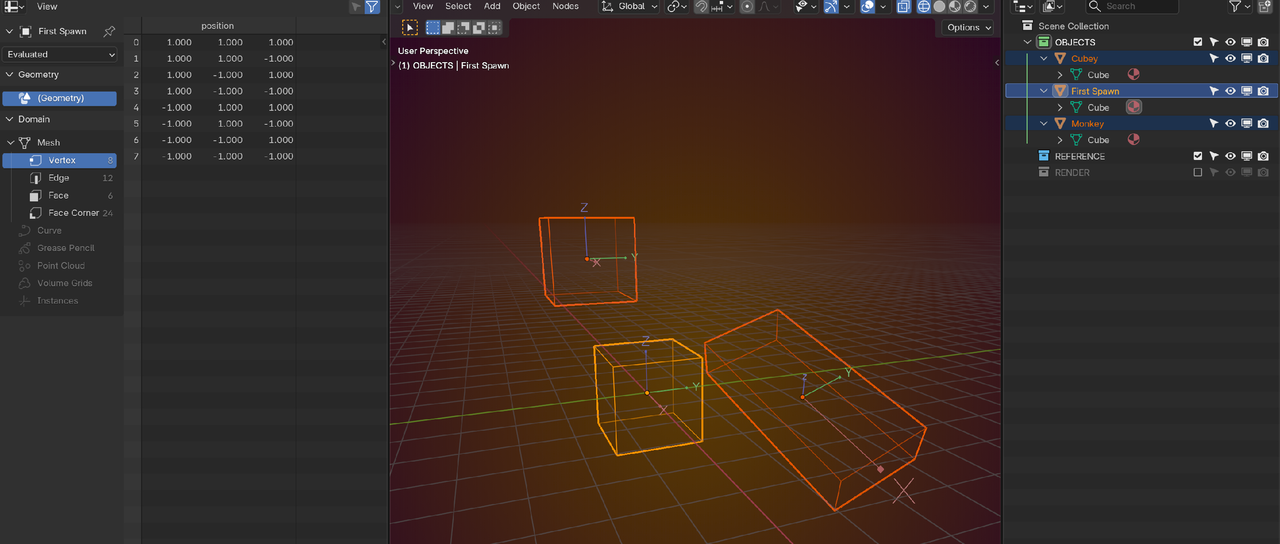
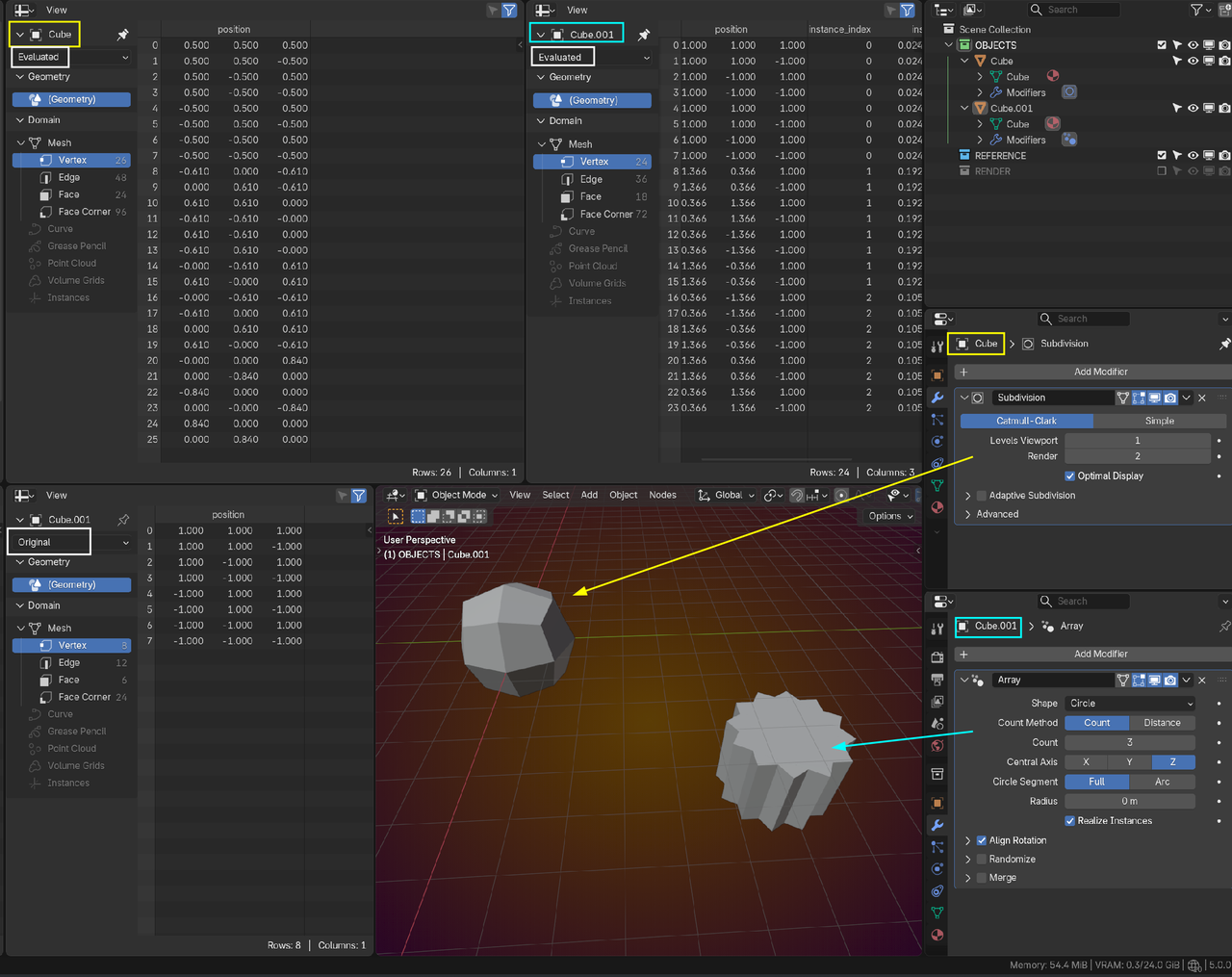
A Modifier calculates a new list, based on the existing list and keeps that original list, so if you make a change in Edit Mode, you change the original list and thereby also the Modified list.
The really cool thing is, that you can have different Modifiers for different Objects, even if they share Object Data. So we can do this:

Yeah I don't remember where I got the suitcase analogy, I saw someone using that analogy and it stuck with me. I wish I could remember who it was. Whenever I think of why Blender does something, I just think it's coding magic. Instancing saves memory because coding magic. You have one thing and you instance it and it's still like there's just one thing when in reality there's like 100 and Blender is only seeing one. Coding magic.
Appreciate it Martin, now it's clicking for me.
Just a little ramble: So the reason we can scale up an instanced mesh (in Object Mode) and have the distance between vertices remain the same, BUT, appear larger, would be then because the coordinate system is what is being stretched? Kinda like a stretchy fabric.
This would then imply that the "Object's Coordinate System" is local and unique to each Object. May seem self evident but it just made sense to me now.
This took me back to the YT tutorial "Why you should always apply your scale!" I saw that video and did it, but no idea why I was doing it (I don't like that).
Again, thanks for the clarification.
P.S
Omar & Grady, I appreciate the suitcase analogy; it works in practice but it wasn't working for me in theory.
"...the "Object's Coordinate System" is local and unique to each Object."
Exactly!
The orange dot that each Object has, the Object Origin, is really the Origin, the (0, 0, 0), of the Object's Coordinate System. It took me years to realise, that it's not just a point in space.
I am at work and I just did the loudest "Ohhhhhhh!"
So THAT'S what the Origin Point means. You just blew my mind, I have been Blending for a few months now and I swear, after every Blender Basics video it turns out I really knew nothing.
I am curious to see what that looks like on the data table if I start just moving and setting the Object Origin in random places.
Again, thanks.
REALLY!
And one more thing:
Because Coordinate Systems in Blender (don't know about other software) are always orthogonal, this will happen:
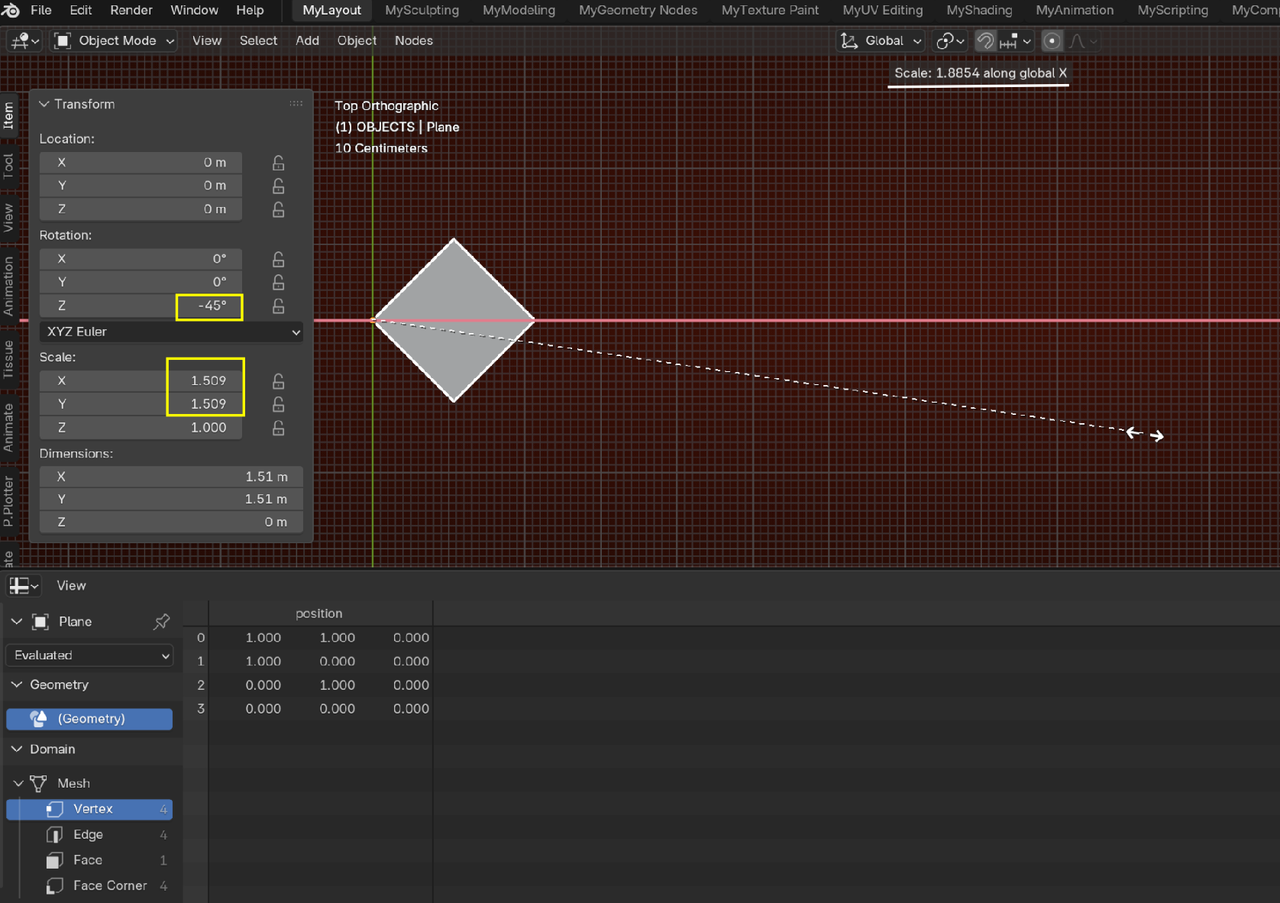
Obvcious in this case, but it could potentially create more subtle Modeling errors, if the Rotation is less extreme.
Therefore it is better to try and get used to Scaling in Edit Mode instead of. Scaling in Object Mode and Applying the Scale.
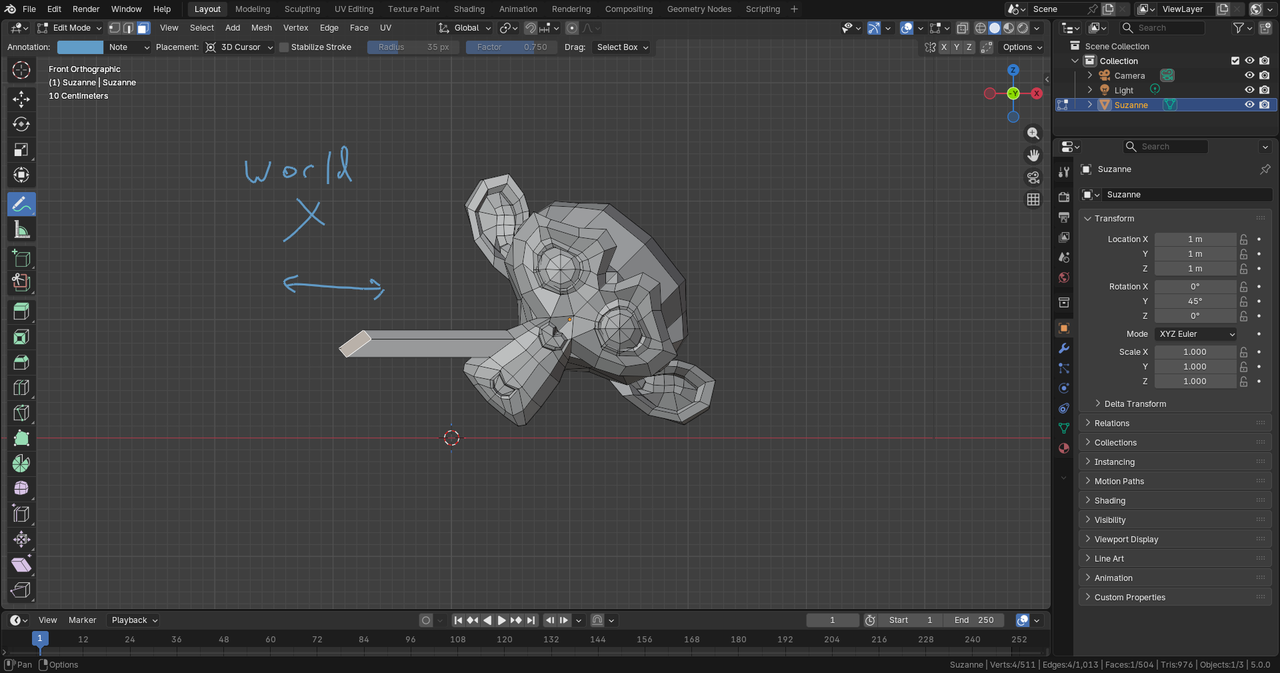
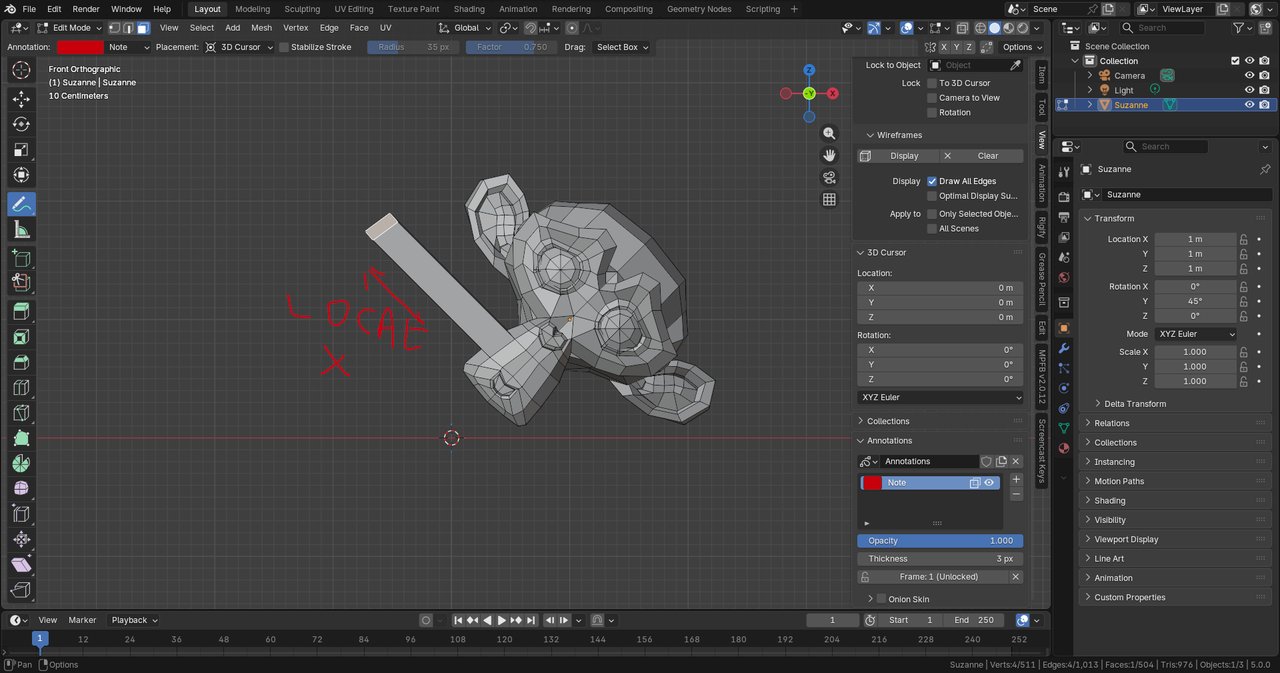
(The Object's own coordinate space is the one we call "local", because it is the "local" coordinates for that particular object. So just like world space has an origin point, each object also has an origin point for it's own local space. That's how we can perform manipulations like rotate, grab, and scale not only using the world coordinates, but also using the local coordinates. So if the object in world space is at [1,1,1] rotated 45 degrees on the Y axis, if we scale, we can scale along the world X or the X axis of the local space of the object... something that can be very useful at times!)
Hi Grady gradyp ,
That is all true, but what I was trying to show, is this, a special case, where Scaling in Object Mode (here in Global X-Axis) doesn't work correctly:
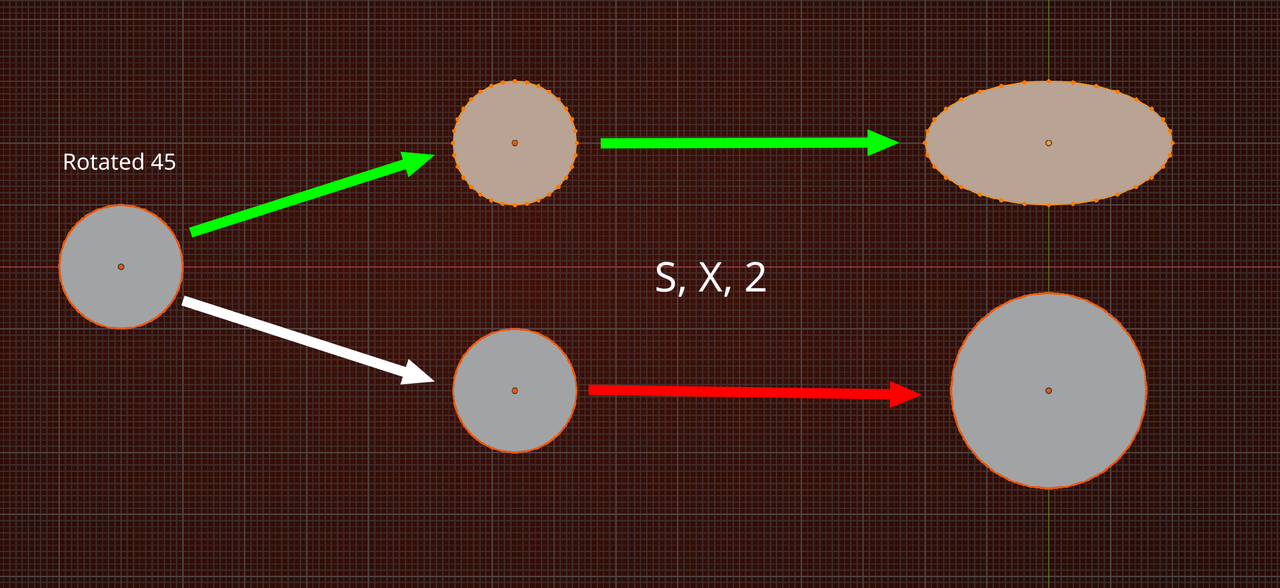
Above, I tried to explain why this happens (it's not a bug 😉).