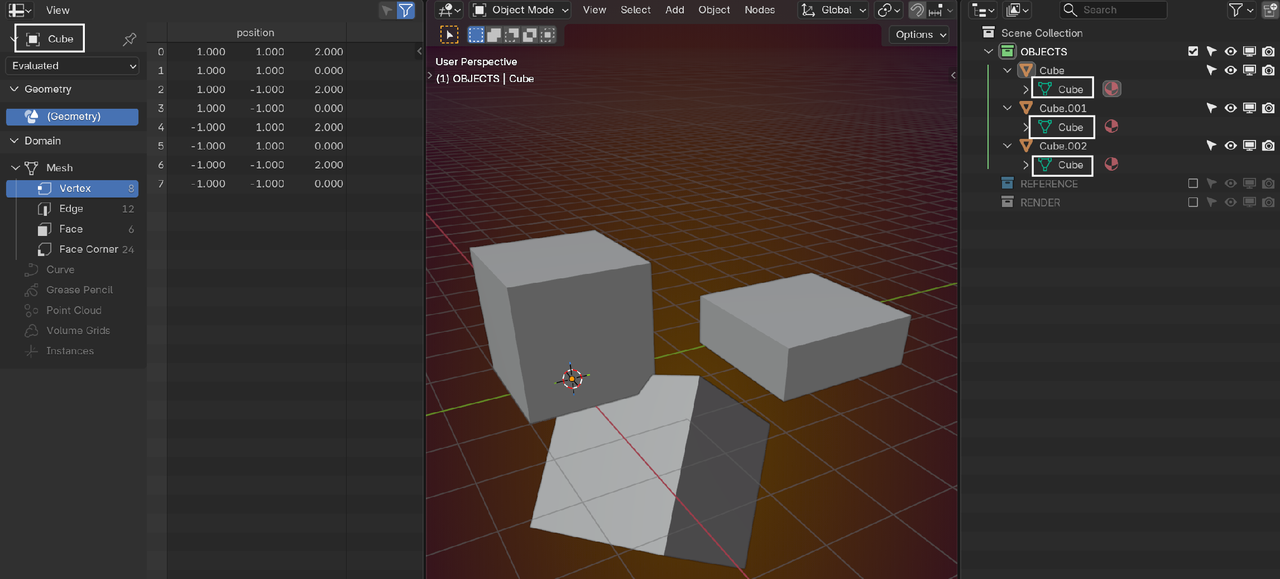
Each individual screw, if it is its own object, will have its own scale if you just scale them in object mode, but any changes you make in edit mode (including scale) will be automatically copied to any instanced version.
If you did change something in edit mode and it didn't change the other screws, then you have a copy of the object, and not an instanced copy. Instanced copies will have their own "object" level data, but will share mesh data with any other instances.

before applying scale

2.after making them sinlge user and appling scale rest of the screws arent changing in edit mood but ib tutorial they are !
And see.. this is why we're always suggesting to include images that show the problem :D Sometimes, It's just a simple thing like that where we might be missing a piece of information but illustrated out and explained with the pictures, we were instantly able to clue in to what was going on :D

And on that point can I recommend a piece of screen capture software I couldn't live without. Whether you have a Mac or PC this is a total game changer in terms of not only being able to capture all, or some of, your screen as a single image or screen recording but also crucially allows you to very quickly and easily annotate the screen with arrows and comments and highlights which you can then paste into this window without having to save it as a file
https://www.techsmith.com/download/snagit/