
I ran into an issue when lighting a scene in space. No volumetrics, no dirt, grime or dust on metallic ship surfaces.
Spot and Area lights illuminating a shiny, metallic surface fail to illuminate the surface if the POV is anywhere off-axis from the light source. The ROUGH image map is dark (=shiny) and the metallic setting is 1.0.
I've re-created a test scene and attached a screenshot to show what I see. The question annotated on the screenshot is my main question here: with the POV off-axis, why can't I see any specularity or spill light at all?
The problem is solved if I increase the roughness (brightness) of the ROUGH image map or decrease the metallic value of the shader to 0.8 or 0.9, but the model artist wanted shiny and I've been told that a surface is either fully metallic or fully non-metallic ( 1.0 or 0.0) Is this a case where Blender is showing me a theoretical result that doesn't really have a comparable situation in the real world?
Can you think of a real-world scenario where one might observe the same result?
Thank you for any insight into this.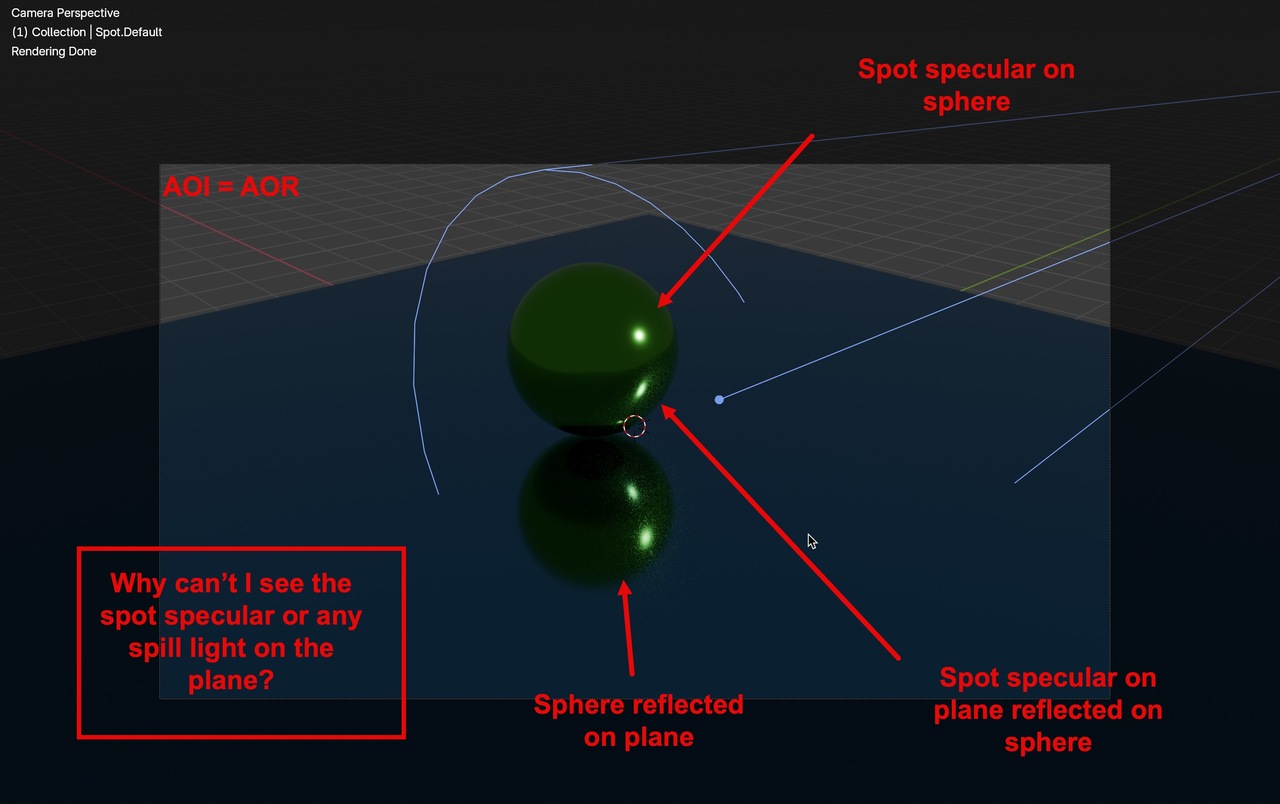

I am not sure if I follow... but:
If you have a perfect surface, 100% flat, no imperfections, completely shiny and metallic, it is basically a mirror, you will never see the spot if you don't align yourself and the mirror to that spot, so now if you were to rotate that plane so its normal points to the light source, you can get the spot. If you were to have a bump map, some of the bumps would eventually be normal to the spot, and you would get some tiny reflections here and there
Thank you for the reply!
So if I understand you correctly, the real world equivalent of what I've set up in the screenshot is a mirror. I didn't make that connection in my mind, mostly because I think of metal as, well, metal.
It makes sense then, that turning down the metallic setting and/or increasing the roughness of the surface or adding a bump map would make it less like a mirror and let it throw some reflections my way.
From an engineering and manufacturing perspective, yes. Of course. From an everyday use perspective, most people tend to think of a mirror as more glass than metal.
Also true. But this CG artist (more CG set designer, actually) needed to learn that all over again. So that's today's thing that I learned (or re-learned). 😀
My favorite question when building and lighting a scene: "Why did it do that?"

Hi Jeff, Have you built an infinity mirror in Blender? That is a pretty cool effect
I haven't tried to build an infinity mirror. It's a bit outside of the scope of what I'm generally trying to do. But it does sound interesting, and I'd have to have a think about the best way to get it set up. I like challenges.
It is just for fun and it is not that complicated. You just need to delete the sphere above and duplicate the plane, move it up alittle and put something in between. Align a camera to the plane, adjust its clipping start, delete the area lamp, add a hdri. Set appropiate values in the light paths, in cycles. Hint: You can check out CGCookie instructor Kenny Phases youtube channel, he has a nice example of this there.
