Hi everyone,
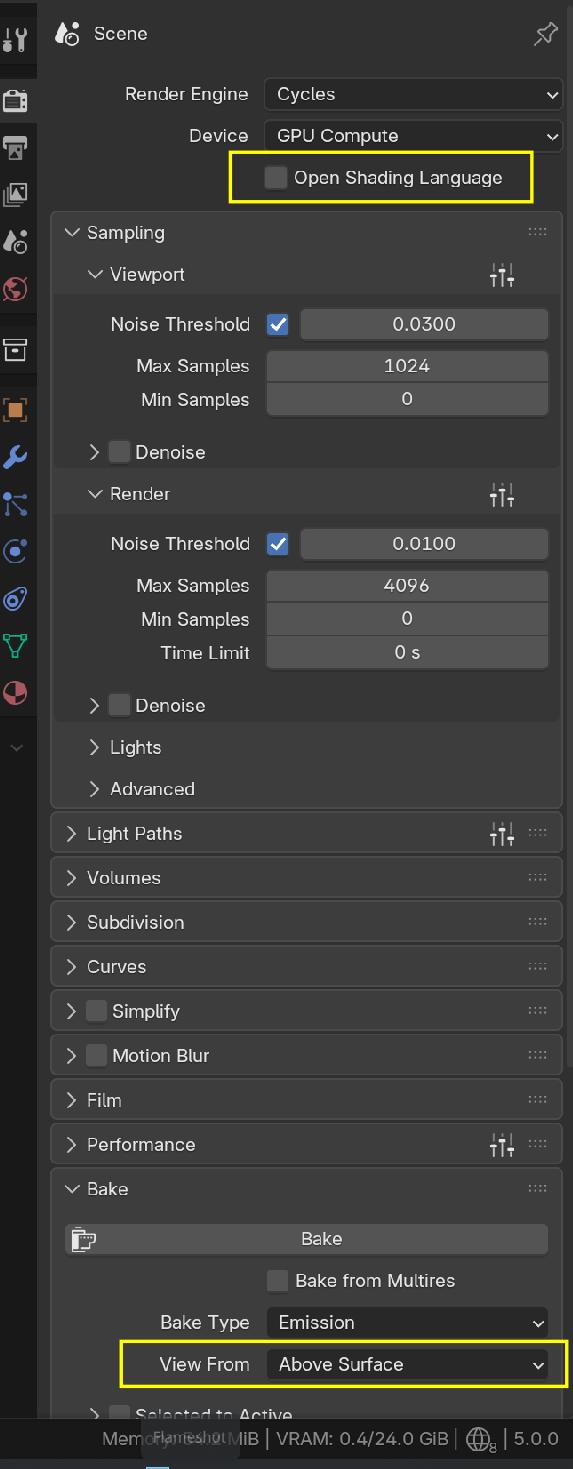
I’m following a CG course for creating a realistic human character. Everything was going fine, but I’m stuck at the emission baking step used for baking pore details onto the face.
The instructor’s settings and my settings are exactly the same, but whenever I click Bake, Blender runs for a while and then completely quits/crashes without showing any error message.
What I’m doing:
Baking Emission Map for face pores
Following the exact node setup from the course
Texture size: 4K
Margin: 10px
Cycles → GPU Compute
What I’ve tried:
Restarted Blender
Reduced bake resolution (same issue)
Disabled addons
Tried CPU bake and GPU bake
Tried a fresh .blend file and appended objects
Increased undo steps + memory settings
Issue:
Blender closes suddenly in the middle of the baking process with no crash report.
My System Specs (New PC):
Processor: Intel Core i9-14900KS
Motherboard: Gigabyte Z790 UD AC
GPU: Gigabyte RTX 5070 Windforce 12GB GDDR7
RAM: Corsair Vengeance 64GB (32×2) DDR5 5200MHz
Storage: NVMe SSD
OS: Windows 11
What I need help with:
Why is Blender crashing during emission bake?
Is it a GPU/VRAM memory spike issue?
Any recommended bake settings for high-detail pore maps?
How can I check proper crash logs?
Thanks in advance for any help!

Hi Aashish aaashishpatel ,
Have a look at this: https://docs.blender.org/manual/en/latest/troubleshooting/crash.html
Or a similar page for the Blender Version you are using.
If you want, you can upload your .blend file (Pack all Resources!) to Google drive, Dropbox, or so and post a link here, so we can test it on our hardware..
Please, also tell us what Blender Version you are using.

What I usually do is just render or bake on other different Blender versions. Chances are whatever rogue 0 or 1 that is causing the crash, isn't there in other Blender version. What I also do is import or copy paste all my stuff into a brand new .blend file and usually if it's a bug on my file, it wont be there on a brand new one.
https://drive.google.com/file/d/16JLY2mGqIvGi87kIodKSQ5uelFJJRdjI/view?usp=sharing
I have uploaded my Blender file here for reference.
That OSL option is only available when using OptiX. I am using CUDA, and I don't use any addon. And that above surface option only available when you have camera in your scene, so right now i do not have any camera so it is disable.
In my blender there is only one addon is there right now which is blender kit, and also i have updated drivers.
Ok so let me try on the another version of the blender, after that I will update here what happen.
Hi Aashish,
It is definitely something on your end, but I don't know where the problem lies exactly (although it sounds like it might have to do with your System Memory). There is nothing wrong with how you set it up, because it Bakes fine for me (I didn't change anything, just pressed Bake).
As far as I know, Blender only uses the CPU for Baking.
Have you found the Crash log (that Blender Manual page I linked to, tells you where it is/should be) yet?
You tried a different Blender version, but also try moving all your stuff to a new .blend file. That works for me like 90% of the time. Perhaps because whatever bug there is, it stays in the original .blend. Try it.
One thing I do is, I take stuff to the new one by parts and try rendering. If it all goes well, then I copy paste other stuff and render or bake again. If it all goes well I do it again, until everything is in the new file or at some point it all crashes. The cool thing is, now I know which part might be the one causing issues.
Hey Omar you are right, I just tried your suggestion and it works for me! Thank you.