
Hello, new here and fairly new to Blender.
Seem to be running into an issue when trying to Bevel the corners. I'm sure it's something super basic, but it's got me stumped for the last 45mins!
Link here for the screen recording: https://mab.to/t/VG4DkQPSHnE/eu1
Thanks

I've not done this course but is the issue that you are selecting vertices and your bevel is set to edges?
If it's not that then I'm not sure I understand the issue even watching the screen recording.

If you're new to Blender, even if fairly new, I suggest you start with The Blender Basics and Mesh Modeling Fundamentals before jumping into Press Start, which is a bit intermediate and more of a tech demo than a regular normal course. Linking up:
https://cgcookie.com/courses/blender-basics-an-introduction-to-blender-3d-4-5-lts

Hi Henry CChenhen01 ,
The issue is, that you have the classic issue of so-called 'double Vertices'.
Your corners look something like this, when looked at under a microscope:
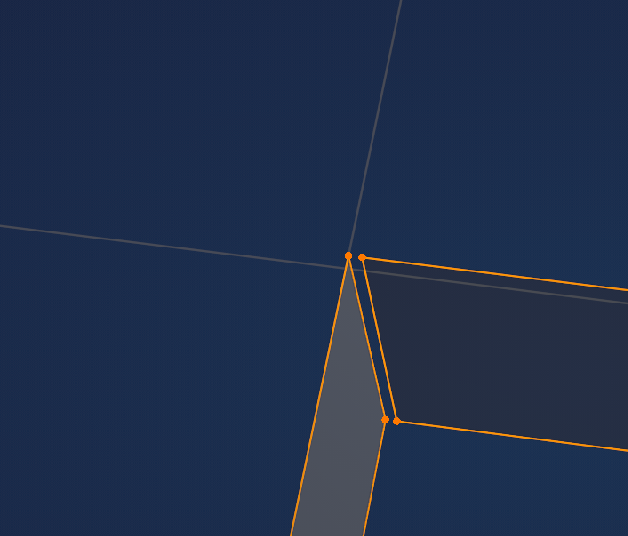
Select everything with A and then M > Merge > By Distance.
And yes, Omar is right; watch those Courses first.
Thanks everyone for chipping in. Yes, I've worked my way through the courses. Once I did the A-M-by-distance, we were cooking on gas!
Thanks for speedy help

Hi Henry! I'm glad mesh guru Martin found the solution for you :)
Yes, in many situations double vertices are the villains. In bad shadings it can be flipped normals. A third thing (maybe not that common) is to check for manifold mesh. You can do that in edge select mode and in the select menu select all by trait, and non manifold. If then your selection is not empty, it means you have a non manifold mesh. And that in most cases we don't want. So you then need to fix each parts of the selection until you get an empty selection when you click non manifold. I hope that made sense. Good luck!