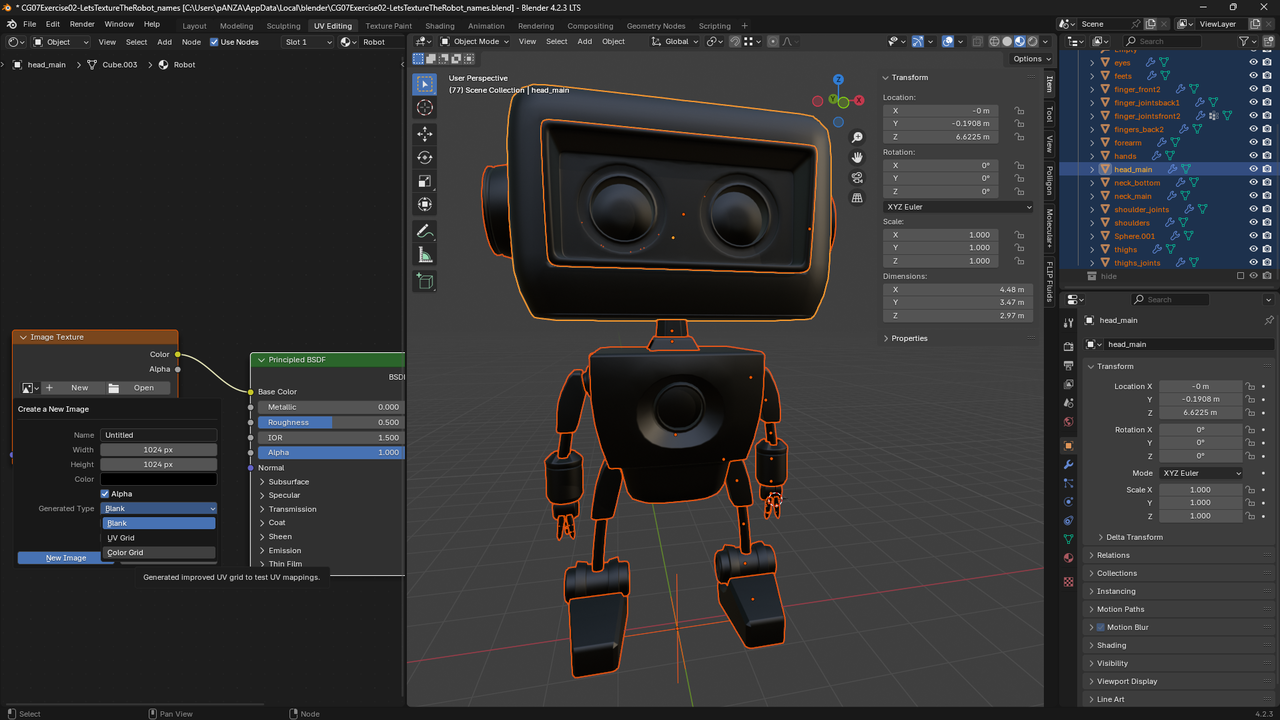
Hi, I'm looking through all the course files, but I can't find the UV map image. Can anyone tell me where to find it, please? Thanks!

Select the object, Tab into edit mode, press A to select all, goto UV Editor, click UV menu->Export UV Layout. Then choose a place and name for the image. If you don't see the option to Export UV Layout goto preferences(Ctrl+comma), click addons, in search type UV then turn on the UV Layout addon by checking it. It is enabled by default.
Hi Josh,
The UV map image is embedded in Blender.
When you connect the Image Texture node to the Base Color and click “New,” you need to change the Generated Type from Blank to Color Grid.
In the first video in Chapter 7 (at 2:11), it looks like Ewa’s Blender defaults to Color Grid—at least she doesn’t change anything. I also looked through the course files before checking Ewa’s settings more closely. I’m guessing this is simply because we’re using different Blender versions.
I’ve attached a picture and hope this helps.