
I modeled some pliers for practice. I thought I'd done ok as quite complex shape for me. Previewing in render mode gives a shading issue which I can't work out. Seems fine in solid and preview but not in render mode. I know the geometry must be faulty somewhere but I've picked it apart and can't seem to fix it. What's the likely cause? Where should I be looking? I do have a few shrinkwrap modifiers but turning those off doesn't correct it so I've discounted this as a cause
Solid shading
Render
Render. All mods OFF
Material Preview - faces hidden so you can see inside

I went nuclear. Deleted and rebuilt all those faces and that seems to have fixed it. Now spotted a new problem!

Hi Charles thehomme ,
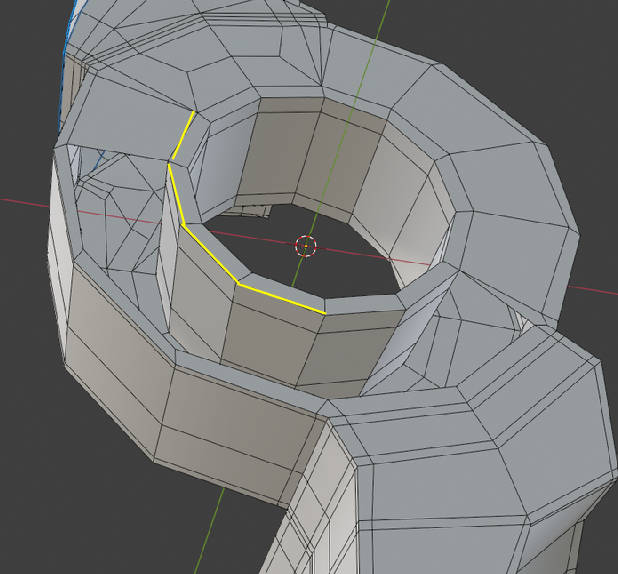
Omar is right, you have so-called interior Faces:
These Edges all around, are connected to 3 Faces:
OK. Not perfect but better. Just needed to scale down the verts on the Y. Imperfections introduced due to the way I built this. I started with the claws but then couldn't resolve the 2 circles pivot joint. So then I built that and joined the claws to the joint. It would have been better to build out the claws from the joint as I would then likely have had a better curvature fit of claws to the circle 

Ahh! So one of the things I did was delete these faces in red. So an edge can't have 3 faces without causing issues?
That's very kind of you to say, thanks. Definitely not easy as there is so little symmetry and both pieces have to fit together perfectly. I'm not sure I completely nailed it but can see I am slowly making progress and finding it possible to put all the pieces together.
