

Hi guys, hope you are doing well, I have been practicing for a while about lighting ,material and sculpting. Is there someway to get rid of lines of light while still using their light sources ?
I don't want their line of light get into the scene while I am sculpting ,it ruins the mood.


Quickest way is to select lights and press H to hide them. Press alt+H to unhide. You can also put them into a collection and click eye icon next to collection in outline to hide them.
Well,I know how to hide thing ,the problem is the light sources also gone as well. I still need light while working on sculpting but I am quite annoyed of their line of light.

Change Solid lighting to Flat instead of studio? Or just move the angle of the lights? Or use and HDRI to light the model without using lights?
Thanks guys, I probably have to tried using other lighting sources instead of real lighting.

Hi Panus zenogias ,
I am not sure what you mean by lines of light, but maybe it's this:
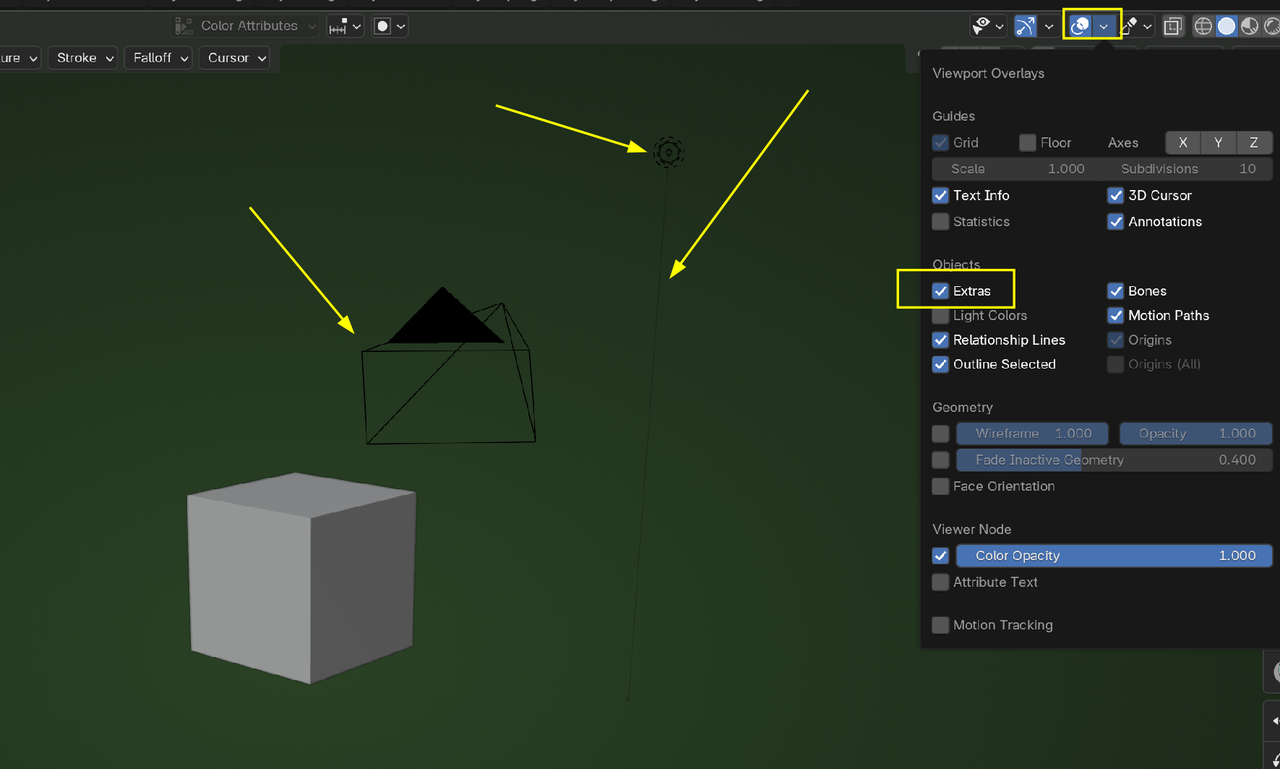
So, then you can simply disable the Extras in the Overlays.
