
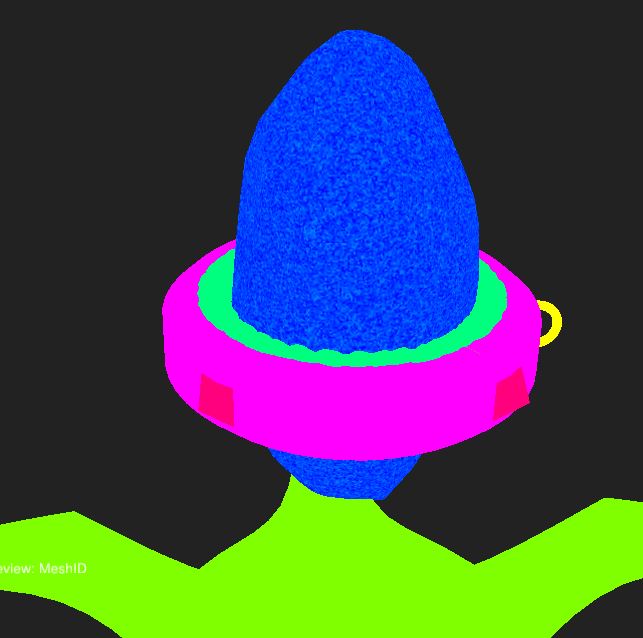
I'm having a problem with the gem. I can't mask it using ID Mash because it doesn't appear to be a single color, but a color with noise. Also, the material won't apply to the gem even without a mask. Do you know why? Maybe it's a topology issue or a Blender export issue?

Hey Diego! I'll admit, I haven't seen that one yet!
Would you be able to share a couple screenshots for me to get the ball rolling?
I'd like to take a look at:
- the UVs for the model
- bake settings in InstaMAT
- what it looks like with a material applied in InstaMAT and no mask
The fact that you cannot even apply a material to it without a mask has me suspicious that it either may not have the same material slot from Blender as the rest of the model, or there is something funky going on with this instance of InstaMAT. Perhaps even trying a new file and attempting this again may yield new results?

If you think about it, maybe it's the power of the gem that's interfering. It's a powerful magical device, so it only makes sense. Of course you can take Chunck's approach and check the "UV's" and the "settings", he's like a pro at this stuff, but I'm sticking to my version.

I have seen this before, although I can't remember the exact cause, I'm sure it's an issue from the baking process in Blender.
Take another look at baking the gem, check the high poly is selected with the low poly as the active object.
Also check the image texture was added to the low poly gem.
I'm confident it is a simple error, I've made lots of those.
Hi everyone! And thanks so much for the replies. I was about to go to sleep satisfied that I had created such a powerful gem that could interfere with the software, until sadly I found the solution. Chunck's material theory is correct, before exporting the wand from Blender, I mistakenly duplicated the applied material. In fact, while trying to solve it, I also tried importing the model into Substance Painter, which created two lists of Texture Sets for me, that's when I realized I had made a mistake in Blender :')
Thanks again everyone!


This exact thing happened to me with my hilt. I had played with materials in blender to see kind of a 'draft' of what the finished product would look like with materials not realizing it would create some ID confusion in instaMAT (hilt appeared all speckled when trying to mask via mesh id). Removing the materials in blender, re-exporting my FBX files, and re-baking in instaMAT completely resolved it. Next time I want to have some materials playground time I'll be creating a new collection and duplicating the model into that collection to keep it separate from the model that's intended for export.