

To answer your question, I'm trying to add a "Smooth by Angle" modifier to the main object, not the cutter object. This was advised by the instructor in the video. The exact moment I'm referring to is around the 17 min and 40 sec mark. Screenshot is attached. I did finish the tutorial, skipping the smoothing, so there's a bit more on my screen than the instructors at this point.
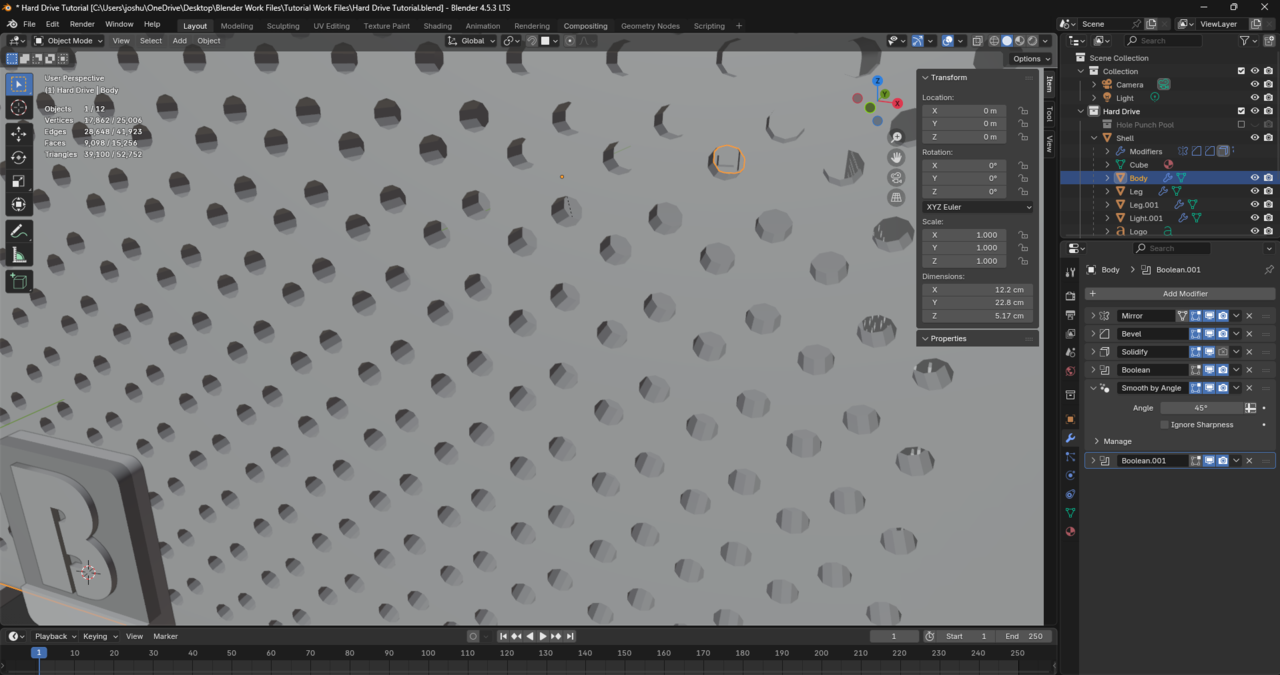
I totally understand what you're saying, but in the video the instructor explains why he did it this way and it worked for him. While I agree with your reasoning, I think there's something else I'm missing.
Hi Adrian,
Thanks for this info. The second Boolean at the bottom of my modifier stack is actually for the plug on the back (made with a cube, no smoothing needed). I'm only trying to smooth the first Boolean in the stack for the holes/mesh. Is there anything else you think I should try?
Thanks, Omar. It starts at the 17 minute and 40 second mark in this video. How do I upload the file here? I only see options for images, videos, and links.
Got it, thanks so much! Here's a LINK to the file on Google Drive. Please let me know if you have any trouble accessing it.
Thank you for all your efforts, Omar. I just tried adding a smooth by angle modifier to the boolean objects and set both smooth by angle modifiers (Base object and Boolean objects) to 70 degrees and nothing changed in the viewport. I don't know what I'm doing wrong.

