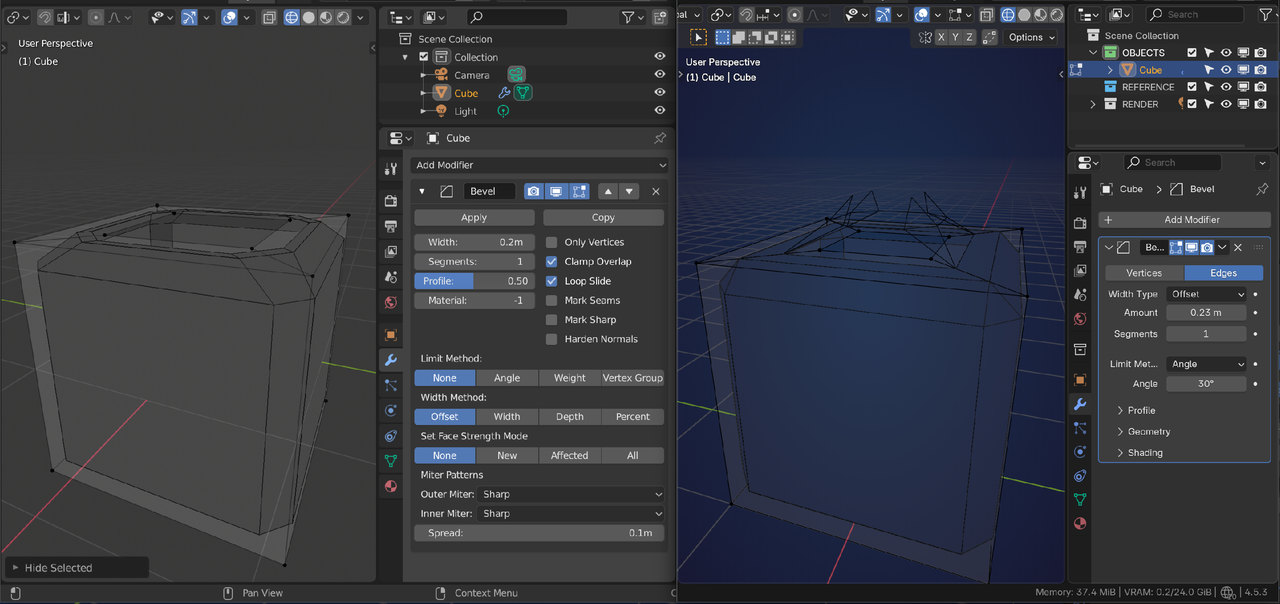
Unsure if this is a bug or if I clicked something accidentally. These edges go away when I toggle the visibility on the modifier itself. Only the edges of the shapes i added for the buttons stay visible. I bevelled some edges around the bite and they got hidden properly. Redoing this for practice and it didnt happen the first few times.

Hey Grace,
It's not a bug, and they are not edges, well not actual geometry edges.
They are the result of the bevel modifier which creates new edges, but they are not actual geometry unless the bevel modifier is applied.
If you disable the bevel modifier in edit mode they will disappear.
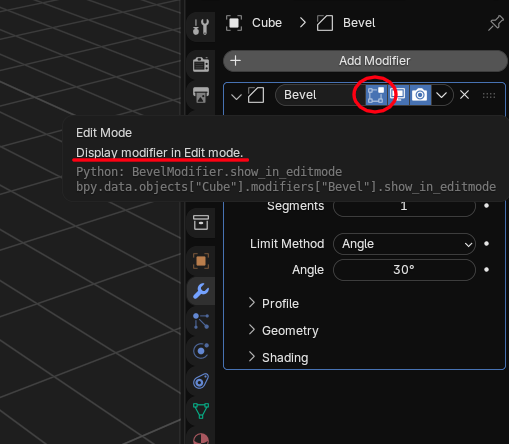
I'm having the same issue... is there a reason this would be happening when in the tutorial he never needs to disable "Display in Edit Mode"? I'm trying to better understand the program.

Hi Triston SSwizzlekeys ,
That is simply because the Course uses a different Version than you.
I can't remember exactly when this was changed (somewhere around 3.x, I think) (it's a feature, not a bug), but here's for instance a comparison of 2.80 vs 4.5: