Hi Chunck!
I’m studying baking. Your courses BAKE | Texture Baking with Blender, RELIC | Game Asset Creation Fundamentals in Blender, and TREAD: Hard Surface Asset Creation for Video Games are all excellent courses to learn just that. So Congrats, well done. And thank you. As we all know cgcookie also have these, included baking (not a complete list)
Kent
Fundamentals of Texturing in Blender 2.7
Combined, Ambient occlusion. (Multires, Displacement), (High res to low res, Normal)
Texturing Game Assets with Blender
(High res to low res, Normal, Ambient occlusion, Vertex colors)
Shading the Sci-Fi Helmet
Vertex colors, Textures, Ambient occlusion
HUMAN: Realistic Portrait Creation with Blender
(Multires, Displacement), Emit
JL
Fundamentals of Texturing in Blender
Combined, Diffuse, (Object to object, Diffuse, Roughness, Normal)
Normal Map Modeling for Games
(High res to low res, Normal)
Texturing Weapons in Blender and Substance Painter
Ambient occlusion
The Blender & Substance Texturing Workflow
Ambient occlusion, Emit
Ewa
Core Fundamentals of Texturing in Blender
Ambient occlusion, Diffuse, Roughness, Normal
And they are all excellent too.
For me it would be ideal if I would be able to bake to a resolution of 512x512 with a good result, but textures from Polyhaven are mostly 1K or above. So, I googled if it is possible to bake to lower resolution than that with a good result and AI answered it can to 512x512 with a descent result from a far.
So, my wish is. Could you make a few lessons about how to bake out textures from one object, with a procedural material and all kinds of modifiers (selected to active, unchecked) with a resolution of 512x512 and teach me/us how to do that the best way? For instance a wooden wall/floor, thank you

Hey Tom, thank you for the high praise! ❤ I'm glad you've enjoyed my courses, and I hope you've had a similar experience with all of those courses from the other CGC instructors as well, I know they've put a ton of effort into them.
Truthfully, I am not sure if I will be able to create lessons that efficiently tackle what you are after, as that topic is a lot more grandiose than time allows me, as well it requires a lot of context and is heavily dependent on what models you are trying to bake textures from. There isn't really one way to consistently create any high-quality textures as it relies on good UV unwraps, proper model topology and all of the texture baking techniques that we've explored here in this course. As well, baking different types of assets requires different strategies (unique props vs. tiling textures vs. foliage cards, etc).
However, I would love to help steer you into the right direction once I know more about what it is you are looking to do!
Based on your question, it appears to me that you have modeled a wooden floor or wall. Do you intend to make this a tiling texture that you can apply to other models in an environment? Or are you intending to create a low-poly version of these floors/walls and bake textures to those as unique props? This will really help determine the approach you would want to take!
Tiling Texture Example

Unique Prop Example

Hello Chunck, thank you for your reply. Well, the main thing I'm wondering is if it is possible to bake to a resolution of 512x512 without getting pixelation (I assume avoiding that completly is impossible) and other issues that lower the quality. And also if possible doing this with a good result without baking from high res to low res. The wooden wall/floor was just an example. I understand the importance of the strategies you mention above. But will they work for a resolution of 512x512? A concreate example if I wanted to bake those materials in the CRAFTSMAN: Precision Modeling with Blender for Real World Application course by Sascha into textures with a resolution of 512x512, is that possible with a good result?
Ah gotcha!
Well, "good" ultimately will be up to your discretion! It is really contextual to what it is you are baking. The general idea stands that the lower the resolution of the image, the more likely you are to notice the pixelation. Parts of your texture that have high contrast in value or hue will make the pixelation far more noticeable than areas with less contrast overall. If your image has a lot of circles or rounded shapes, you will notice aliasing on those curves as there may not be enough resolution in the image to make that transition invisible to our eye.
However, if you're not looking at the texture too closely, than a certain amount of pixelation may be acceptable. You will need to test by baking out your texture and viewing it in the intended environment.
Unfortunately there is no real guarantee that the image size you are trying bake at will be the right one for the job, it may require some back and forth. Even a 64 pixel image can look crisp if viewed at the appropriate size, so it all really depends!
Something you may want to consider looking into is the concept of Texel Density, if you aren't already familiar. This may help guide you towards an answer that you are satisfied with, and provide you with some ideas of texture size based on how big you intend the texture to be viewed at in an environment.
https://www.beyondextent.com/deep-dives/deepdive-texeldensity
Hey again!
So, I understand, there is no easy yes or no, it all depends on so many things.
Yup, I'm familiar with texel density, were a texel or texture pixel is a pixel living in the texture map. Totalt amount of a UV's texture pixels divided by the corresponding mesh face's area gives the texel density there . But I'm using the super useful extension texel density checker. But I assume I haven't fully understood the power of texel density yet, just the basics. So, thank you for that link. I will look into it.
To refer back to what you said about the wall/floor. You asked me if I intended to create a low-poly version. Is there any benefits baking from a high/mid to a low-poly version in that case?
I don't know what unique props are. Aha, from google. In baking textures for 3D graphics, a "unique prop" is a distinct, non-repeating 3D model asset that is textured with its own specific set of maps rather than relying on tiling textures shared with other, similar objects

On the Wall/Floor, the fewer faces a mesh has the more space each face can take on the UV map. This means you have a higher pixel to face ratio. Thus, less pixelation.
Alright, apologies. I believe I was misunderstanding your initial question.
So what you are looking to do:
- You have a floor model with a procedural texture on it
- You want to bake that procedural texture into a texture image, so that you can use that texture outside of Blender with that model
Am I correct here?
If you have a visual example of what you are looking to do, that would help me tremendously!
No worries. Yep you are correct
The reason I want to go lower than 1K when baking is that I'm creating products for an application other than Blender. And 2MB is the maximum size of a product file and 1K for textures. But if I choose 1K I'll reach that limit fast. So, therefor 512x512 or even lower.
Yeah, I have tried to bake a wooden floor before (512x512), but with bad result. I could of course paint a wooden texture either in Blender or Photoshop and then create a normal map for it in photoshop. But it would have been nice to have the knowledge in making a procedural wooden material in blender and then bake out texture maps in smaller sizes below 1K, with a good result. So, if you could steer me in the right direction how to do that it would be much appreciated.
Uhm, I will check if I have that wooden textures somewhere, otherwise I have to create a new, but that might take a couple of days
My last question to you is where do you make your textures tileable (seamless), Blender, InstaMat, Photoshop, or somewhere else?
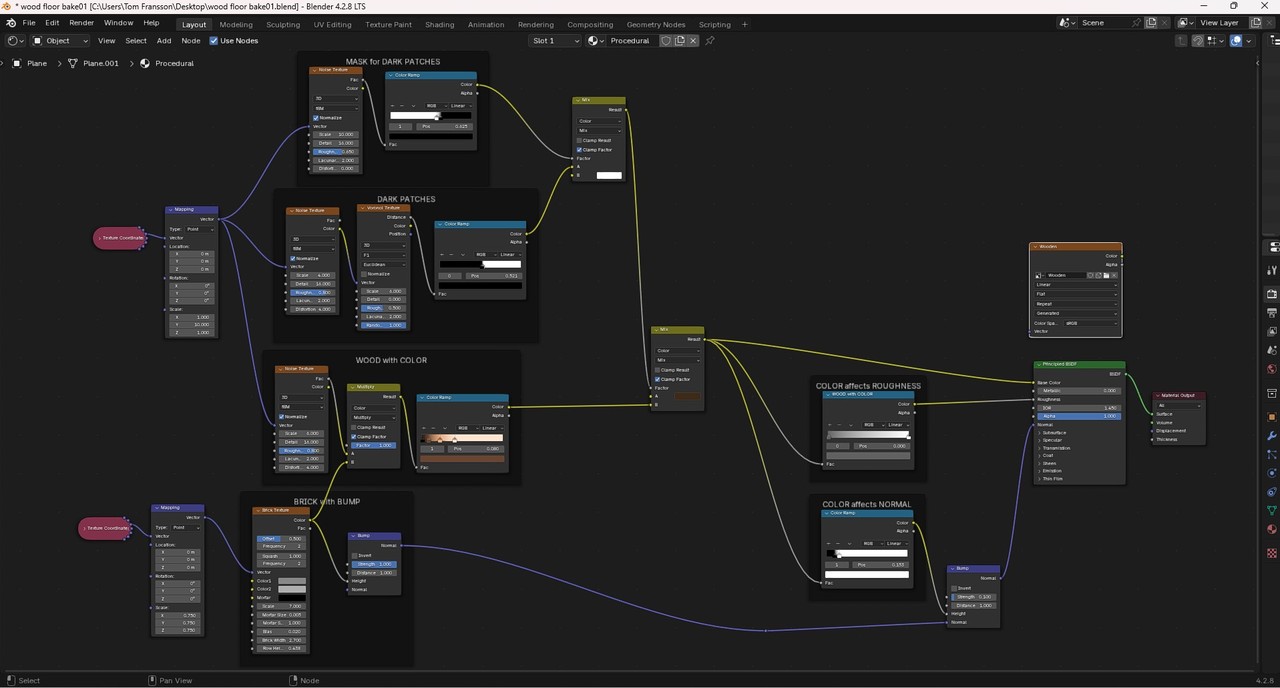
Okay, here is my wooden material
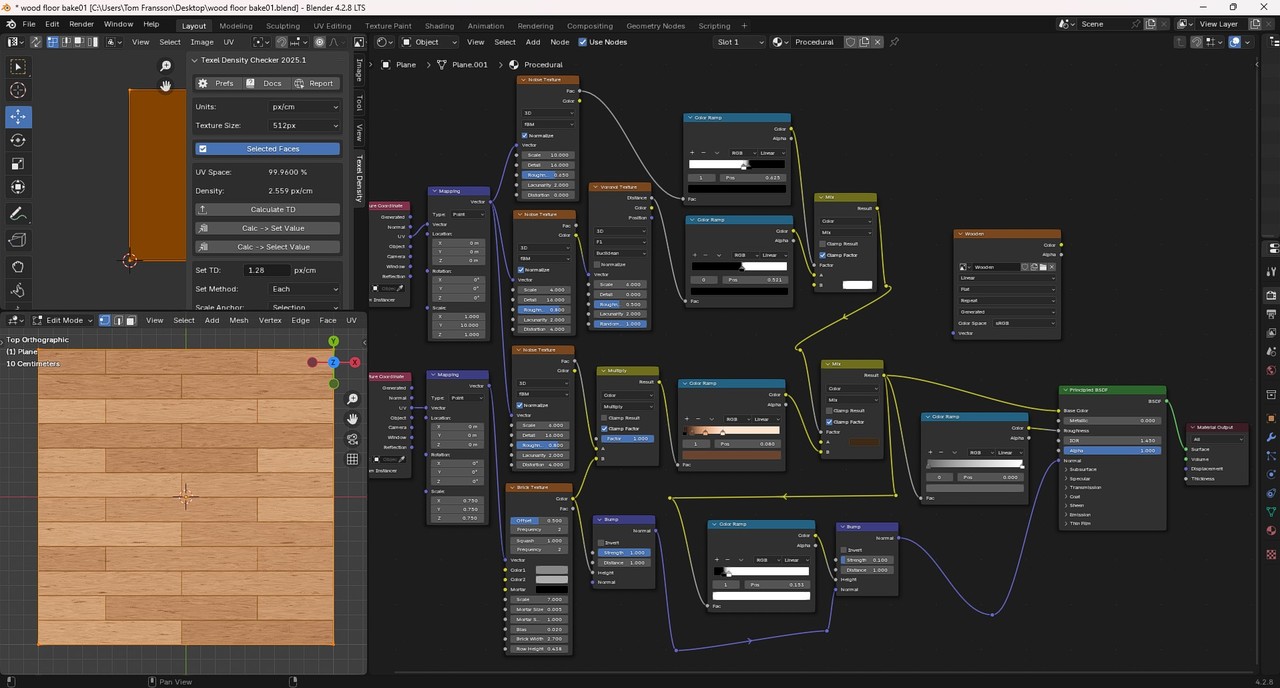
And here is some of the render settings
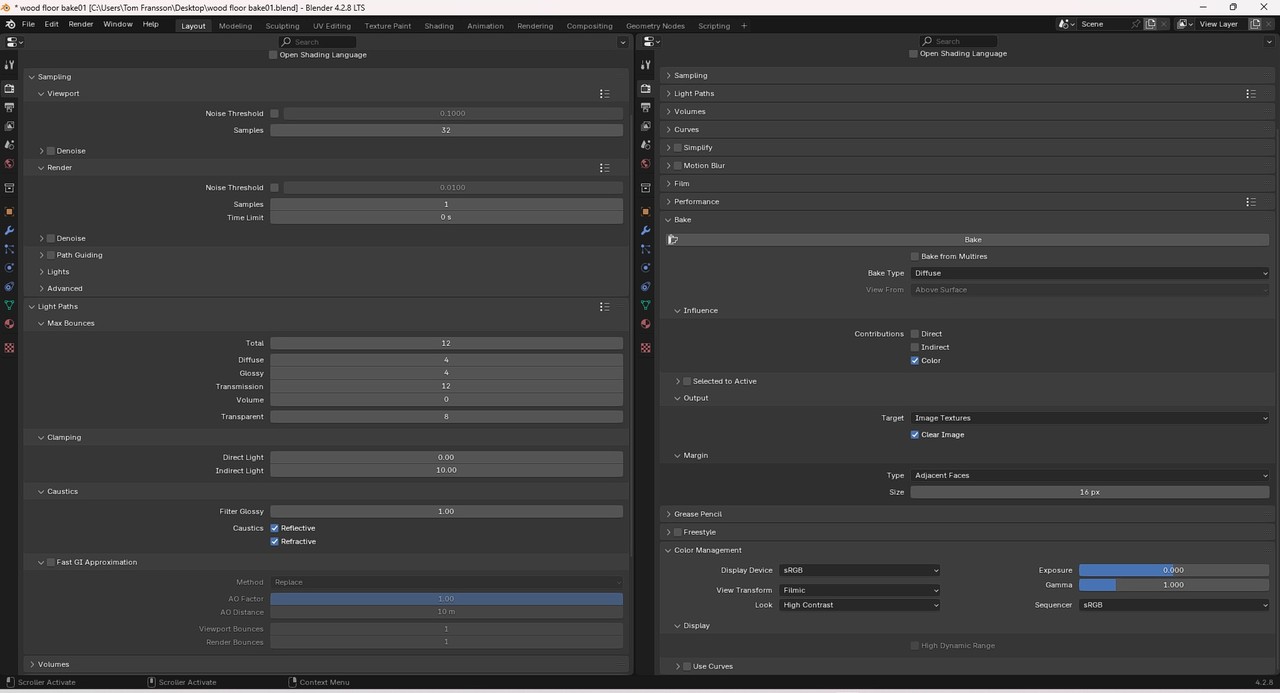
And here is a link to a previous post I made about this, but that was for 1K
Hi Dwayne!
Yup your correct, low texel density can cause pixelation.
But I’m not sure that, that about fewer faces is necessarily true.
Because if we have a quadratic plane with the side of 1 m and if we have the texure 512x512. If the plane has just one face, then it can take up the whole texture space. This gives us the texel density of 5,12 pixel/cm. If we then subdivide the plane one time and lay out the UVs uniformly, so each of them takes up one fourth of the texture space. The texel density still will be 5,12 pixel/cm across the whole plane.
Across the hole plane is still the same, but per face you now have gone from 512X512 pixels per face to 128x128 pixels per face. This really only matters if you are trying to do detail texture map(aka Unique Prop). In your floor example you want a tiling texture also known as seamless textures. In which case, the pixel per face doesn't mater as much. I'd also like to suggest trying a file size reducer program or website. For Windows user TinyPNG is a great one. For color(diffuse/albedo) you can set quality as low as 25. For the others I wouldn't go below 50, but would recommend using at 70 to 80. For normal maps I wouldn't go below 80, and would recommend 85 to 90. Of course you will want to test as each project will be different. Even at 98 a blender rendered PNG can be reduced by 30 to 50%.
One fourth of the texture space is 256x256 and one fourth of the area is 50cmx50cm. So that gives the texel density of 256/50 for each face of the plane, that is 5,12 pixel/cm across the whole plane. Correct me if I'm wrong
Thank you for the tip of TinyPNG. I'll look into it
When you said pixel to face ratio. Did you mean texture pixels or screen pixels?. I assumed you meant texel density. I apologize if I misunderstood you
Excellent, thank you for the clarification and image!
So here is a couple things you could consider when trying to improve the texture quality:
If the ultimate issue is simply file size, and not texture resolution, then I would say you should consider baking at a higher resolution. This way you will be able to bake more details with more pixels, and then try your luck at compressing the image and reducing the overall file size with tools like TinyPNG or even Photoshop. The issue with 512 is that you are limited to the amount of pixels, naturally. So there isn't much you can do in terms of "improving" the bake quality, since whatever detail you add to the textures will ultimately get crushed by the final resolution you are baking to. You will find most times though, that baking to a higher initial resolution and then down-sampling that texture will still retain better detail than a texture that was baked at 512 originally. I seldom will bake to the intended texture size, instead I will bake at much higher (4096 even), and then down-sample the texture to the size I need it to be!
To make the image seamless, ideally this would be done at the source, however you could use any of those software you've mentioned to get the job done. It's really a matter of what you are most comfortable with. I am usually making my textures from scratch in InstaMAT/Substance Designer, so by default they already tile seamlessly. However, there should be some tools to help you tile an existing texture, you may just need to look up what to use for your specific use case!
Great!
Okay, I'll ask no more questions. I'll give your suggestions a try and see what I can come up with. If it turns out I have no idea what I'm doing, I'll tap you on the shoulder for further guidance :)
Thank you Dwayne and
Chunck for your help
I wish you all the best