
I'm following along well, but when I press F to fill, there are parts that are different colors. When I go into object mode, the colors are different or something. Why is this happening?

Hi Choi aayaf ,
Is it possible that you are in X-ray Mode?
Maybe you have inconsistend Normals, that would show in X-Ray and is not uncommon whenm you have filled Faces. In Edit Mode, Select everything with A and then SHIFT+N to recalculate Normals.
Could be something else, hard to tell without a screenshot.
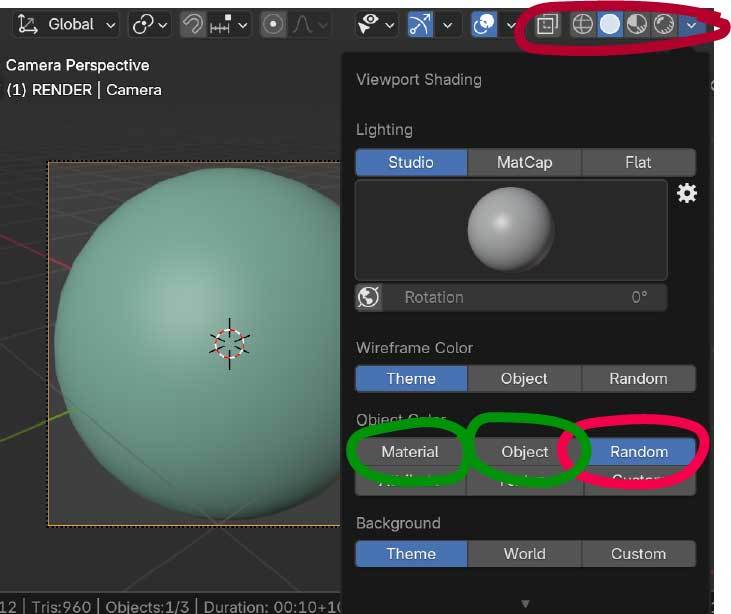
Martin should be right. But just in case it's not flipped normal's, and you're in "Solid" shading mode, you may have "Random" turned on under your Viewport Shading or you may be in a different MatCap or Lighting scenario. Try selecting "Object" or "Material" under Object Color or changing your MatCap. Hope this helps and as Martin said, it's hard to know what you're looking at when you didn't include a screenshot. If you're still having difficulties, paste a screenshot of what you are seeing and one of us can help. Good Luck and keep going‼️
Thank you so much! I just checked and it seems like it was because the heights were different ^^

The viewport has subtle feedback to let you know if surfaces are wonky or normals are flipped. As you say, that looks like if those faces are higher or lower creating a shading split there. So a little S to scale, Z to lock the axis and 0 to scale it all to zero should solve it.
