
So, for anyone who is having a hard time understanding this concept, I was at the same place yesterday. Today I restarted watching it, but before that I went to ChatGPT. It gave me a simple explanation:
Imagine a suitcase (Object) with clothes inside (Data)
Object = the suitcase
Has a baggage tag (name)
Has a position on the airport floor (location)
Can be rotated or scaled
You can move the suitcase around without changing what’s inside
Data = the clothes inside
The actual mesh/geometry, UVs, vertex groups, etc.
If you open the suitcase and change the clothes, you’re editing the data
Linked duplicates (Alt+D)
Imagine making a second suitcase with the same clothes inside.
Move either suitcase anywhere — they move separately.
But if you open one and change the clothes, both now have the new clothes.
(That’s because they share the same data block.)
Real duplicates (Shift+D)
Imagine making a new suitcase with its own copy of the clothes.
Move them independently, and editing the clothes in one won’t affect the other
Then I rewatched the video and ... crystal clear! Thank you!


A simple explanation, but also rather inaccurate...
If this works for you, that's fine, but maybe don't 'teach' this to others.
You might think it's crystal clear to you now, but it's obviously not. That is totally fine, at some point you will understand it.
Let me try and give a brief explanation here:
Each Object has an orthogonal Coordinate System. The center of that Coordinate system (where all 3 Axes meet) is called the Object's Origin, just like the 3D World has its Origin at (0, 0, 0).
The Mesh Data is a list of the Vertices and their Positions (and other Attributes, but that's not important now) (and how they are connected by Edges and Faces).
If you Move an Object (in Object Mode), you Move the Coordinate System, the Vertices don't change their Position in the Object's Coordinate System.
Same for Rotating and Scaling.
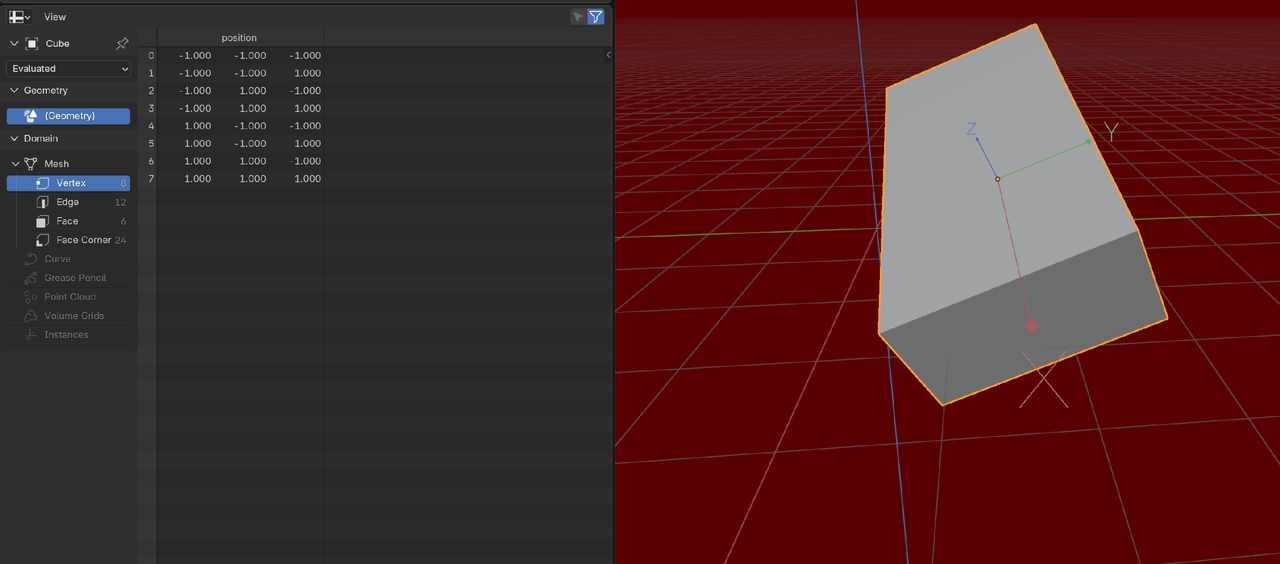
When you are in Edit Mode, you change the Positions of the Vertices, so the list gets updated.
A Linked Duplicate, uses the same list as the Original Object, but in its own Coordinate System.
A 'normal' Duplicate uses a copy of that list, so it can be Edited without changing the original Object's list.

Correct me if I'm wrong but from my understanding, an Object has two systems, one being called the Object Coordinate System which is independent to the object and the other being the Position of Vertices which remembers the position of all vertices in all 3 axes.
When a Linked Duplicate is formed, if the positions of any vertices is moved (done in Edit Mode), then the changes apply to the Original Object as they share the same datablock. However, if the position / scale / orientation of any of the two objects is changed, it does not affect the other block as it used the Object Coordinate System.
I have a question regarding this. When an object is changed using the Object Coordination System, the vertices of the object do move in 3-D space. However, it doesn't affect the linked object. In what relation does the linked object get affected. Is it only when changes are made in Edit Mode or is it related to the Object Origin.
When you have two linked objects, changes are propagated only what you do in edit mode, so inside the briefcase. At the object mode level it doesn't really matter when they are linked. Each object at the object mode level has its own personal coordinate system which the other object doesn't share.
So in the sense of the briefcase analogy, you have two briefcases and they both magically have the same set of closes inside them. Say there's a red pant inside one and the same red pant inside the other. If I rip a piece out of the red pant in one briefcase, the other red pant will be ripped as well. But each briefcase can be placed and moved in the room wherever and it doesn't affect the clothes inside. I can take one brief case and put it in the table and the other in the bed. They both have the same stuff inside but in the outside they can do and be wherever.
