
Tried many things finding the root cause of the following and got stuck. I disabled clamping, merged by distance, recalculate outside,.. If I apply to my mesh, i see the following 
But then by changing my vertex slightly (the highlighted one), it suddenly is solved, and I have no clue 

Hi mmbo666 ,
Looks like you have too many Vertiices, too close together, which you already seemed to have figured out.
Here's what happened:
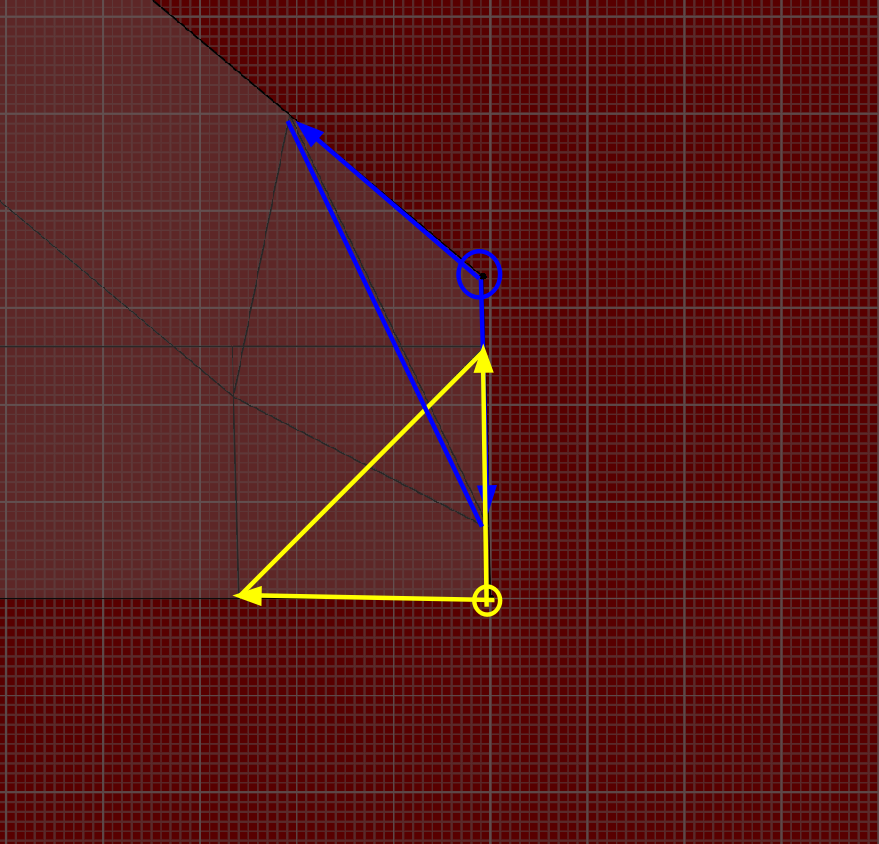
Clamp Overlap would have prevented that, but would then also have caused other problems (all Bevels getting 'stuck' at a low Amount).
Hi Thanks a lot Martin
To confirm my understanding: It would have been better if my bevel (for the teeth cut-outs), would have had one or 2 vertexes less, as then they would have been spaced out more?
In other words, the problem is regardless the scale (apply scale was done). I would have had the same issue if I would have made a console much bigger? (instead of e.g dimension of 10 cm, made one of 10 meter big)
For my own learning, I will restart and do the tutorial, and first start with teeth mark and related bevels before doing anything else... So to play around, confirm and learn!
Regards
"To confirm my understanding: It would have been better if my bevel (for the teeth cut-outs), would have had one or 2 vertexes less, as then they would have been spaced out more?"
Yes, that is exactly right!
Also, restarting is a really good idea; the second time it will go faster and the result will be better and you will have a better understanding of what you do and why.
Got now more intuitive feeling, not yet able to full explain to someone else. But at least what I learned is that in the case of doing this small segment (that messed it up before), that *sometimes* it might better not to model the small edge, but can use a bevel modifier as well (with limit mode set to weight). Will take more experience to fully grasp it, but at least one step ahead. Thnx for your support
