
I'm working on my own office scene project, and although I've gotten off to a good start with a table for an amateur, there's just something about the render that screams CGI. I turned all the light path bounces up from 12 to 32, and this is the level of realism I'm trying to emulate: https://superhivemarket.com/products/office-luxury-interior
As soon as I look at my render, I can tell that it's not real, but I'm not sure why. I'm using a wood texture inspired by Ryan King Art's materials, and I'm using RAW for color management. What's going wrong? I'm using 4096 samples for the Cycles render engine.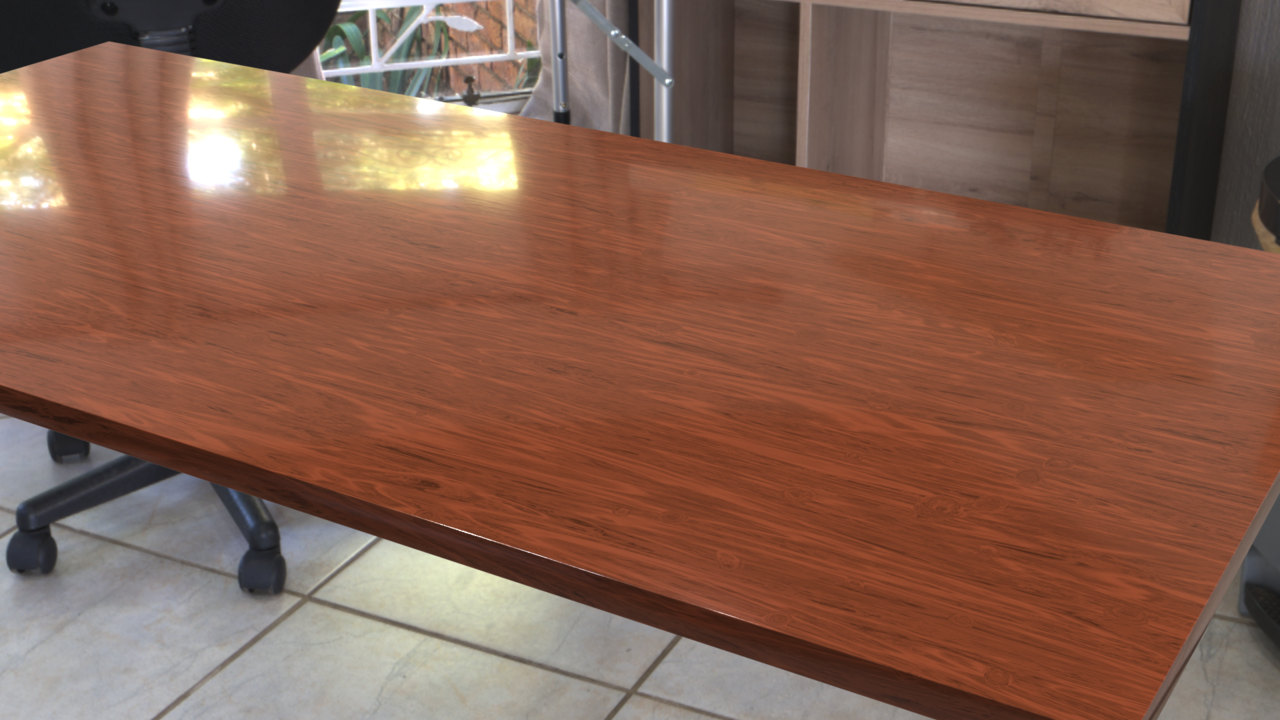
I really wish I could attach .blend files because that would make feedback a lot easier, but CG Cookie doesn't allow that.
Maybe I just need a more complete scene, instead of just an HDRI I have actual walls and some windows and misc objects.

Imperfections is what you're missing. Like finger prints, scratches, dust, etc. Even brand new just polished tables have imperfections. Also, you are correct it would help to have more thing other than just the HDRI or align the it to match better. Also it's lighting is to bright compared to the HDRI. It would help to make the roughness a little higher. It's to glossy. Unless you're going for the it's brand new and was just finished polishing it look.

There's two things here. First it's context. That's just a rectangular piece of wood, it's not telling anything, there's nothing around it, there's nothing on it, the camera is pointing unnaturally to it, it's gong to scream CGI in that context. The scene you linked to has a lot of stuff in it and the layout is as a room like that would look like and the position where the camera is, it's like you would shot a photo from.
Second is self-perception. Nothing you do will ever feel good, because you're the one that made it. You know where all the errors are, you have hyper focused on it, you have seen it come about little by little, it'll never surprise you, you'll never see it with totally fresh eyes. That is why people ask for feedback to other people on their work, because you yourself are blinded and biased by it already, since you've seen it so much.

First, the link you shared isn't perfect either. I see some faults in that also. The shadow from the statue on the right by the wall stands out.
It is much stronger than any other shadow in the room and given the majority of the light sources are diffused light it draws attention. I see a spot light above the statue, however not only is the shadow direction incorrect from this light, it would likely eliminate or lessen the shadow from the other light sources.
Biggest give away for me in your image, the reflection on the table top is much sharper than any of the surrounding furniture in the HDRI, immediately making it look out of place.
Additionally the lack of shadow on the floor in the HDRI is a big one.
If you look at the chair legs in the HDRI, there is obviously light from other directions other than just the window. There should be shadow under the table, not only from the window, but other light sources or bounce light. In fact it suggests the light from the opposite side of the room from the window is the stronger light source.
As for the table itself, in addition to what is already mentioned, there are no legs. At least one leg would be visible in this image in the far left corner, and again there would be shadows from the table legs.
What can be seen is the table top, however IMO the edges are way to sharp. The edge mostly facing the camera may just be acceptable as you have the reflection on the edge, another indication of a light source. However the end of the table looks too sharp and unnatural.
Given all the comments, you can now see Omar's point. As the creator, and very common with beginners, many factors do inevitably get overlooked.
To give a totally honest critique, I see a lack of effort in this image. Photorealism requires much more knowledge than simple modeling and textures. Adding a model to an HDRI background will always result in a CGI look. In realism an HDRI should be used for lighting, not for a backdrop, except in circumstances where the HDRI is an exterior image and may be visible through a window or door. The HDRI shouldn't be the sole light source either, you will always need to add lights to promote the effect of bounce light.
All those details mentioned in all the comments have a massive impact, even if subtle details.
Camera angle and lighting are big ones, subtle details such as fingerprints or smudges and not only dust on the table but atmospheric dust and particles are noticeable with more experience.
Unfortunately critiques alone will not fix the issue, knowledge and practice is vital in the world of 3D realism.
The recent CORE | Fundamentals of Lighting is excellent, however I would also recommend the earlier version of the Fundamentals of Digital Lighting to get a step closer to better lighting. You can never watch too many courses on the same subject, learning Blender and 3D doesn't end, there is always more to learn.
