
Applying the array only applies to the active object not all selected speakers. It also wont let me fill in between the individual speakers.

Hello. Can you clarify what you mean? Gives us a little more context. Also some screenshots will be very helpful so we can see where the issue might be.
If you have an array modifier on a speaker, and that speaker is just the one original part, when you apply the modifier, all the other instances become their own original real mesh, so to speak. So I'm not sure what you mean by all other speakers. And if it wont let you fill, there must be geometry issues, but it could be anything, so more context and screenshots will help.
It wont let me fill in between each of the speaker faces. In the screenshot I applied the array modifier but it only applied to the selected object. 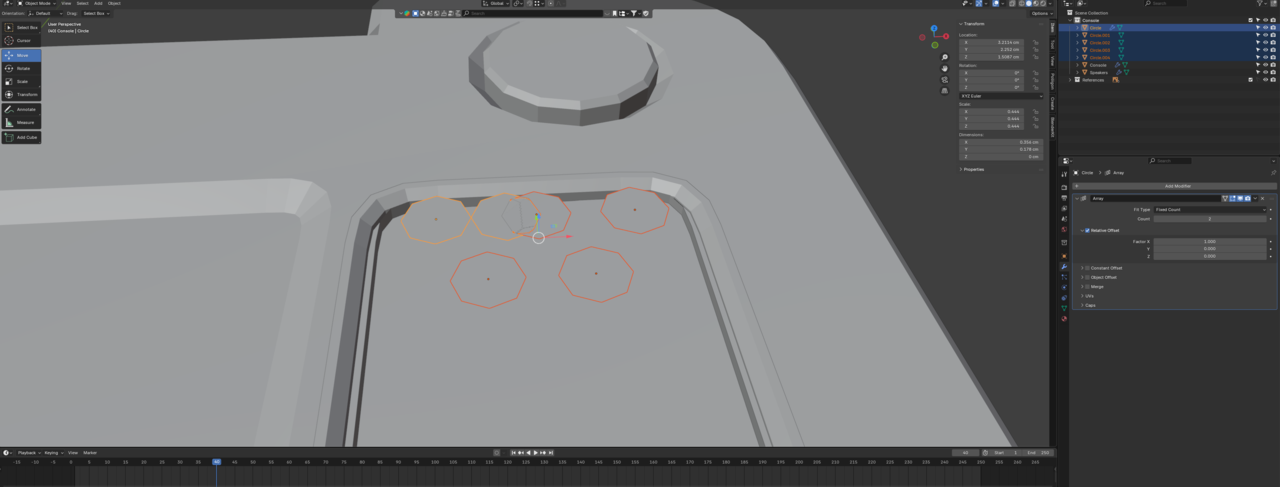

Hi Jeremiah JJerryDoes3D , a timestamp would have been nice, so we don't have to search the entire video.
But, if you mean Applying the Modifiers for all Selected Objects, you can hold ALT while clicking Apply (in the dropdown of the Modifier). If the ALT Key doesn't work, you may have Emulate 3 Button Mouse enabled, or your OS or another piuece of software is overriding the ALT Key. In this case, you can also go to Object > Convert > Mesh. This will Apply all Modifiers on all Selected Objects.
If, however you mean you Added the Modifier, then you could use CTRL+L > Copy Modifiers, will will Add the Modifiers of the Active Object to all Selected Objects. (Deleting any other Modifiers that might have been on the other Selected Objects).
In this case, however, it is better to use CTRL+J to Join the Selected Objects into 1 Object (the Active one) and that will automatically get the Array Modifier to all circles (because they are now 1 Object). You will have to Join them into 1 Object anyway, because you cannot connect two Meshes (Fiiling in between the Circles), that belong to separate Objects.
You probably got into this situation in the first place, because you Added the 2nd, 3rd,...Circles in Object Mode. (Rookie mistake, but a good one to make, because this is how you learn!)
Thank you I appreciate the help, I was unaware I needed to be in edit mode, and my apologies for the lack of description. I don't usually post on forums.