
In my understanding the metallic BSDF is gives more freedom and flexibility (via its options) over the Glossy Anisotropic option. For quick and mostly regular jobs a glossy anisotropic is fine. Is my interpretation right?

Glossy is different from a Metallic Shader, but again, the difference is not overwhelming.
Here, from left to right, 'real' metal (with complex IOR, available since Blender 4.3), Glossy and 'normal' Metallic Shader. I made as close in color as I could:
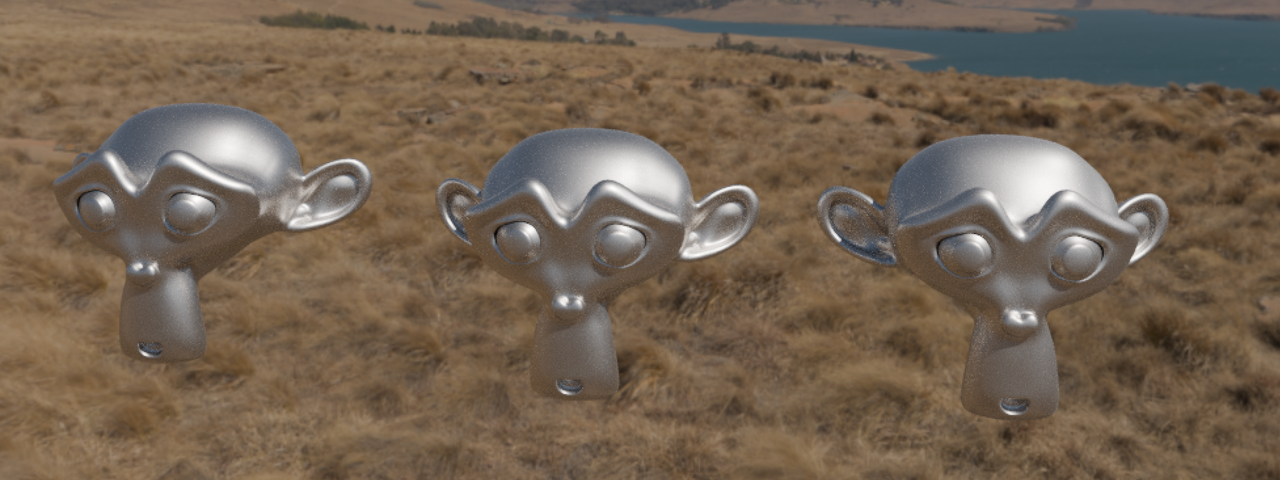
You can probably get away with using a Glossy BSDF for Metals, as you say.

The reason I compared the two was based on this answer from this current video "The Anisotropic Shader", it leads to the conclusion that "anisotropic" is now merged with "glossy". Thank you though, for your clarification. I guess it depends on more practices that I put in and use cases that I work on, the answer will get more clearer.

This always brings up the topic to me of just faking everything. We try to get to a point where we respect the laws of physics, but time and time again I've just heard people say, it's all about artistic freedom, if it looks good enough and gets the point across, you can just fake it. Use a cement texture for a scratches surface, glossy for metallic, metallic for glossy, etc, etc. So all that to say, best practices is to follow things as they should be, but never forget about artist license.