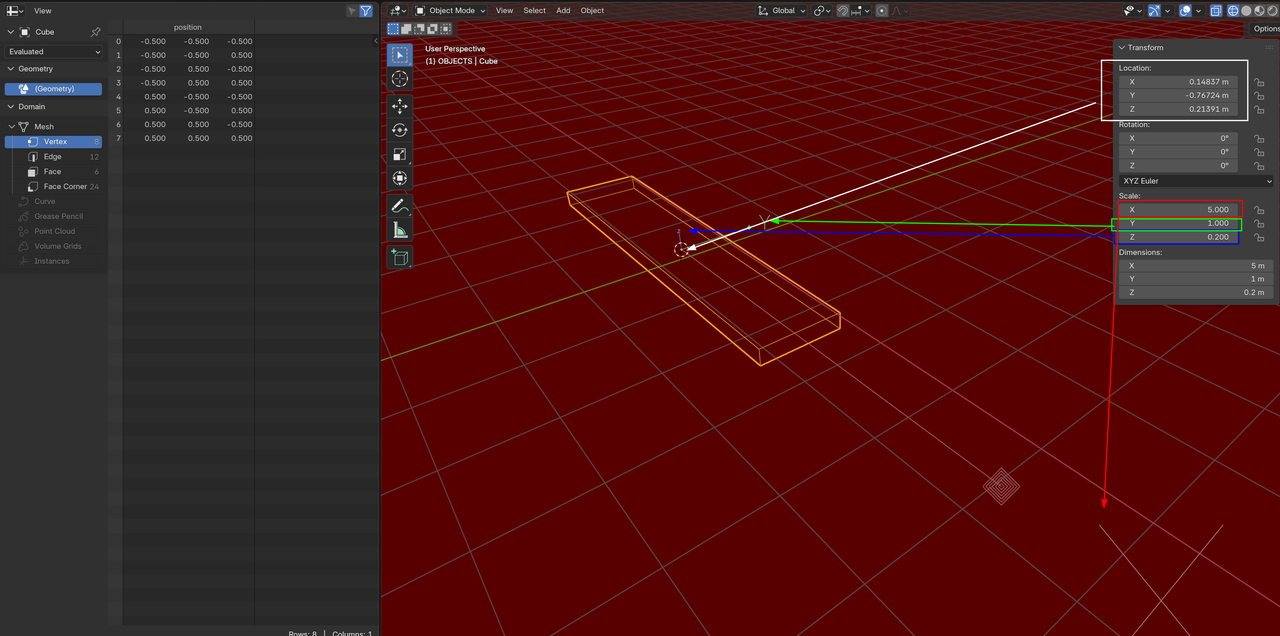
I'm trying to follow along with a tutorial that advises to extrude faces along normals and then using the numpad to extrude by 0.5. This was working for me just fine until today. Now when I try to follow those steps the extrusion looks like this:
Super thicc
Instead of like this:
I'm on 4.5.1

Hi HHkb24 ,
That has nothing to do with the Blender Version you are using!
It probably has something to do with the Scale (or Dimensions) of your Object.

I'm assuming you're just starting to use Blender, based on this and your previous post. Have you watched the Blender Basics? Just in case here's the link:
https://cgcookie.com/courses/blender-basics-an-introduction-to-blender-3d-4-5-lts
And follow it up with the Mesh Modeling Fundamentals. It's a killer combo:
https://cgcookie.com/courses/core-fundamentals-mesh-modeling

Adding to the above:
Scale in Blender works as a multiplier/percentage. So whenever your scale is not uniformly 1/1/1 and you perform an operation like extrude by a certain value, that value gets multiplied by the scale value in the various directions.
So when you scale in object mode: CTRL + A -> Apply scale as Martin said.