
Okay, I may have answered one of my own questions as I've gone through more of the exercise.
The DEF-Base bone appears to be important once the mesh and Armature are connected. It creates a vertex group that the Crane Base can be assigned to, since the Root bone does not receive a vertex group. Otherwise, there's nowhere for those verts to be assigned and their deformation would be incorrect when the rest of the rig is moving.

DEF bones are the deformation bones. These are the bones that object are either parented to or weighted to.
Control bones are the bones that the animator actually animate.
The root bone is the master parent. It is used to move the entire rig in the 3D world. For example if you wanted to move the device to be on top of a ship. The base bone then would be used to rotate and move from that point.
dillenbata3
In the case of deformation bones then, for the majority of cases, are we always going to have a duplicate/corresponding copy control bone, provided that the deformation isn't already being controlled via an IK rig or other parenting / constraints automatically?
I.E. In the crane example, we don't add control bones for the DEF-Arm_01 and DEF-Arm_02 because they're part of an IK rig. Same thing for the DEF-Base because it's parented to the Root, which covers the extent of its purpose by making the mesh stay in the correct location.
Normally yes. In blender we use bones for deform and controls. In other software like Maya controls are actual objects. Bones are called joints I believe. Another reason that they are separated is in case a rigger wants to add advanced setup like the ability to switch from IK to FK. Technically speaking, if you're staying in blender then you can use the DEF bones as controllers. Also known as a straight rig. This is common for simple game engine rigs.

Hey Elouan,
It looks like you've got some answers - but I will try to summarise, as well as provide context in the case of the Crane Rig.
All bones are Blender are exactly the same. We just give names to them to make it more logical and manageable.
If a bone has the "Deform" option enabled, it can move any vertex that is weighted to it (provided the object is connected via a matching armature modifier)
You don't need to use an armature modifier if you want the entire object to follow along without bending or 'deforming'. You can use bone parenting (which is much faster for your computer)
However, if you need some verts to go one way, while some verts go the other - you need an armature modifier (and weight painting etc).
DEF- Bones:
Generally it's really smart to use the "DEF-" prefix on all the bones that you want to deform your mesh. That way all the vertex groups are named nicely (and searchable) plus you can stick all these bones in the one collection to easily isolate them.
If you weight some bones to DEF bones and other to control bones, it becomes harder to manage everything.
CTRL Bones:
These are the ones the animator will animate. They don't need a prefix (or suffix) because they all live inside the uniquely named armature object - plus they should be the only ones that an animator can see, so less letters in the name lowers the cognitive load on your brain to read the name to 'find out' what it's called. (you have to start reading part way through the string of text)
Other software uses separate objects as controls (not the bones inside an armature), this is why they use that extra naming convention.
MCH-Bones:
You only need these in places where you need a workaround to solve a particular problem.
For example - you want to add a constraint on a control, but then you can't move the control anymore (because the constraint blocks that). Solution, add the constraint to a MCH bone, and then parent the control to that.
Now in the case of the Crane. You will see that there are DEF-Clamps and control versions. This is for the reasons mentioned above. Same for the DEF-Base. It's sole purpose is to hold the bottom verts. If you disable that then when you move the Root bone, that part would stay behind.
Why didn't we call that bone "DEF-Root"? You could, and that would be fine.
Now why didn't we need any MCH bones on the clamps but they had the action constraint on them?
That constraint doesn't block the normal animation of the control, so it's not needed.
Why don't we have and control bones on the arm segments?
The animator does need to animate that part because the IK chain is taking care of it.
Ok - hope that catches any gaps in your understanding.
Let me know if it doesn't
This is a really great summary, thank you for taking the time to clarify everything! It has really helped with my understanding of the reasoning behind everything.

Thanks for this. I had similar questions. I am also still wrapping my head around bone types and think I need to go back and rewatch the presentation of these parts so I can now understand them in the context of a model. In my mind to this point I had thought of MCH bones as the skeleton inside a body and DEF bones as children of the MCH bones which act as muscles that deform the body based on the movement of the MCH bones but it seems I've got this all wrong and I'm still not sure why the Clamps aren't MCHs. I take the point (and greater experience of Wayne) that we don't need the CTL prefix once you're experienced but as a beginner I'm finding it really confusing to try to remember what each bone is doing is when some names allude to function and others don't.
"This one is a bit challenging, and I noticed that I missed one bone. I’ll need to redo the crane a second time. Should I stay focused on finishing this one properly, or move on to the next? What’s the best approach?"
@Tian du plessis it depends? Do you understand what this is teaching? If yes then move on to the next part. If the answer is maybe or no then redo it.
Hmm, something’s off here and I can’t figure out what. Can anyone explain what’s going on? I’m kind of puzzled!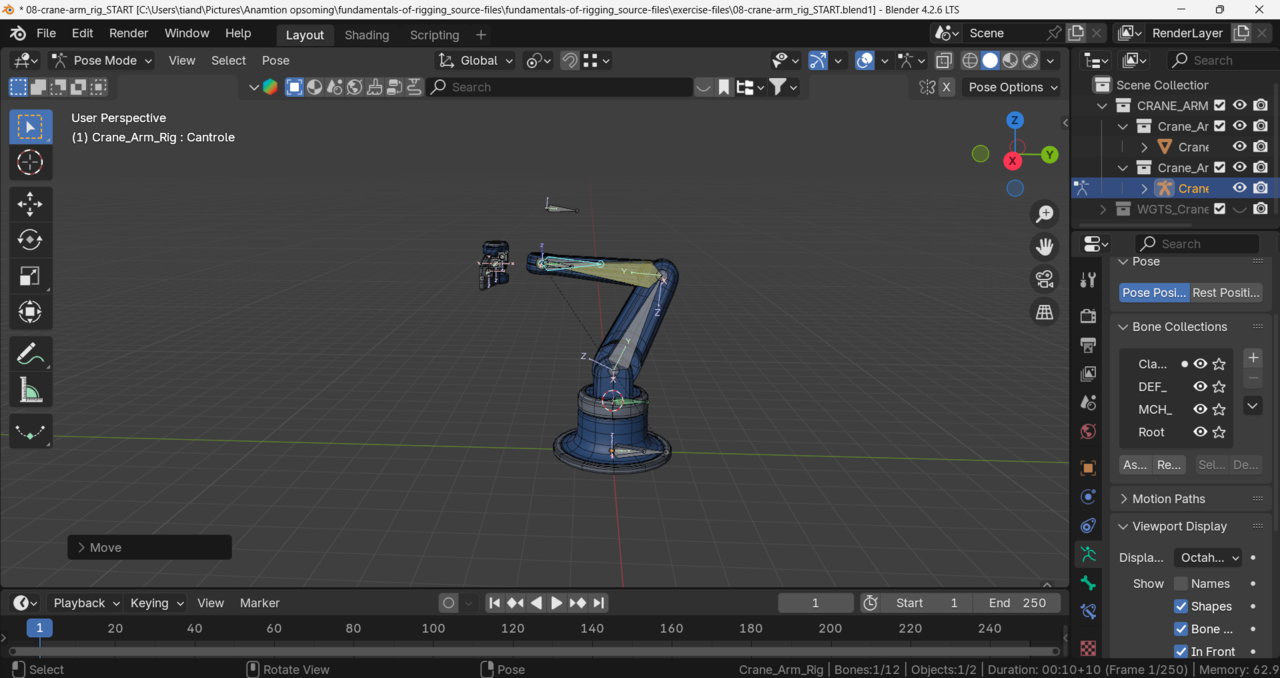
- Can someone break this down a bit more? I listened to Wayne’s explanation, but I’m still not understanding.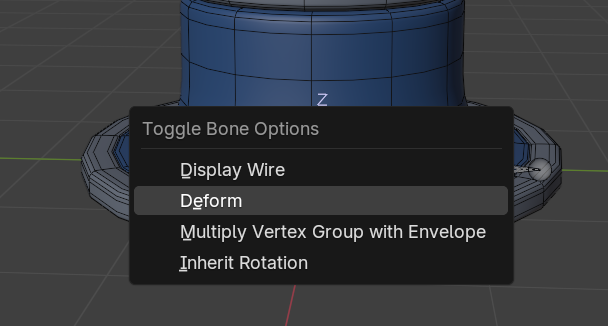
Hi Tian,
That popup menu gives you access to some of the bone settings in a different way than going over to the properties panel to check an option on or off.
Display Wire will not draw any faces on the bone shape (if you bone is using a custom shape)
Deform will toggle the deform option - but I usually then open up the redo panel to make sure it is explicitly set to what I want. Because it may already be the option I want and then I have made it the opposite of what I want.
You will never need Multiply Vertex Group with Envelope
Inherit Rotation is the option for the bone to include or ignore the rotation of the parent. (you probably won't need that either because you use constraints to force it to do what you want.)
As for you Crane Rig issue, it's hard to say w/o looking at the file or it moving - but I think perhaps the widget bone is parented to Arm_01 instead of the control.
And the clamps are not parented to anything.
But that's me guessing from a still image. If I'm correct I'm going to high five myself and take the rest of the day off.