
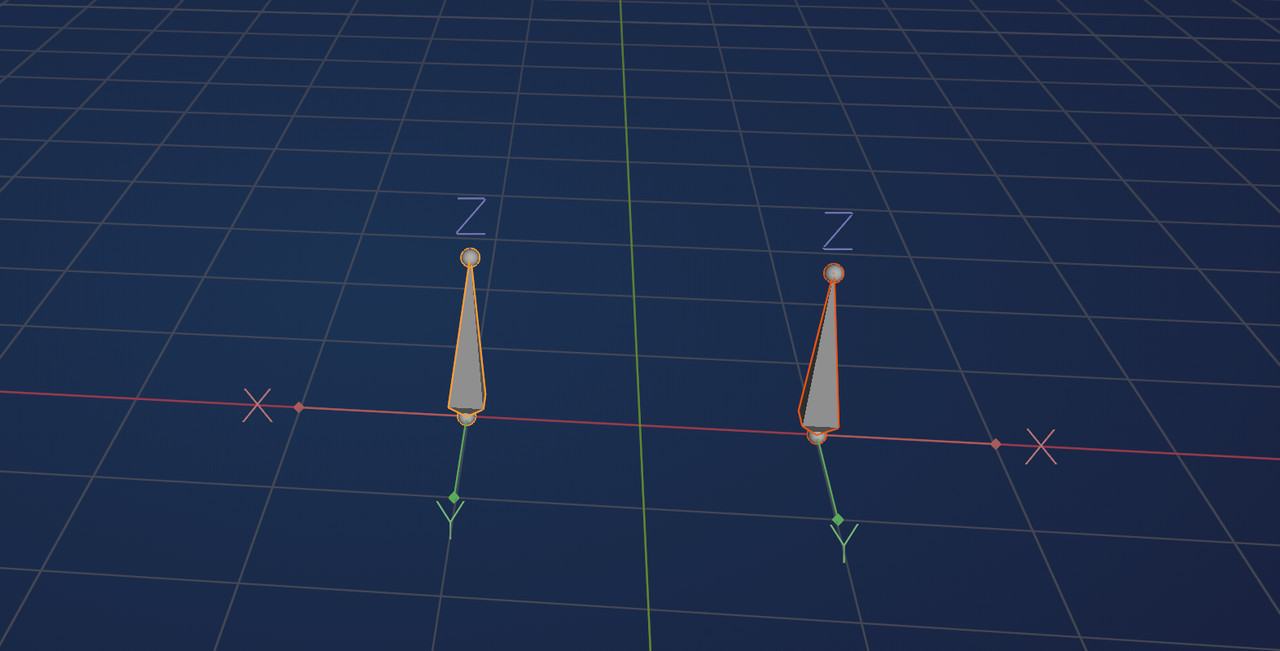
For this exercise, everything is working as expected rig-wise. However, I found the symmetrize results a little confusing in terms of the bone roll values. It looks like the symmetrize affected multiple axes, instead of just flipping across one. I would have thought that the bones' z-axes would be facing each other (mirrored) while the x-axes would point in the same direction (forward towards the knee poles). However, the x-axes are pointing opposite each other. Any ideas why this happened? I'm not sure if it's something that would need to be fixed or if I made an error somewhere during the rig setup. The IK settings seem to have compensated with the Pole Angle automatically.
Screenshot of Symmetrize Results
Additionally, I was wondering if there might be a reason to use the IK Constraint Pole Angle settings as opposed to manually rolling the bone to orient the x-axis as needed. Are there situations where it would be better to choose one over the other?
Another question that popped into my brain is about the behavior of the knee pole itself. It only aligns with the height and orientation of the actual knee joint in the rest pose. However, it becomes out of sync once the foot is moved, especially when the foot is stretching the leg. Is it common to place additional constraints on knee poles to help them stay more aligned with the rest of the IK rig when it's being posed? This might be answered in a later video, but I'm too curious not to ask about it now haha

Hi TTheRavensCurio,
What you seem to expect, is that by Symmetrizing, the Orientation of the mirrored Bones would change (from right-handed to left-handed, or the other way around):
That would really be unwanted.
Others will be better able to answer your other questions (that will certainly be expained later on).
We'd have to ask someone with more practical experience, I guess...for me it's like a gut-feeling; something like inconsistent Normals in a Mesh.
In the screenshot I provided, I indeed made 2 Armatures, one Scaled negative 1 0n the X-Axis. But, bad as that would be, to have something like that in 1 Armature? My bones ache, when I try to imagine something like that 😱
But, I cannot explain exactly why it would be bad.

So Symmetry Flips the roll. Thus negative becomes positive and positive becomes negative. That is way the Axis are flipped. On the pole target, the bones with the IK constraints(the first in the chain) will have it's X axis point towards the pole target. In this rig the main control/Bend axis is z. Thus you need to change the Roll. If you wanted to use X as the main bend axis then you would set the roll to so that X runs across the the knee instead the Z axis. Then you would use the Pole Angle to position it back after it twist to point the X at the pole target. They are used for different things.
For the getting out of sync, I'm not sure what you are talking about. If the Pole Target isn't aligned correctly in combination with the roll and/or Pole angle being off you can get some undesired effects, but without seeing what it's doing it's hard to say what the issue is.

Excellent questions Eluoan.
I'll do my best to explain without it getting complicated (which it can if you start talking about maths)
This seems simple, but it isn't quite straight forward.
When you symmetrize a mesh object - 1 side is pretty much scale by -1 over the x axis.
However, with bones, they have x,y,z axes that always need to stay in the same relationship to each other. What is this relationship?
You heard Martin mention the left handed and right handed coordinate system. Well this is a mathematical term for which direction is +x, +y, and +z.
(Blender -like many other softwares- is right handed).
Why isn't it as simple as scaling the x axis by -1?
That would change it from right handed to left handed. This breaks everything.
However, it means that you simply can't just flip the value of a Bone Roll in order to symmetrize it. This would change it from right handed to left handed - which breaks everything. It needs to be recalculated in the same coordinate system, just pointing in the mirrored direction.