
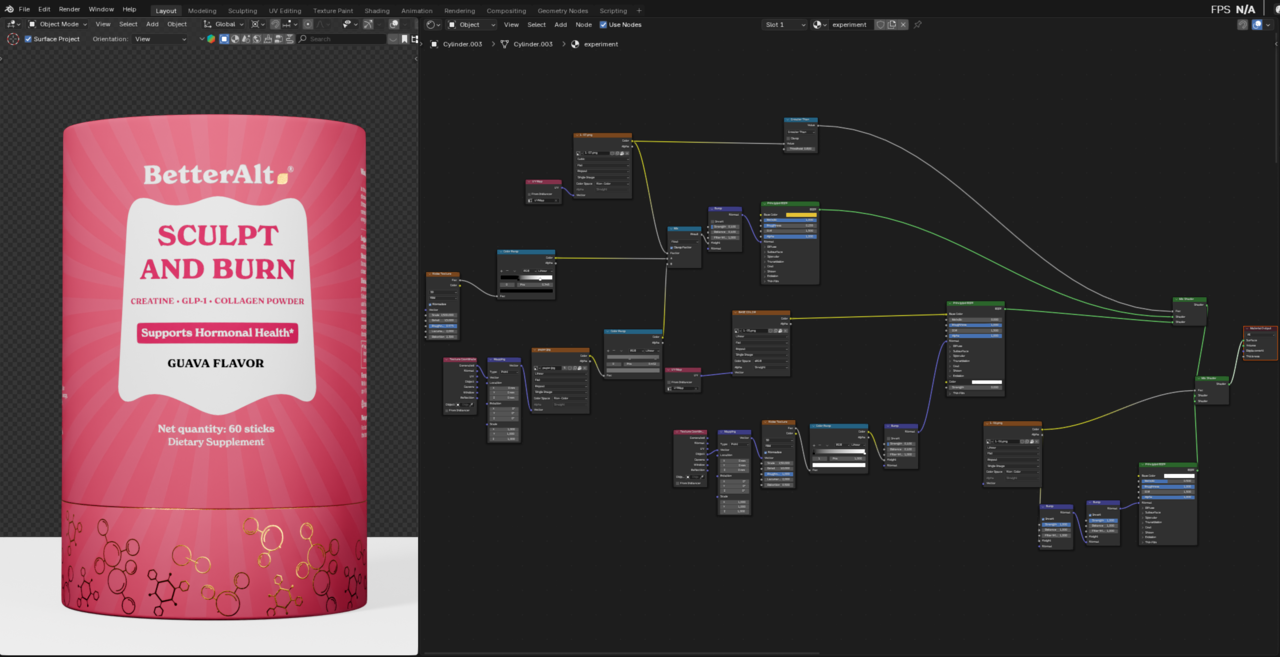
I'm trying to export a GLB file for After Effects and running into an issue: I’ve used multiple PNG textures in Blender, and a few of them are set to Non-Color (for roughness, metallic, and normal maps). However, when I export the model as GLB, it seems like only the color textures are included "non-color textures are missing" or not applied in the exported file.
Is there a proper workflow to ensure non-color PNG textures get packed correctly into a GLB? Or is this a limitation of the format/exporter?
Would really appreciate any tips or fixes!

Hi MMohan_Pradeep_2917 ,
Sorry, but I can't help you, I don't have AE and don't do any exporting, but you might have misdiagnosed the problem; it may not be whether the Image Textures are set to Non-Color or not. Have you tried setting all Textures to sRGB , to see if they get exported then?
if i turn them to sRGB i wont be getting the details so there is no point in doing that or is it because there are too many bsdfs??
while that's true but when you import a glb model with not many nodes and complications you can animate the model right away in ae while the textures are there you really don't need to do anything for that and while i am doing for these high quality textures its not happening. I am not getting the gold or silver textures in those. Just want to know what mistake i did

You need to bake your maps.(Color, Roughness, Metal, Normal/height, etc.) You are mixing multiple normals(Bump) and mixing them into 1. The exporter doesn't know which is which. GLTF is designed for standard PBR output. Meaning a principled BSDF with images plugged into it.
You can include all textures, but it won't be setup for you and I'm not sure if AE can import it. To do that: File->Export->glTF->On right hand side expand material->Unused Textures and images->Check Unused Images. Note: If you check Prepare unused images it includes data that doesn't fit into the glTF specification.
