
I cant use assets

Question
posted to: Asset Library
I'm still having issues with the Asset Manager. To summarize, I need to create a Blender scene and store all the elements I want to save there. The problem is that I can't see my assets in another scene. Well, it kind of works, but if I want to create a subcategory, it doesn't work. Anyway, I'll try it like this for now.


1 love
Reply
  • Martin Bergwerf replied

    Hi Stéphane,

    To make a new Category, you must be in the File where your Assets are and then switch to Current File, Click the plus to make a new Category under the one where you click the plus. You can then Drag and Drop your Assets in the new Category. Don't forget to Save the changes and then Save the blend File.

    So, something like this:
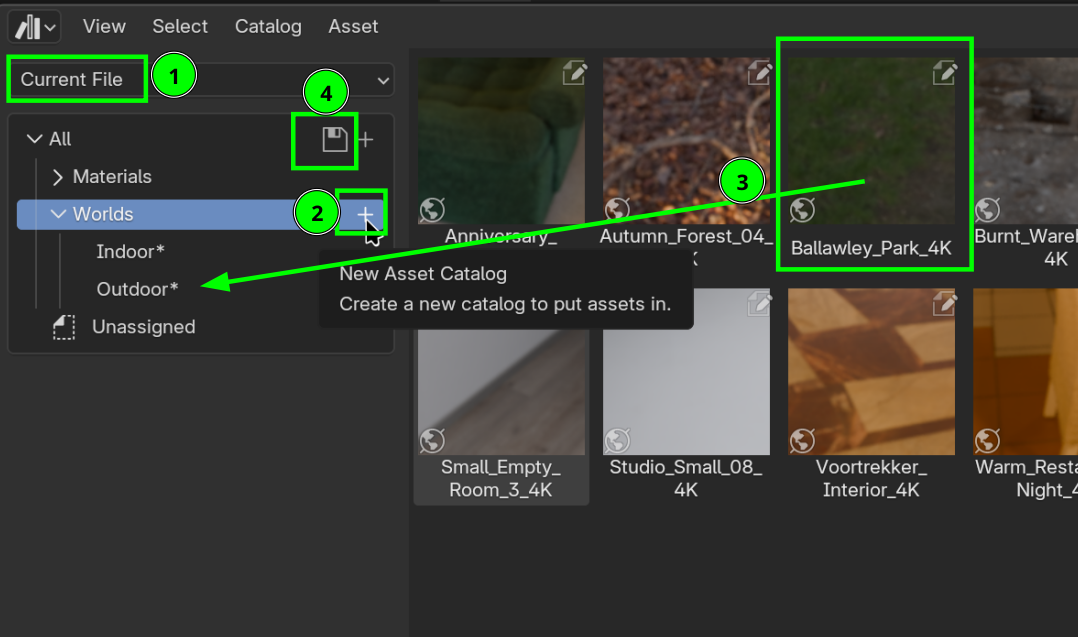
    Assets_00.png

    Is that what you were having problems with?

    There might be other ways to do this, but this is how I do it and it seems to work.

    1 love
  • Stéphane Vahle(Injaw) replied

    Thank you very much, I’m going to test this. It could be more intuitive in my opinion. Thanks again

    1 love
  • Martin Bergwerf replied

    "It could be more intuitive in my opinion"

    I totally agree!

    2 loves

Comment not found.