

Note: I'm using Blender 4.2.1 LTS
I could not get follow active quads to work no matter what I tried. After following the instructions meticulously, rechecking my mesh, the unwrap, the other comments in this thread, etc., my friend (having the same issues as me) noticed he got it to work after switching away from using circle select mode to box select mode. I don't know if there's something to this or if it's just a bug, but using circle select to perform the selection simply would not work (despite the fact that it was visually making the selections just fine). Box select works, and I was able to use the instructions in the video with no further issues. Hope that helps someone, because that was a very annoying issue.

Hi A.J ellofromearth ,
How you Select things shouldn't make any difference, but what is important, is what you Select.
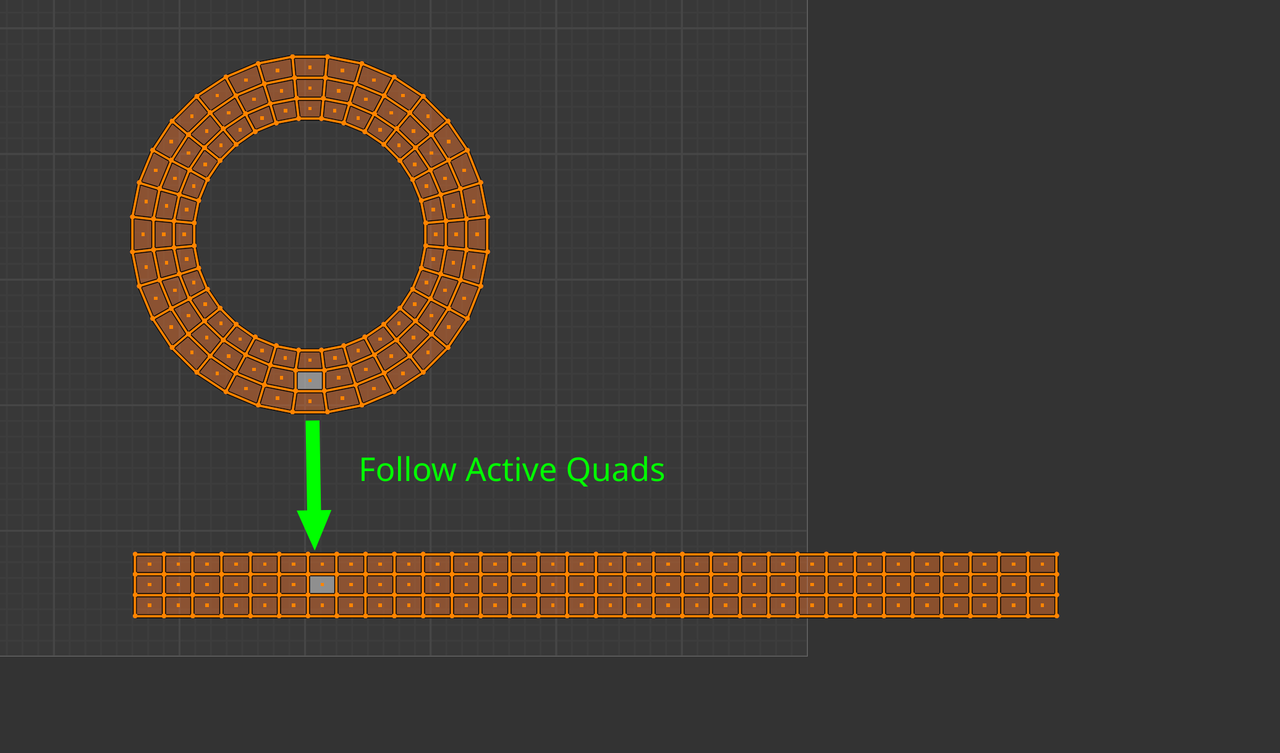
This is different in 4.2, you need to Select the whole Island and have one Quad Active:
To be clear, I ultimately got it to work, but only if I didn't use the "select circle" tool. I along with another person verified this problem. Selecting the proper faces is perfectly straightforward and had nothing to do with my issue, which is why this was such an annoying problem to find. It seems like a bug.
Hi AJ,
That was totally clear to me, but it's hard to believe, that Circle Select gives a different result. There must be something else you were doing wrong...
But the main thing is, that you got it working (although, if you can reproduce it and post here what exactly you did, with screenshots, or even better a screen-recording, that would be great).
Hey AJ ellofromearth ,
I think I found what your problem was:
The Follow Active Quads didn't work because you didn't have an Active Quad.
You didn't have an Active Quad, because the Circle Select Tool, when using Left Click Select, doesn't allow you to make a Vertex, Edge or Face Active.
Now, I use Right Click Select and actually never use that Circle Select Tool, so I didn't know this.
