Hi Mail TThatsHim ,
Could you upload your .blend file (to Googledrive, Dropbox, or so) and post a link here, so we can have a look?

Yes, the blend file or screenshots, preferably the blend file. And don't worry, this is super normal when working with 3D, things become a Sherlock Holmes movie with you trying to get to the bottom of a mystery all the time. Things always go wrong and you are left clueless, even when you're a Blender expert with 15 years of practice.

2 things.
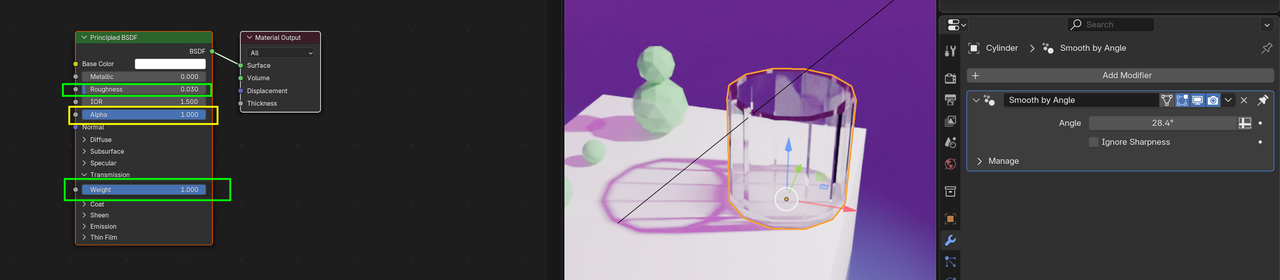
First, you need to set the objects to shade smooth or shade auto smooth. On the cup I'd recommend auto smooth and set the angle on the modifier to something like 15 degrees. On the gem looking spheres I'd use auto smooth set to 5. The single sphere just shade smooth.
Second, you need to set the transmission weight. I'd start with 1 for full effect. Also set the Alpha back to 1, but you don't have to.
Okay Mail TThatsHim ,
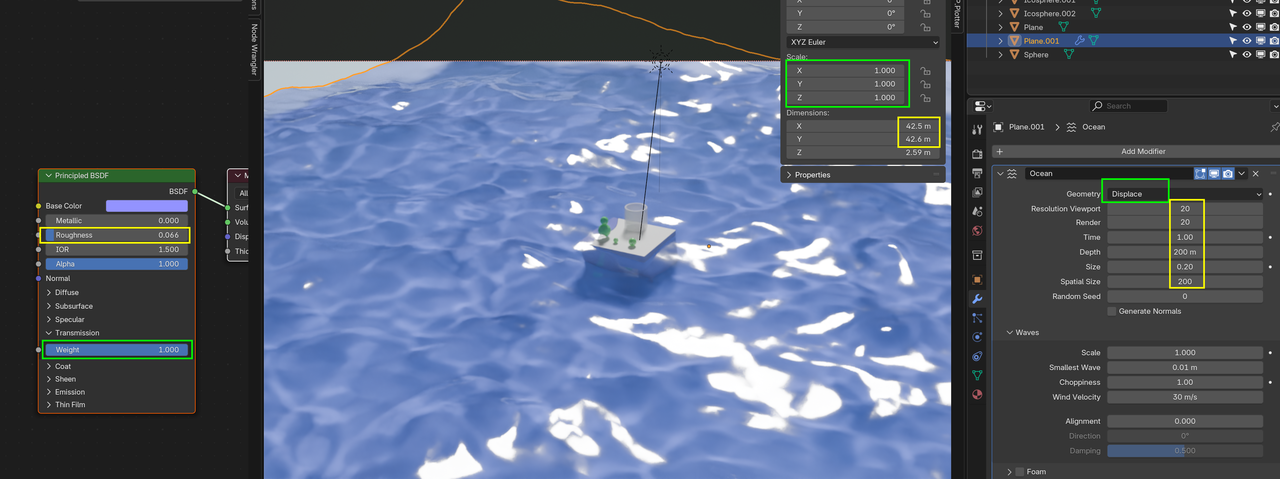
Scale the Plane (that becomes the ocean) in Edit Mode (so it becomes about 40 m x 40 m), Subdivide it a lot; like 100 or 200 Cuts. Set the Geometry to Displace and up the Resolution. Shade Smooth and adjust the Shader (I also changed the Light here to Sun, but a Spot Light works:as well.):