
Hi all,
I want to outline the adaptation of the CUBICITY application's creation template workflow for an existing Residential Community project.
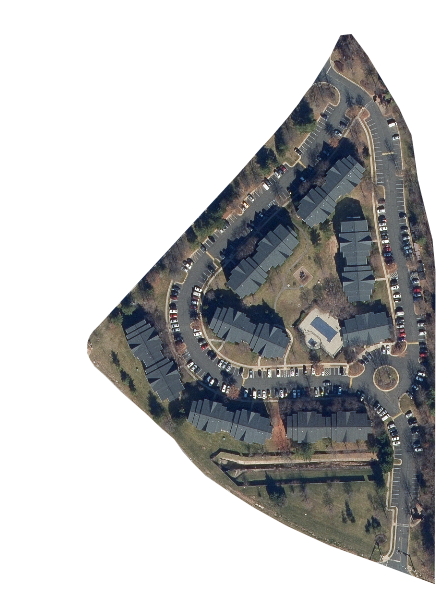
This Community's layout presents unique challenges as it is not based on a square grid, but rather incorporates polygonal, curved, and splined elements.
A brief analysis of the community map reveals the following characteristics:
- A sloped terrain polygon defines site boundaries.
- Sloped splines represent roads.
- The building footprints within the parcel boundaries are inclined.
- Parking cars appear to be perpendicular to the curb and gutter.
- A buffer exists between the sidewalk and the curb & gutter.
- A spline walking track is present.
- A roundabout with three intersecting roads.
- The community includes landscaping, picnic and grilling areas, pools, and a playground.
My objective is to accurately layout this residential community to match the map I have provided.
I have attached the map for your review.
To achieve this, I am seeking guidance on the following:
1- How can I create a grid template that conforms to the sloped terrain and polygonal site boundaries?
2- What color-coding strategy would be effective for distinguishing road patterns, apartment footprints, and other assets?
3- What is the most efficient method for segmenting the sloped spline roads into tileable pieces that align with the existing terrain?
Your insights and expertise on these points would be greatly appreciated.

Hey sserviteur! That sounds like a fun and challenging project to tackle.
I too am running a project map at the moment and have found that the free add-on Blender GIS is amazing for giving you a solid base. If you don't necessarily need it to be a modular/expandable setting (like with Geo Nodes and BCity), that might be the way to go.
Here are a couple of videos that might be helpful to get you the idea of what it can do:
https://youtu.be/YNtKnmRXVlo?si=l2xN8kWrlrTKfeuA
https://youtu.be/Mj7Z1P2hUWk?si=2kCpyCBubg6Lai1P
Then, there is the open source QGIS software, that will give you an easier time if the are you need is too much bigger. Though for the looks of your map, Blender GIS might be just fine for great amount of detail.
https://youtu.be/1GveI7knDuA?si=wvlVleH7uGQ7U5le
With Blender GIS and Google Data, one word of caution for commercial projects though. Read their licensing terms and make sure they apply to you. The OSM maps are totally fine to be used, but if you choose to bring in roads/buildings/ and more... just check what can and cannot be done commercially.
Hopefully this helps a bit, or sparks some ideas.
As for your other questions, I'm not sure how to help. Curious to follow this thread though.
Thank you for sharing these resources, Nathan. I am currently utilizing QGIS, Blender GIS, the Blosm add-on, and other tools within my workflow.
My project necessitates a modular approach and an expandable setup. Therefore, I will proceed to explore solutions that meet these requirements. It's a challenging but rewarding process.

Hi sserviteur ,
This is not going to solve all your roadblocks, but i'd recommend modeling the terrain (with the roads and so) flat, then Displace that in Z for the necessary elevation and then distribute the houses and cars through Geometry Nodes.
Not sure what exactly you mean by modular in this case.

@ Martin Bergwerf
I appreciate your recommendations, which involve modeling the terrain as flat and then displacing it. This workflow is one of the methodological approaches I am currently evaluating.
@ Omar Domenech
I'm prepared to adapt my workflow and explore additional courses/tutorials to achieve the desired results. I'm not new to Blender, so your encouragement is much appreciated.