

Hi, I've ran into trouble that I can't seem to be able to solve. I have my carousel, and I can change radius, padding (distance from pole to the edge of the bottom plate) and height. I can also control the speed of the circular motion, as well as the vertical one (separately).
The "horse" that I have put on the pole also follows the base curve normal, so it is always pointing in the direction of the motion.
My problem is that I can't find an effective way to add more poles with horses. No matter how I try I get one or more issues. Either all the horses move up and down at the same time, or they no longer follow the curve normal. I have made many attempts, and I have been able to solve all issues individually, but I can't put everything together. I think this attempt: https://youtu.be/W4eeprIa4kI is where I have gotten the furthest, with the least amount of nodes.
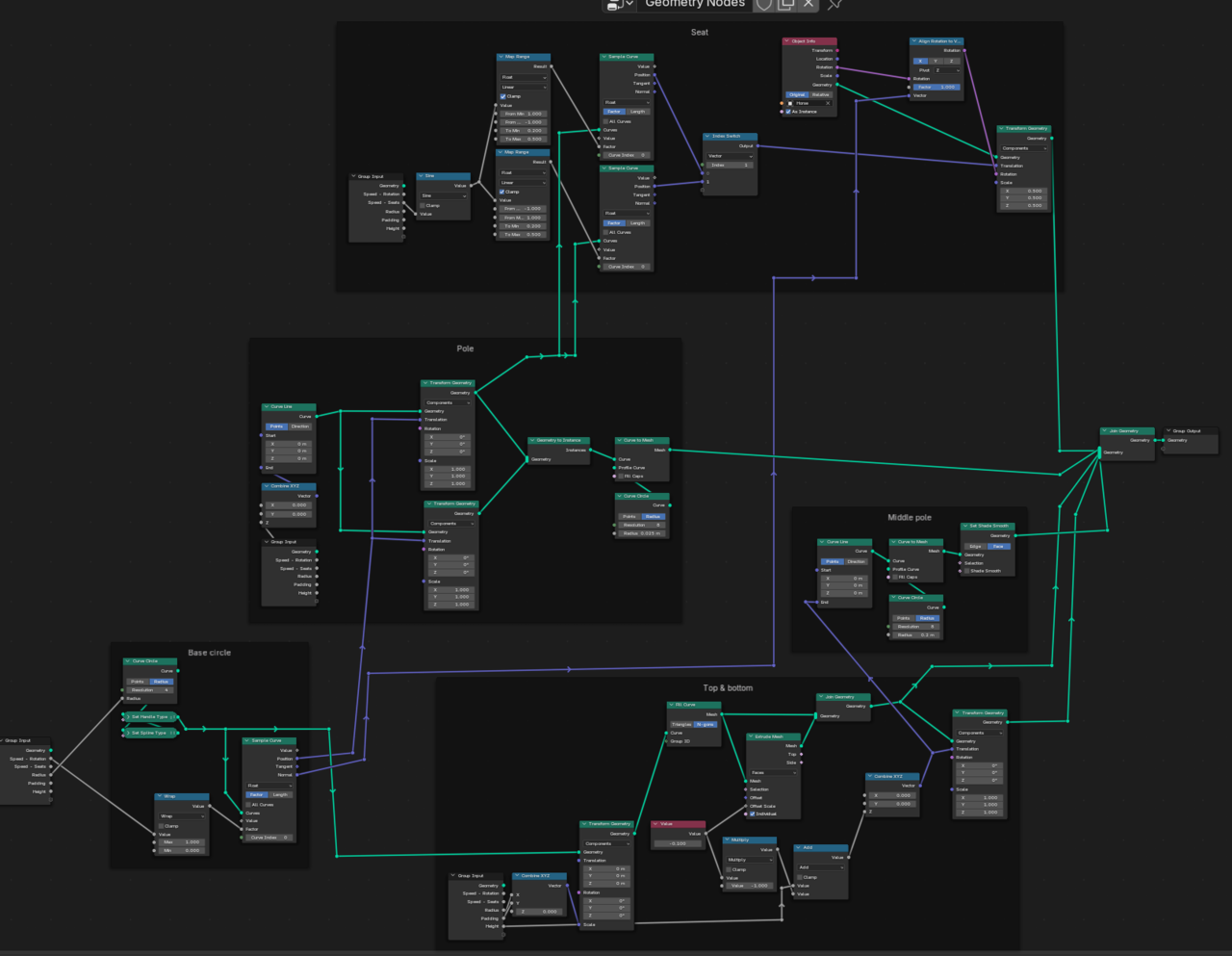
I've also made a screen capture of my node tree: https://youtu.be/soL2A2B-WOQ in case the above image is hard to read.
I would be grateful for any tips on how to proceed. And if my route is at all viable, or if I need to start from scratch.
Hi, here is a link to all my attempts: https://drive.google.com/drive/folders/1DgGTaRkuxmPcD9M32jjpEuaPi9WenRWd?usp=sharing. It is my fifth attempt that I have posted videos about. But I took some other routes, so in case my fifth attempt is a dead end, perhaps I got closer in any of the others :p
Thank you for taking the time.

Hi @carramone ,
I had a look, but wasn't able to figure out what exactly you were doing (yet).
Mostly, I think you made it too complex ("Too many Nodes, dear Sir, too many Nodes.").
Here is your file, after removing some of them. I also removed the Drivers.
Basically, I Instance the Poles and Horses, make the Horses go up and down and then Rotate the whole Merry-go-Round at the end.
Here's my version (it's called Fixed, but that's not really an accurate name😉):
https://drive.google.com/file/d/1s0ktukJurIJ5TCxiQ1YivYVP0xG5swPa/view?usp=sharing
Hopefully you find this helpful.
Thank you Martin. I have looked through your version and it's so much more elegant. I see things that I tried to figure out how to do, that just works (if you know what you're doing). For example, I tried to add instances, but I couldn't get them to move independently. But you just added an index node to the movement, and passed it to a translate instances ... I was trying to capture attributes of the original points that I instanced stuff on... But the index data is just there, ready to be used. I need to get it into my head that these nodes references whatever is passed back to them through the node tree.
Yes ... I really need to think long and hard on how info is passed through the node tree. There are things that just work in your version, that I tried to accomplish in spectacularly convoluted ways :p
Anyway, thank you very much. I will study your approach some more. And then sleep on it and see if I can create the carousel by myself tomorrow. Otherwise I'll study some more and try again the next day.
Best regards,
Hi again Martin. There are a few things you've done in the node tree that I don't understand. I see that they work, and what happens when I remove them. But I don't understand the logic, and I want to know "how to think".
For instance, this:
How did you come to the conclusion that you should divide the index to drive the factor?
Then I had one more question, but as I wrote it, I figured it out. I leave it in, just in case I get confused again tomorrow :p

Again, thank you so very much for your help. It has been very helpful following your nodes.
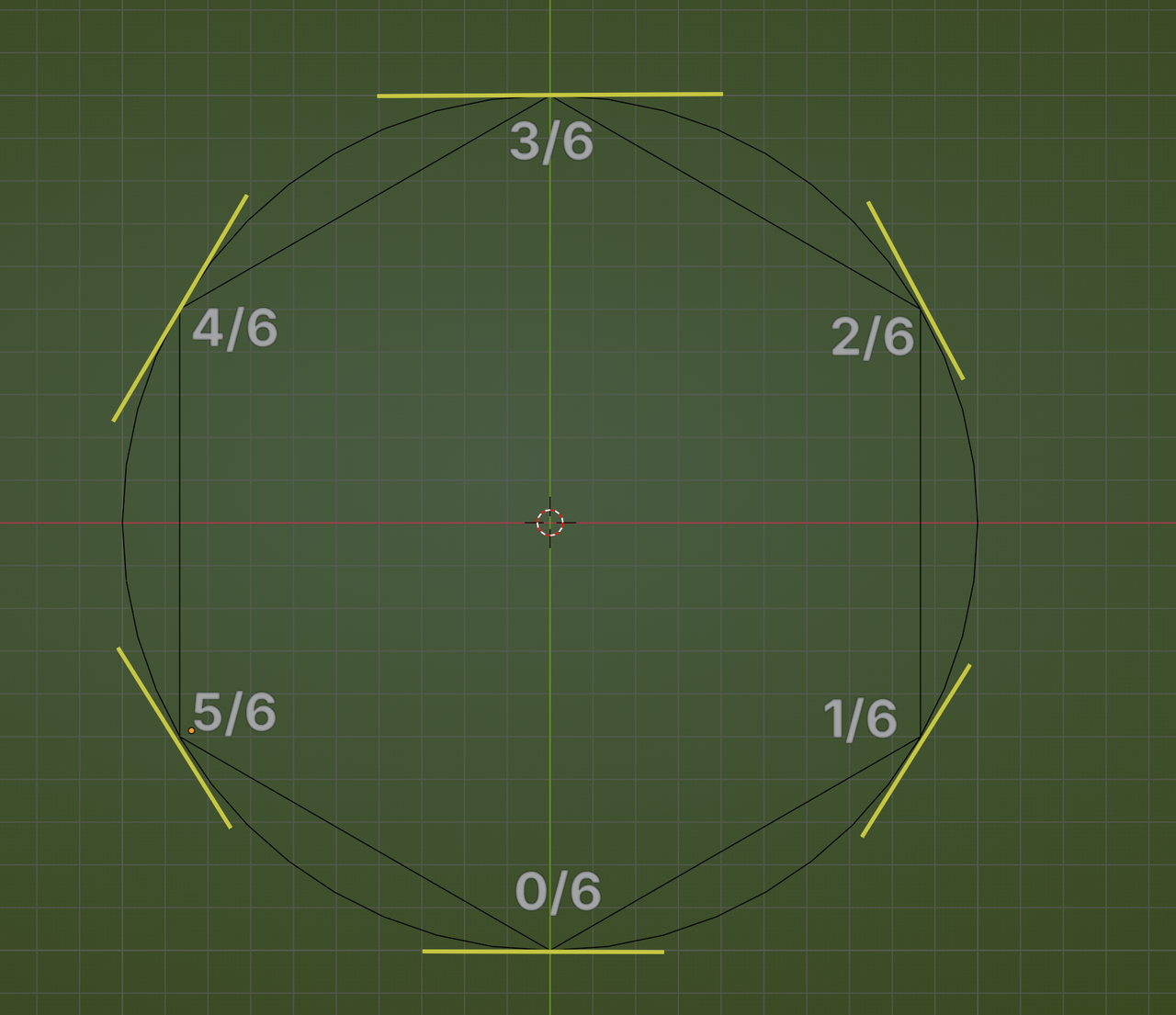
"If I understand correctly, the index references the individual points of the curve. The points created by the resample curve. And this operation here takes the index (integers between 0 and 5 if count is "6". Then this is divided by the count. So, 0/6, 1/6 ... 5/6."
That is absolutely correct!
Those values then go into the Factor of the Sample Curve; consider the Length of the Curve to be 1, then 0 is the start of the Curve, 1 the end and 3/6 is exactly halfway, etc. I then use the Tangent of the Curve (Circle) at those 6 Points:
As to the other question, you are correct, to be precise: the Nodes before the Combine Node, give a Value and if you plug a Value into a Vector Socket, that Value is used in all Components of that Vector, so yes, like you say it would affect all 3 Axes in this case, hence the Combine XYZ Node
Ahh, clever. It makes sense when you show it like this.
Does this mean I can use a math add node to the index node to shift from where the tangent data is read? My logic is this, instead of reading the curve at exactly 0/6, let's say I added .5 before the division (index node -> math node [add .5]). That would give 0.5/6, 1.5/6 etcetera. And in my mind, that would cause the read tangent data ahead of the actual curve points, resulting in horses that look a bit more inwards. And also, if a value was subtracted before the division, the horses should point outwards.
Or am I wrong? Is it only the points that can be sampled, so it is important that the index/count is exact, otherwise it won't work at all?
I will need to experiment. Hopefully understanding what it is I see as a result :p
Thanks again, I'm very grateful for all the help. It really makes all the difference!
Hi @carramone ,
Yes, you can do that, but the Factor of the Length of the Curve Circle goes from 0 to 1, Adding a Value, can potentially result in a Value higher than 1 (and that would probably be read as a Factor of 1), so to be sure, you might want to use a Math > Modulo 1, just before plugging it into the Factor of the Sample Curve Node. That way, if you get to a Value of 1.01, for instance, that would be turned into 0.01.