

Hi Caleb LLRonHubbard ,
Make sure you don't have the Option "Affect Only Origins" enabled:
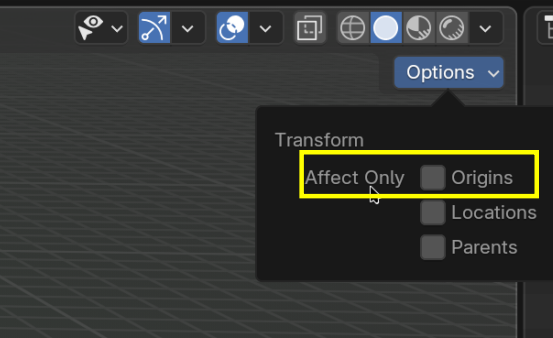
that'll divorce the Gizmo and Cube.
@MartinB (had to do it like that so it wouldn't tag others) Thank you so much, I appreciate it.
How would I reset the gizmo to be centered within the cube?

In object mode, right click->set origin->Set origin to geometry

You'll later learn that if you move the content of the objects, so if you move all the elements in edit mode, the origin point will stay in the same place and when you get out to object mode, your origin wont be centered. So you have to keep in mind that is different to move stuff in edit mode and in object mode.