Question about using JPGs?

posted to: Textures basics
Although JPGs can be lossy with artefacts, can you use JPGs with a low compression to minimise artefacts while maintaining detail and a small file size? (I understand that in a working environment you will be told what format is preferred)
1 love
Reply
  • Martin Bergwerf replied

    HI Rory,

    Maybe don't overthink it; you probably don't want to go down that rabbithole.

    For instance I tested one Render, Saved it as:

    JPG with 90% Quality (default in Blender):  just under 700KiB.

    JPG with 100% Quality:      3MiB.

    PNG with 15% Compression (default in Blender): just over 9MiB.

    That's just looking at the size, not the resulting quality. Or what happens when you increase the Compression of a PNG.

    And the resulting quality and size will also depend on the image.

    It really depends on what you're using the image for, what format to use.

    2 loves
  • Omar Domenech replied

    I believe the lossless and lossy things are for when you're doing post production on the images. I think you may not notice the difference if you're looking at the image, where it does make a big difference is when you're managing the black and white levels, the saturation, the ping highlights, etc. Because you have much more data in the image to go to the extremes. But the overall picture when you look at them side by side, the difference will probably be unnoticeable. 

    1 love
  • Rory_B replied

    When I asked this question I thought I was posting it under 'Fundamentals of Texturing - The Basics of Textures: What File for Specific Textures' so don't know what happened there.

    The general message of the video felt like "PNG good, JPG bad!" so not going down too much of a rabbit hole, just questioning this. In my general experience you can get quite good looking JPGs and file sizes if you don't use too much of an aggressive compression. Have other people found this especially for textures?

    1 love
  • Sascha Feider(SFE-Viz) replied
    Don't worry, you posted in the right location. Questions under lessons always go straight to the forum.
    As for the jpg v png I'd say it really depends on the quality of the result you're aiming for. From my point of view if you do anything under 2K resolution and you're working on a texture that's not required to show ultimate detail in a close-up shot, then a jpg is totally fine. Especially if you're texture painting some minor details or blemishes you're generally good.
    On the other hand if you're creating a texture that will be seen very up-close and you want as much detail as somewhat possible, then I'd bite the storage bullet and opt for a png, if you need more color values even a tiff. For lots of post processing work consider exr.
    Also if you're going 4K and up I'd opt for png or better, as jpg will always have compression artifacts, even if you choose the best quality you can get out of a jpg.
    Example: I bought a texture pack once, which included the same textures in 2k, 4k and 8k. Nowhere in the description did it state, that it was all jpg. Unfortunately this made the 4k and 8k pretty useless for up-close because of the artifacts and for far away it was overkill.
    So bottom line: It's a case by case thing for me, depending on what I want the result quality to be.
    3 loves
  • Martin Bergwerf replied

    Actually,

    apparently, PNG's are hugely over-rated and some say, should be avoided at all times (see for instance:  https://skientia.co/cgi/image-formats  )

    In short: EXR has a higher dynamic range and results in smaller files:
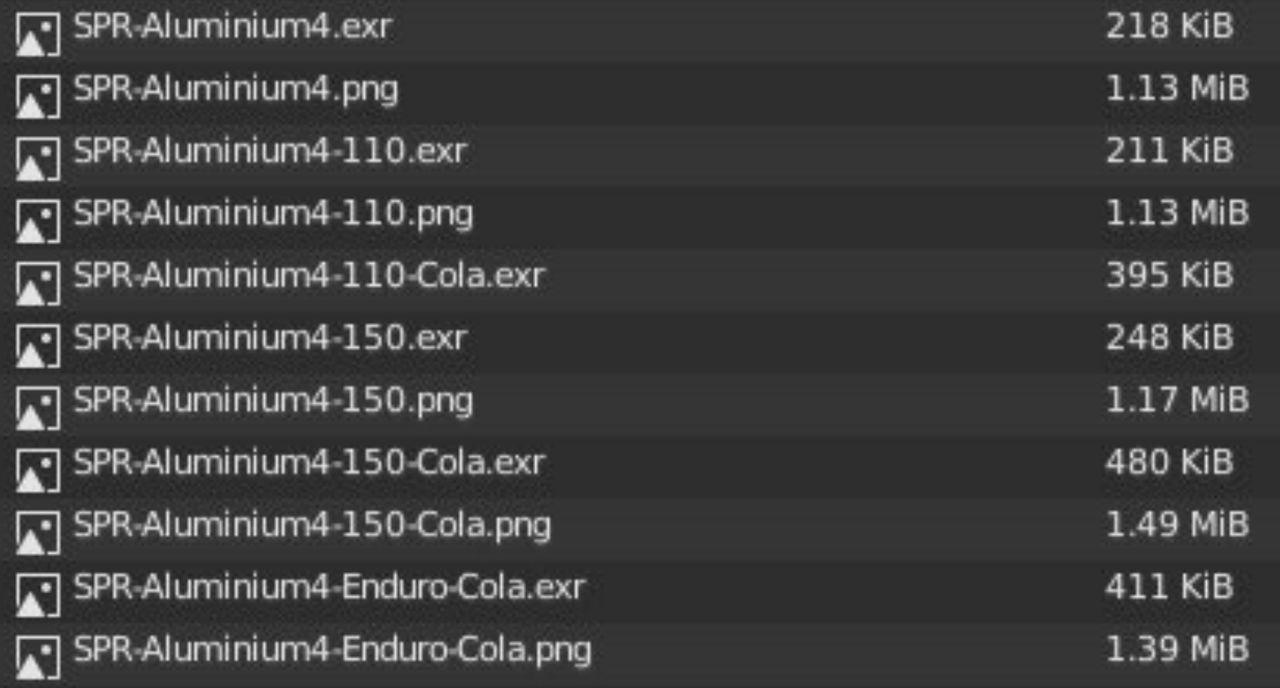
    Formats.png


    3 loves
  • Omar Domenech replied
    Usually in life, if it's healthy it doesn't taste as good as it could. If it's tasty it's probably not healthy. You wish there was a food that is super tasty and super healthy, but that's never the case. But EXR files do have the best of both worlds, they are higher quality and results in smaller files. We need this kind of black magic in the real world. And then healthy foods will be awesomely tasty and super good looking girls will be the smartest in the room and take notice of nice guys and we'll all live happily ever after. 
    • 💯
    3 loves
  • Dwayne Savage(dillenbata3) replied

    To answer your question, yes you can use jpeg. Texture artist avoid them, because every time you edit it you lose data. Also they don't have an alpha channel. As for materialist and shader artist they use them all the time. In the world of 3D, no one cares what format you use. They only care if the end result looks good... or bad if that's what is needed for the project 😀

    1 love
  • Rory_B replied

    Thanks for everyone's replies - there's great things to consider there. I'm surprised by the quality and size of EXR files, I've never used them and thought they were solely used for HDRI images. Sounds like it's just important to keep your eyes open. Thanks again.

    • 🤘🏻
    • 👍
    2 loves
  • Martin Bergwerf replied

    The size of EXR files was a surprise for me too, Rory. Just learned about this  yesterday; it's a good thing you asked this question!