
Been trying for 1 hour, just cannot to get it to work:
Tried looking at face blue or red, that is ok. Outside is blue.
Tried origin to geometry of cover, also not work
Tried local or world, nothing.
I have no clue, I have done exactly how you did it, still it does not work. I do use 4.2.
Please help. I am out of ideas
https://drive.google.com/file/d/1E6sX5HjPD4is4CIL6z8gHo0knG2enJTm/view?usp=sharing

Hi LLittlesheep ,
You have quite a lot of so-called 'double Vertices'; just look at the amount of Faces you have in your lid:
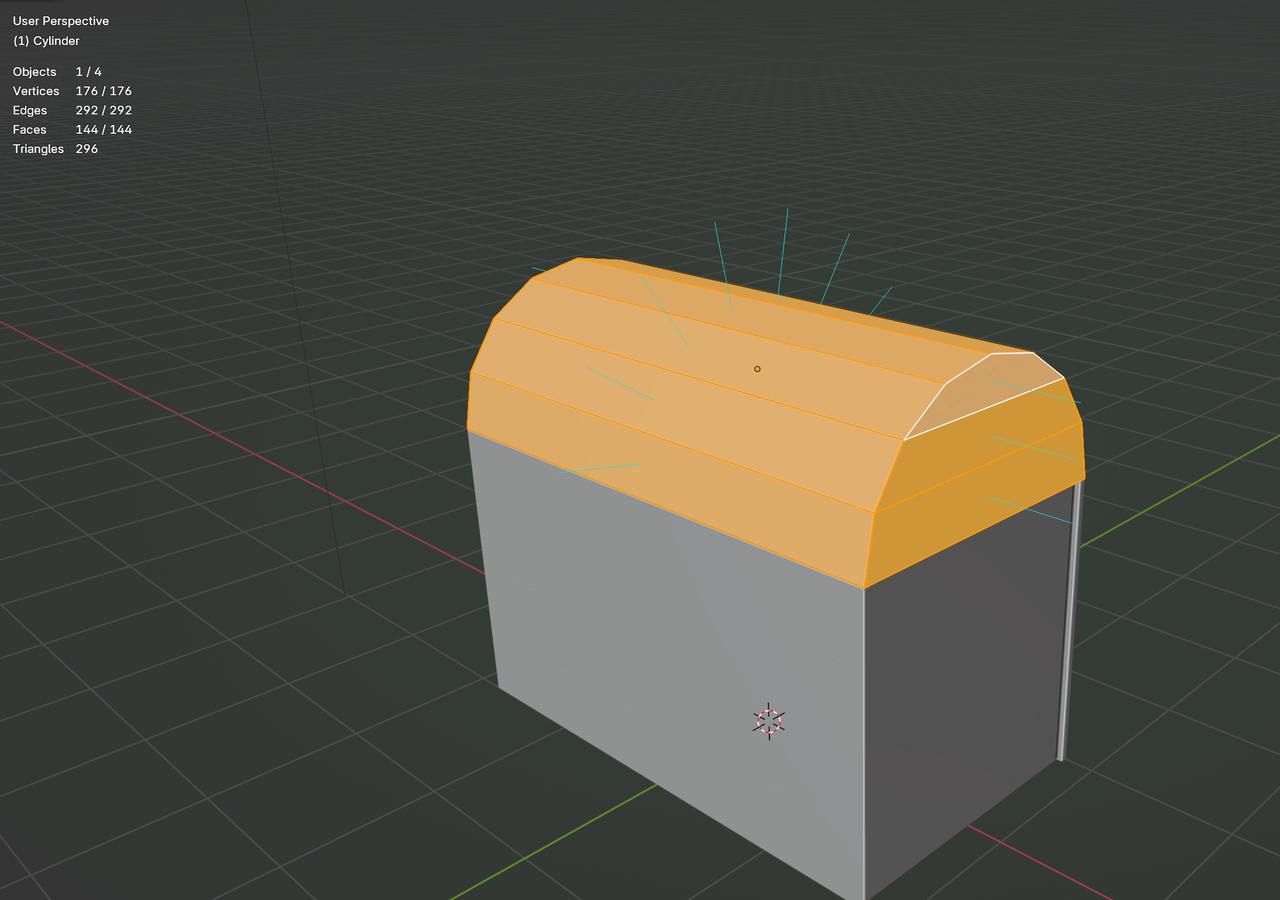
So: Select all with A, then: M > Merge > By Distance. Then you might need to fix your Normals with SHIFT+N.
Then you can E, ENTER, ALT+S.
Ah thank you. That solved it. I just wonder. I re-created the top again, but it resulted in the same problems. Which step is actually wrong in my process:
Goto Object mode >> SHIFT+A , add cylinder >> R, Y, 90 , ENTER >> S, X, 1.8, ENTER >> go into edit mode >> choose vertex mode >>
delete the lower half of the vertices >> create horizontal faces with F (addon mentioned in video), last face add the other top 3 faces and create a face with 5 vertices)
All faces look ok. (normal lines all point out from all faces). Double check: enable blue/red colors, all outisde colors blue. So ok.
Press E (extrude from faces), right click to chancel (you mentioned, press ENTER) . The extrude does not work normally as in your video. CTRL+Z back to before I pressed E, then try again.
Right in above step it goes bad again. But after a CTRL+Z several times, stop CTRL+Z right after undo the E action, and repeat from extrude again, it worked normally.
Really strange.
But somehow it worked now. I am repeating the same steps to re-create the issue, I saw the issue, but right after re-doing and trying to get the error again, it worked now. I am baffled. Now I tried for 3 times and no problems what so ever. I do not know how and what went wrong. Really trying to get the same mistake back. Cannot.
But, thank you, it is working now. Really strange.
I wonder: are planks with 1 or 2 sides without faces a problem or ok? Must a cube that is hidden from view always be completely closed?
2nd idea: 2 faces on top of each other can cause problems, if you zoom out of the object, it causes 2 faces to fight which is in front and back. Z fighting If I remember well.
So, should I keep some parts without a face?
The mistake is probably that you Extruded several times, each time creating new Vertices. (By the way, E, ENTER does the same as E, Right Click. EDIT: at least in the situation when there is no Movement after the Extrusion.)
It's one of the classic mistakes, that can create double Vertices, if you don't pay attention. E is a 'double Operation': Extrude and Move. E, cancel, cancels the Move, but leaves the Extrusion.
ah thank you. And leaving some cubes that are not visible by "player", is it ok to keep 1 or more faces deleted? will that cause problems, or ok to do?
Edit: below is the treasure chest, lowest plank missing. If I do not fill the long thin side, that face I mean.
