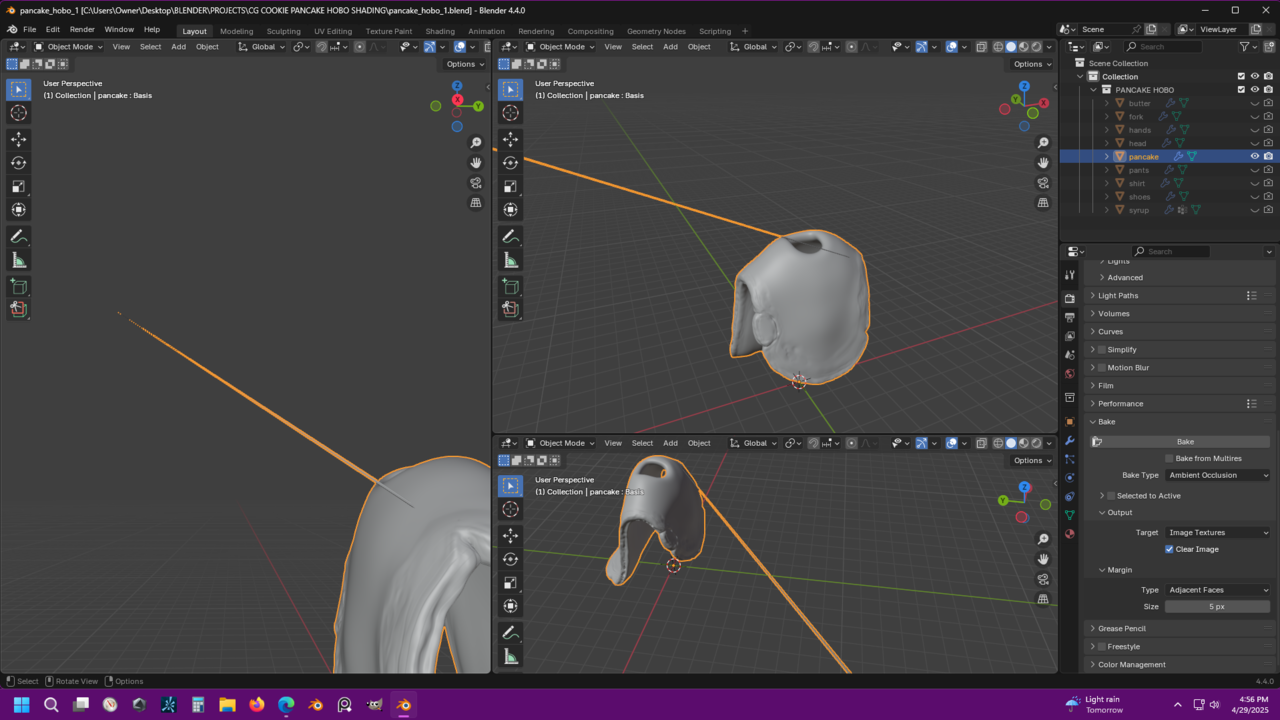
To add some context, I appended the hobo model into a new scene. I’m not sure if that makes much of a difference.

Hi Jason,
I think that's not because of the Baking, but because of the Multires Modifier (possibly in combination with the Shape Key); that has been re-written since the Course was made, if I'm not mistaken.
Those spikes seem to appear when you go up to Level 5. I tested this in Blender 2.79 and there it has no problems.
It also doesn't seem to make a difference, if you Append the model, or simply Open the .blend file in 4.4.
So, what can you do?
Obviously, you can just use Blender 2.79 for this Course, that would be my choice.
Alternatively, you can try to remove the spike(s) in Sculpt Mode (Smooth Brush), going up in Level each time (I think it's only on Level 5, though). Don't go switching back and forth between the Levels, don't try to stress-test it.
Okay I will just use the lvl 4 for the Multires. That fixes it and it is not showing up in the render on LVL 5. I have tried to smooth it and move some verts around but it doesn't fix it well enough. Moving the verts makes it go really crazy.