
Is it possible to set a key bind for insert single keyframe on hover like the default i key bind? feature in question showcased at 4:34

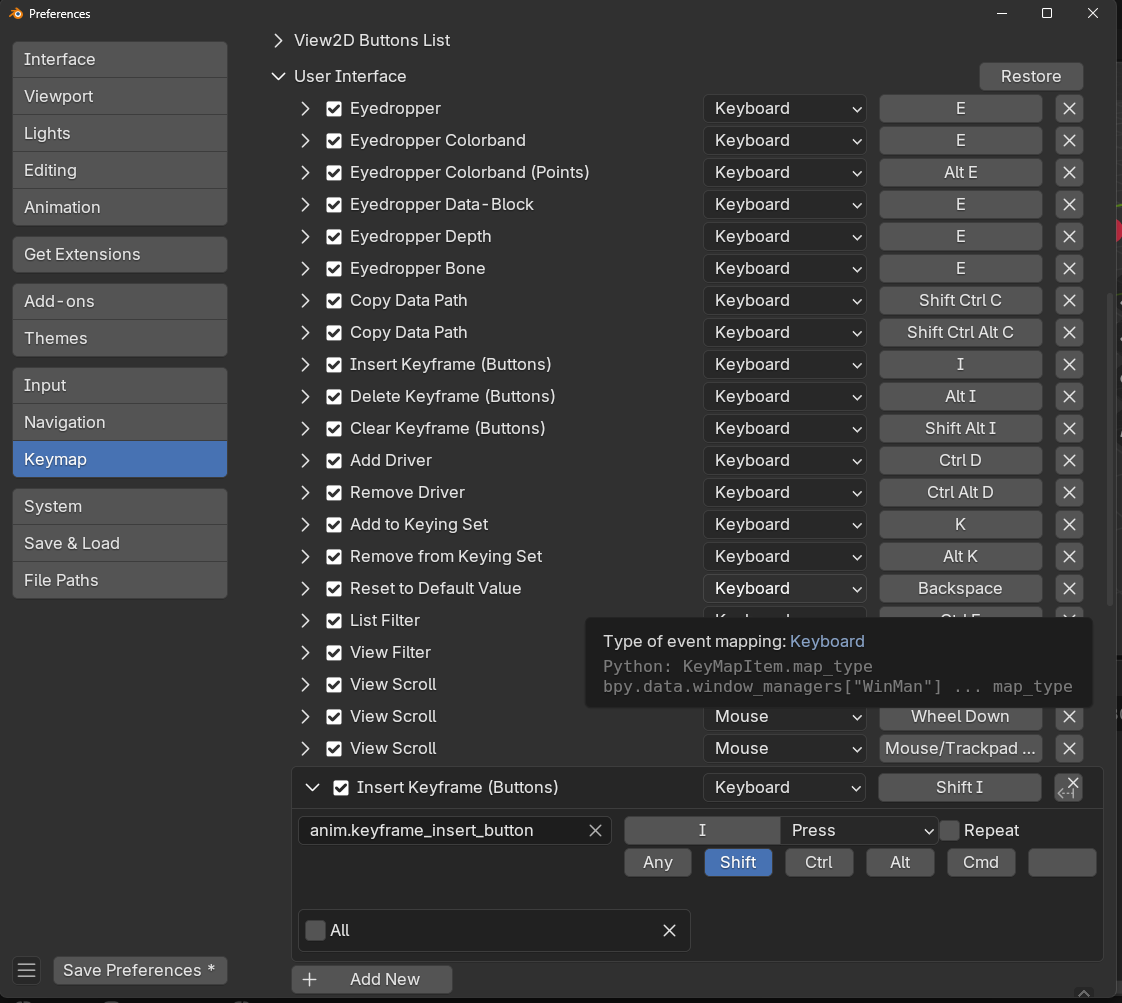
Yes it is possible. Go to preferences->Keymap->Scroll down and expand User Interface section->scroll down and click the Add New button. This will add a keybind of A to none. Expand that and in the field where it has none enter "anim.keyframe_insert_button" without the quotes. After you press enter, uncheck where it says all at the bottom of this panel. Then on the right where it has A in a box click that area and assign the key you want. I'd recommend shift+I. If you have a button on the bottom left of your preference window that says save preferences then you will need to click that to keep the changes.


If I recall correctly, Jonathan Lampell also had a shortcut for adding a hotkey in the Press Play course. I wish I could remember how he did it.
jasonbadum In a lot of case you can right click the menu option and then click assign shortcut. This is one of the times where the option doesn't work. At least not in newer versions of blender. Technically it does work, but it adds it to the window or system section and so the hotkey never triggers the even, because of the order in which the hotkeys go thru the section. It ends up getting captured at a different section. That's why you have to manually add it to the user interface section.