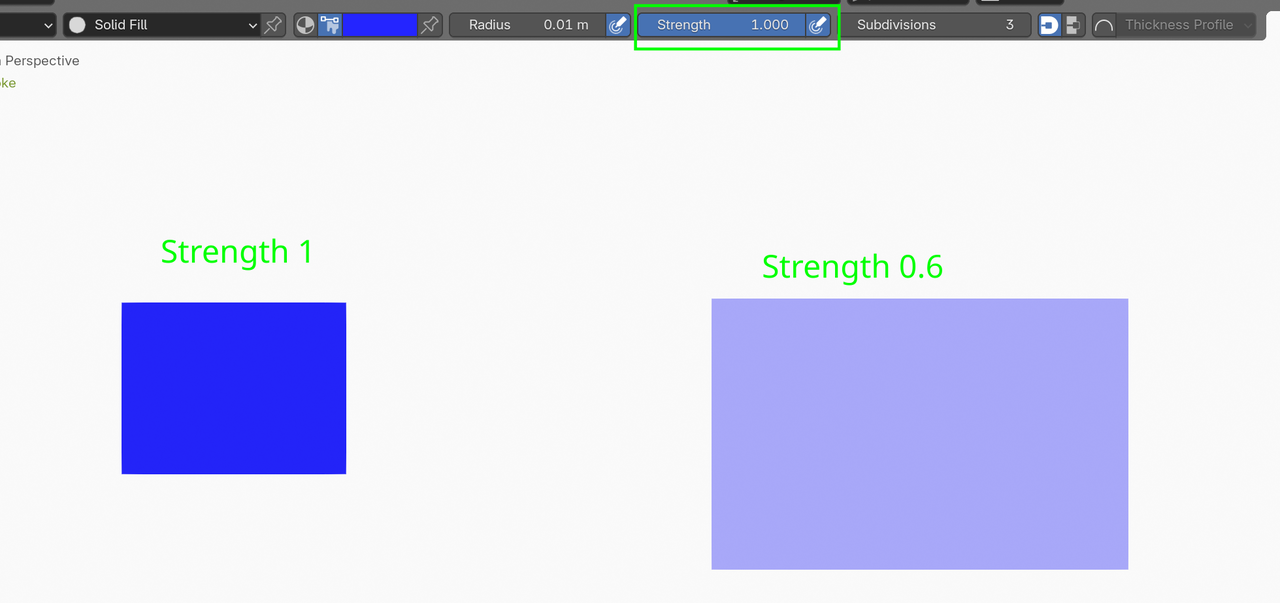
Hey guys, I'm following along in this tutorial but i've hit a hurdle where the colour I select in the Color attribute box isn't the colour that gets filled in - it's a slightly different blue. In the tutorial when the box is being drawn this same blue is being displayed until enter is pressed and then the correct blue is displayed. But for me this doesn't happen. Is this a bug? Thanks
Blender 4.4.0

Hi Paulo,
Check your Fill settings and base color for the material:

I doesn't matter what the Base color is, but check your secondary color's alpha is set to 0 - click on the right-hand side of the swatch, then change the alph to 0

Most importantly, check the Blend is set to 1 - this is likely what is happening.
Hey Paul, I don't have any of those options below the base colour like you have. Are you in Blender 4.4.0 as well? Cheers
Thanks Martin,
Changing those options as per Paul's instructions gets the gradient going but the base color still isn't the blue I selected in the color attribute palette.
Thanks Martin that was it! I played around with lots of the settings except that one doh!

You know what's really strange is that Paul's strength setting is 0.6 as well. Probably why I didn't touch that setting.
Ahh ok gotcha thanks Martin. Jeez this software is hard to learn lol.
"...this software is hard to learn..."
Here's a part of the 2.40 Quick Start Guide:
"Blender does not follow the most common, somewhat standard rules for user interfaces -- it doesn't look like most programs do -- which is not necessarily a bad thing. There used to be two sides to this: Blender was both a powerful production tool for professionals and enthusiasts who dedicated enough time to master it and also a nightmare for some newcomers who might have tried one of the commercial 3d modelers first. The main reason for this is that Blender was born as an in-house studio tool, optimized to speed up daily heavy work, not to please everyone. But it's true that in the past the interface was far from newbie-friendly.
Hopefully this is not the case anymore: it has been considerably improved for the 2.3x series, exposing most functionality via menus, adding panels, color "themability", tooltips for all buttons and internationalization support. This is an ongoing effort or, better, a goal to keep the best ideas in Blender's design while expanding and making it more user-friendly.
Too many buttons!
Again, 3D Computer Graphics is a vast and fun field. If you're only starting, Blender can seem daunting, specially because of all its packed functionality. Don't let that upset you, there is no need to care about all those buttons right now -- or ever."
Thanks Martin!
I think it helps that the community is so friendly and supportive.
It's funny that later on in the same video some other functionality has changed ie. the gradient button but that was easier to figure out thankfully.