

So I had the bright idea to put a brand name on the Sci-fi Crate project in the Mesh Modeling course using the boolean modifier I learned about in the Press Start course.
I was excited. It'd be great, I could add my own little personal touch. I worked through it. Got it looking great, even went through with marking sharp, etc. It was perfect. Then I zoomed out...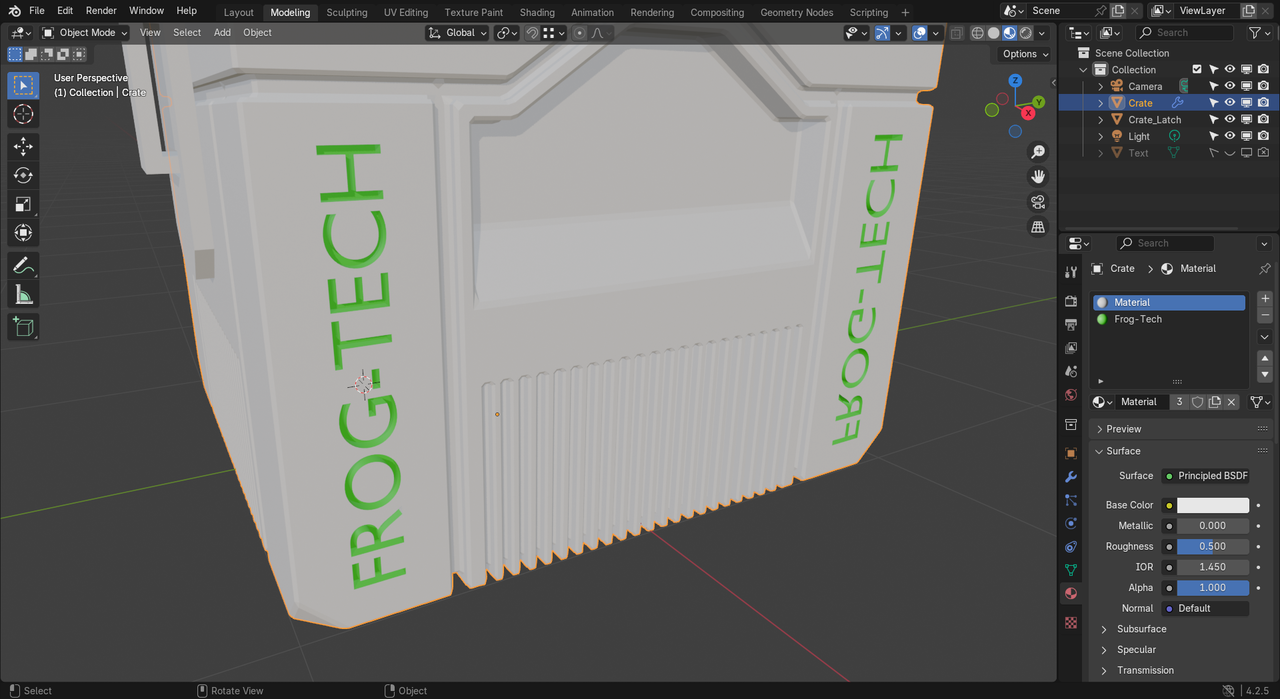
Not cool man, not cool.
I figure this won't be too hard to fix, but wasn't sure the best way to go about it. I want to keep the (correct) frog-tech on the opposite side. I'm thinking the best course might be to apply the crate mirror modifier (creating the full crate geometry) and then dissolving the mirrored text. Is there a better way? Thanks.
Edit for clarity: I've already applied the boolean modifier so the text geometry is in the crate object.

HI Froggy ,
You can Apply the Mirror Modifier (before Adding the Text, if possible).
You can also (better way) stamp in the Text with a Boolean Modifier and if you place the Boolean after (below) the Mirror, that should work.