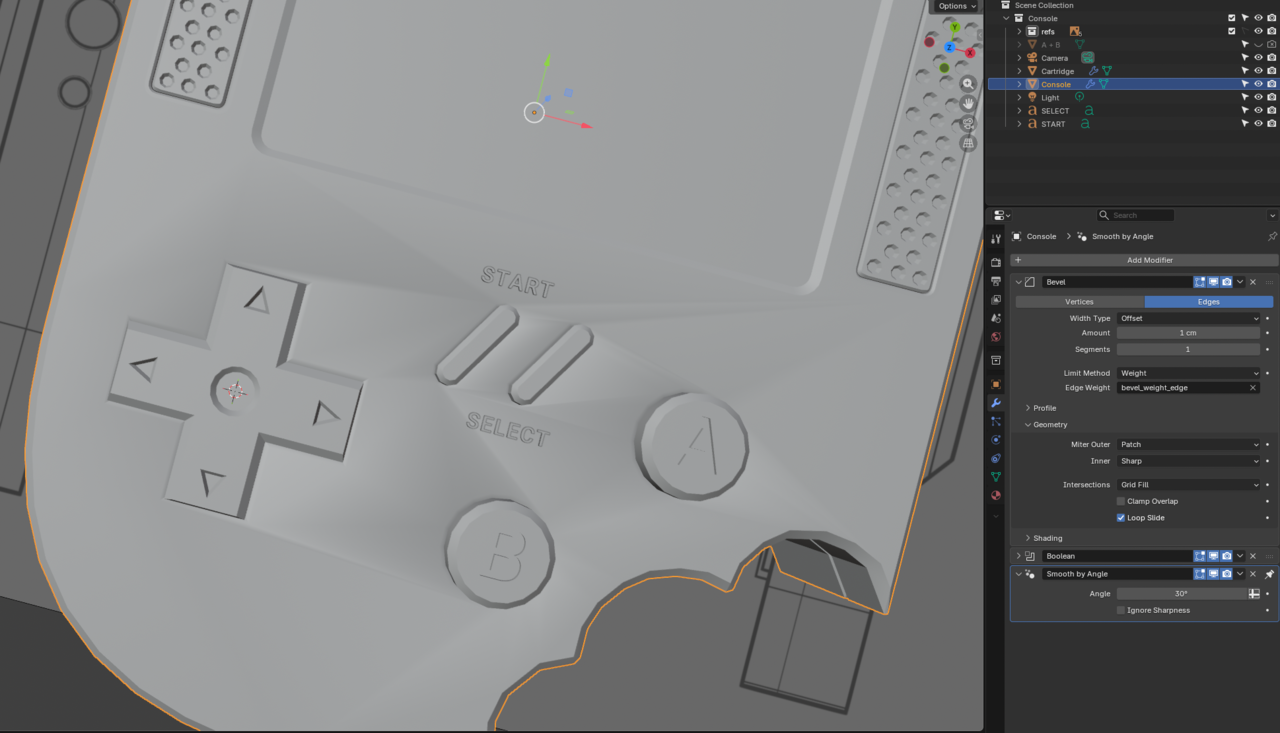
I'm still having a problem with normals, after I've selected auto smooth (Blender 5.0) with 30 angle and checked normals orientation with Shift N. What am I missing?
I've "marked sharp" edges that run between the buttons and it seems to help

Hi Timor,
Lowering the Angle of the Smooth By Angle Modifier should also help.
The cause is, the inlay around the buttons isn't deep enough, so you could also lower those Edge Loops.
You can also, in Edit Mode Select the top Faces, that aer having the shading artefacts, and the CTRL+F > Shade Flat.
I had some very similar issues to this. Thanks all that chimed in for the insights.

Also sometimes the vertices in the Z axis can be slightly higher or lower, causing shading errors. So if they are not, you need to have them at the same height by scaling them to zero. So selecting all the vertices or all those faces, it's S to scale, Z to lock the axis and zero on the numpad to align them all.

I seem to rememeber I had a bit of a combination of making sure the surface was planar as well as marking the edges around the buttons, screen, speakers, and outer edges as sharp to get the shading to look right.