

I'm loving the honey jar video recently released, and seeing the whole concept to completion is a wonderfully helpful demonstration of the pipeline process!
Can someone please help me understand the benefit/use of the edge-split modifier for the cork? I accidentally removed it whilst attempting my own version, and yet the end result appears identical... 🤷♂️ thanks in advance!


In general, if the end result is good, or identical with a Tutorial, even if you've done something differently, there is absolutely nothing to worry about.
There are always many ways to do something and not every detail in a workflow is essential. Sometimes, you see someone zero-ing out the Location of an Objectin the N-Panel, for instance, while you could also just use ALT+G, to Clear the Location.
I also haven't watched this yet, but often these things are simply habits of doing something a certain way, even if it's not the 'best' way, it gets the job done.
But I'll go and watch the Honey Jar and see if there is something more to the use of the Edge Split in this case.
Hm,
Well in this case, the Edge Split Modifier with its default Threshold Angle of 30° does nothing, because after the Bevel Modifier, there are no Angles greater than 30° left.
We''l have to ask Kenny what he was trying to achieve here, because if the Modifier would have actually Split some Edges, then the Subdivision Surface Modifier after that, would have smoothed out single Faces, creating holes in the cork. Something like this:
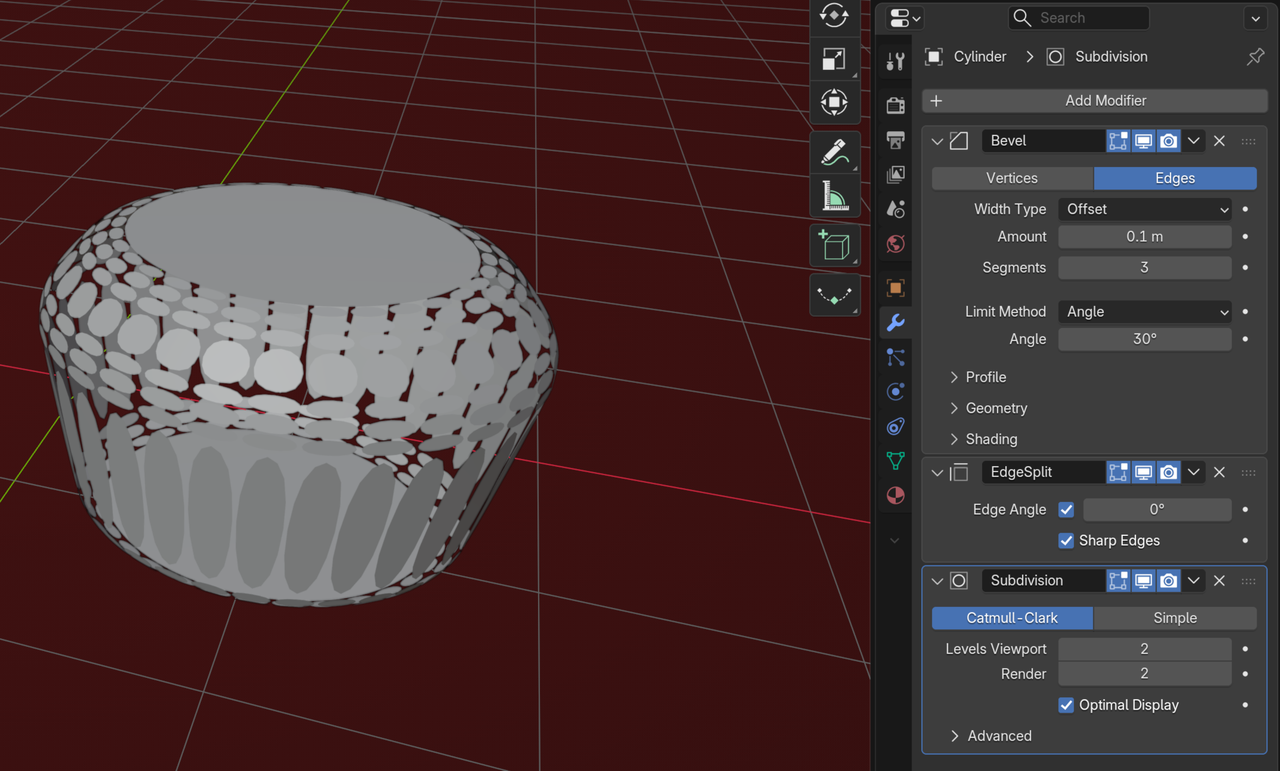
and I can't imagine, that that would have been the intention.
But then again, Kenny is more specialized in Physics Simulations than in Modeling.