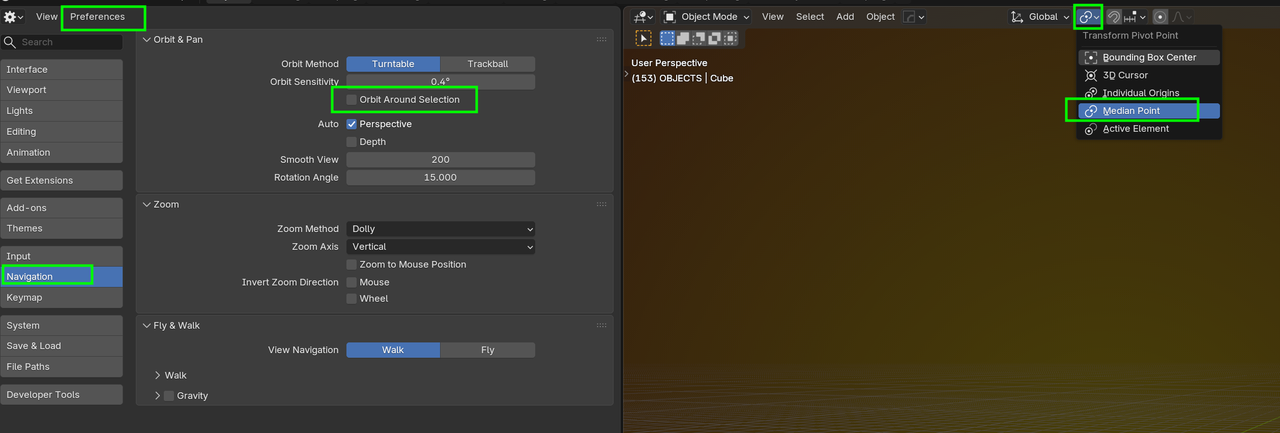
I'm having an issue scaling the loop cut on the y asxis it just wont do it. Idk why, Google says it's something to do with my pivot point, which at one point I did accidentally change. Now I rotate around the selected object, which was the only fix I could find for that, so I'm wondering if that's the cause. But I'm stuck because of that I could just add one loop cut at a time but i'm trying to follow along how your doing it.
Okay, so I got it to work. I'm not sure what I did. I just kept doing it over and over again until something worked. The timestamp is at the 1:50 mark; it would scale the Z axis only for me originally, and just wouldn't move on the y, but eventually did scale on the Y axis. I can't get a screenshot now cause I finally got past that point. But I still have the pivot around the selected issue. I would like to go back to the default, though, if you can help with that, please?
Yes, that worked, thank you. I had that selected in the preferences somehow.