Array in 5.1

posted to: Working with Curves

Hi! Looks like the Array modifier is pretty much different in 5.1, could not make it work as shown in the video. Although the legacy one is still available.

2 loves
Reply
  • Martin Bergwerf replied

    Hi Philipp,

    You can use the Legacy one, if you're following along with this Course, but the new Array Modifier can do everything the old one could, and then some,, but it's easier and more intuitive (I think). For the example in the Course, you only need the Array Modifier:
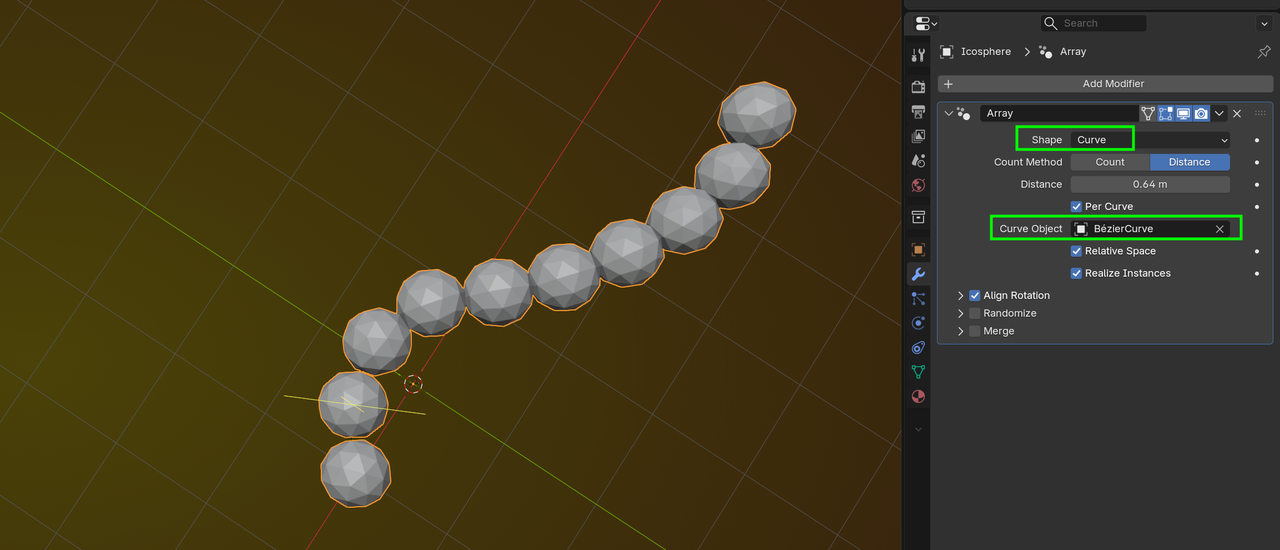
    Array_00.png

    1 love
  • Omar Domenech replied

    I didn't know the Array had changed. Martin can you link me to a video you've seen where they show what changed and what got added? 

    2 loves
  • Martin Bergwerf replied

    Haven't seen any video for the new Array, but it's really very intuitive and easy to use.

    2 loves
  • Dwayne Savage(dillenbata3) replied

    It's covered in the first section(modeling) on the what's new in 5.0

    https://youtu.be/4wEqD-jK0DU?si=IRsqsK0OtDF9s2lR

    • 🤘🏻
    2 loves
  • Philipp Yalovega(pyalovega) replied

    Martin! Thank you very much! Mine Array interface is way different from yours... And it is the opposite of intuitive :))) very confusing seeing count and distance for example. But yes - no need for curve modifier this time:


    1 love
  • Martin Bergwerf replied

    Hi Philip,

    You are using an Addon, right?

    That is not what the default Blender Array Modifier looks like (HardOps, maybe? I'd have to check...I haven't instaled it yet in Blender 5)


    1 love
  • Martin Bergwerf replied

    Okay, doesn't look lke HardOps.

    Must be some other Addon, I'd guess.

    2 loves
  • Philipp Yalovega(pyalovega) replied

    Hi Martin! You are right, that was add on “Modifier list” which apparently screwing up native modifiers’ interface. I removed it and Array got simplified like it’s supposed to be! Thank you!

    • 👍
    1 love