
Just a note on the Sky Texture direction

posted to: Sky Texture
Maybe this is just me... but I found a little quirk with the Sky texture that I thought I'd point out in case anyone else messes with it... After a bit of experimenting, It seems to me like the Sun Disk "rises" in the Positve Y direction and sets in the negative Y. That means facing Negative X is north and postive X is south. Personally, I think this might be a bit more intuitive if this was rotated 90 degrees so that facing north would be positve Y (the default direction when you press num pad 1 and the default postion Blender sort of faces if you don't change the initial Blender direction. However, the sky texture does not (at this time) have any vector inputs. Maybe it's just me, but I would thing "facing north" would make more sense with either Positve Y (with my personal preference being Y) which would have the sun "setting" on the right (west, along the negative X) and rising on the left (east along positive X)... But I could also understand if this was rotation 180 degrees from current so that facing Positive X is "north". I guess to me, it just feels wrong to be facing "north" in the "negative" direction :D But I thought I'd mention it in case it trips anyone else up and it's definitely something to consider if you were going to use this for more than just clouds and wanted to build an actual environment. (Not sure why it doesn't have a vector input to adjust rotation with a mapping node, because I think that would be a very useful thing for getting it in the right angle for a scene, regardless of which direction it was facing.)
1 love
Reply
  • Grady Pruitt(gradyp) replied

    (BTW, it's just the Single and Multi scattering that do not have vector inputs.)

    1 love
  • Grady Pruitt(gradyp) replied

    Oh... and for anyone wondering, Sun Elevation of 0 is sunrise and 180 is sunset.

    Ah! Sun Rotation allows you to change what direciton is "north/south/east/west"

    .. just noticed that :D

    • 😉
    1 love
  • Martin Bergwerf replied

    Hi Grady,

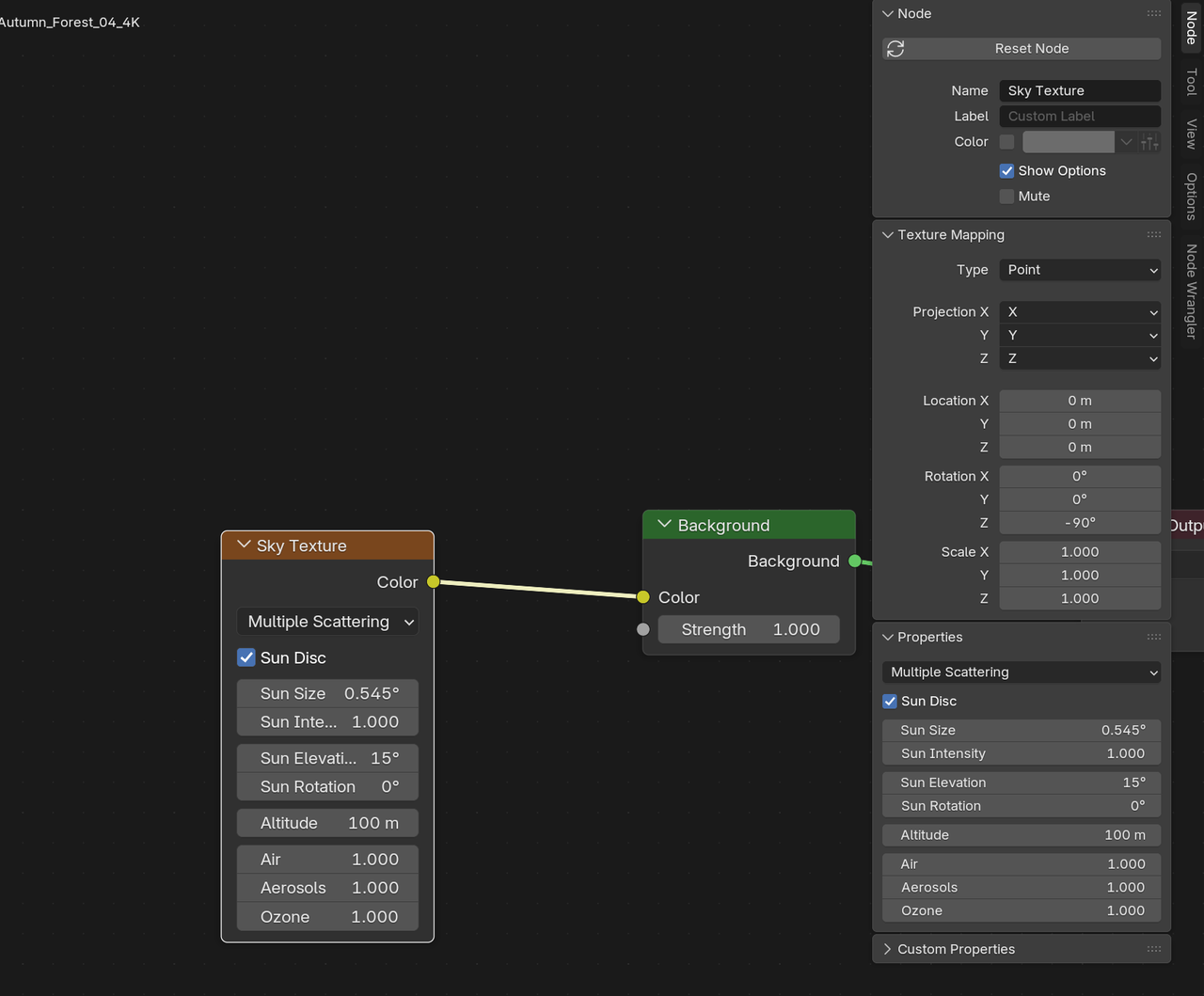
    You can also Rotated the whole Texture in the N-Panel:

    Sky_00.png

    1 love
  • Grady Pruitt(gradyp) replied

    Really? I didn't know about that one.

    1 love
  • Martin Bergwerf replied

    It's well hidden😉

    1 love
  • Grady Pruitt(gradyp) replied

    Texture Coordinates into a mapping node is usually how you move mapping around, which is why I was surprised not to see it. 

    I guess the thing that struck me most though was that "north" was in the negative X direction, which I thought was an odd choice for a default.. I would think north being positive Y made more sense to me as that's the direction I'd think of as north when I'm modeling, which if I was going to model something to bake into the skybox, I'd want to know that so that I could model and light it the way I intended. Somehow missed the rotation initially, but I figured it out plus the texture one you showed me. I figured there had to be some way to do it, I just had to figure out what it was :D
    • 👍
    1 love