A move problem

Guys there's I pressed something on my keyboard and it's showing these coordinates on my viewport and when I try to move my model it's all buggy and snappy and doesn't move!!!!

1 love
Reply
  • Omar Domenech replied
    Solution

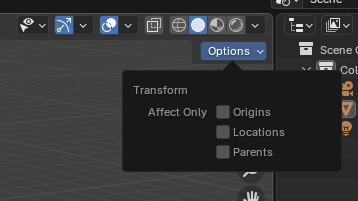
    Looks like you have addons enabled, which usually makes Blender weird and misbehave. But if it's not the addon, you may have turned on "affect only origins". You may have it enabled when it should be all ticked off:

    Affect-Only.png

    2 loves
  • Gabriel Santos (Monhjayer) replied

    You're amazing !!!! THANKS

    • 🤘🏻
    1 love
  • Dwayne Savage(dillenbata3) replied

    Side note:Ctrl+period(not numpad period) is the hotkey to toggle affect only origin.