
Hello
Starting at 9:27 video time Kent Trammell paints vertex colors in vertex paint mode. His painting affects the color of beard hair (separates it into black parts and white parts). I try to do the same thing, but It doesn’t work the same way: beard mesh changes color as I paint vertex paint, but hairs themselves remain black all the time (see video https://dai.ly/k7C41SH1XN6i42EXF5G). I added red paint to vertex coloring just to illustrate that neither black, white or other color work. I got back to black and white coloring of the beard mesh and hairs remained unaffected both in vertex paint mode (see picture 1)

Picture 1
and in render preview (see picture 2).

Picture 2
What should I do to be able to control hair color with vertex painted mask?
In case this is important: I’m using Blender 5. I also tried Blender 4.5 and I got the same result. Loading my file in earlier Blender versions (like 3.6) results in error «*filename* not an .blend file» and the file doesn’t open.
I will be grateful for any help

Hi CCherry_Pie ,
You need to Convert your Attribute to Face Corner, Byte Color. Don't forget to fill in the correct name in the Attribute Node.
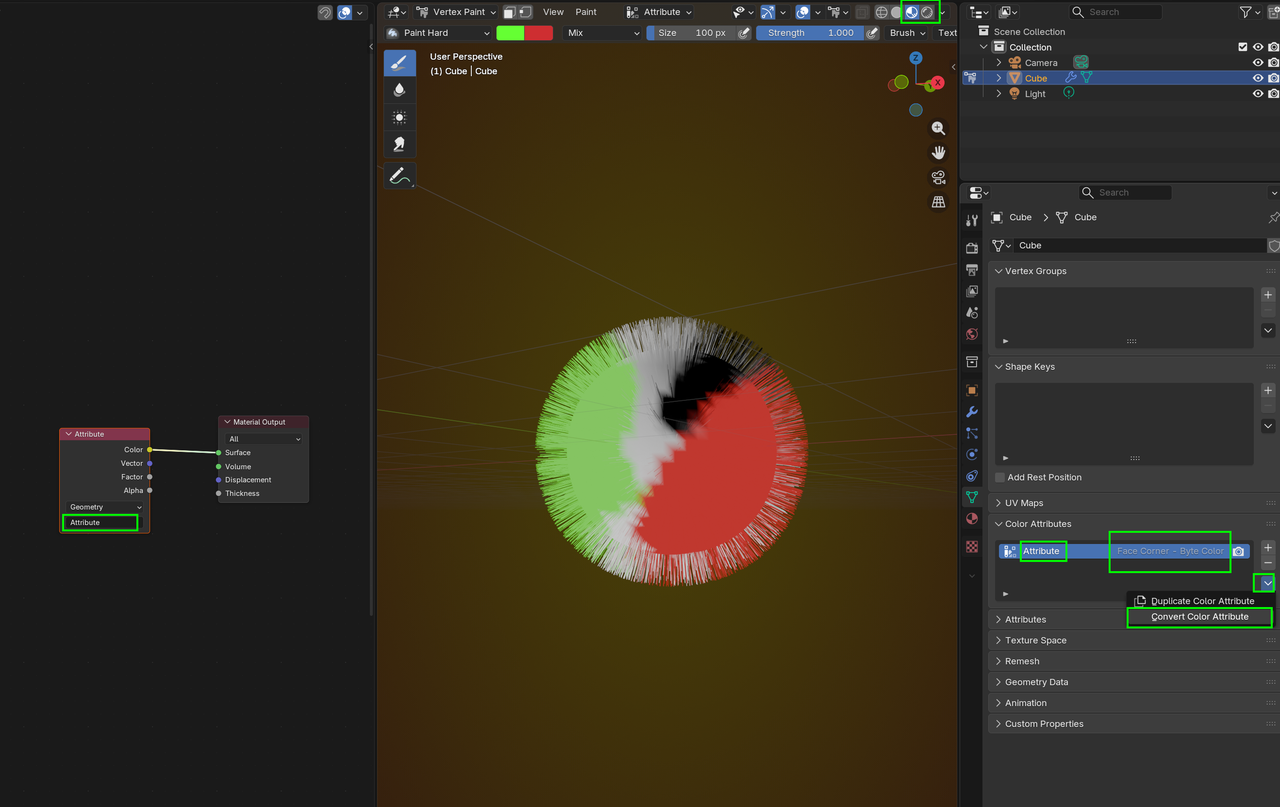
I use Material Preview or Rendered Mode. I think it's possible to show in Solid Mode as well, but I don't remeber how to do that (should be easy, though).

In Basemesh, Lucas uses the new hair system and it may help you get used to it. Also HUMAN is such a huge course, most people watch it 2 and 3 times before they get the hang of it all. So it's ok if you want to pause at some point to watch something else that complements the course and then get back to it and even restart it. Link up just in case:
https://cgcookie.com/courses/basemesh-create-stylized-characters-quickly-with-blender